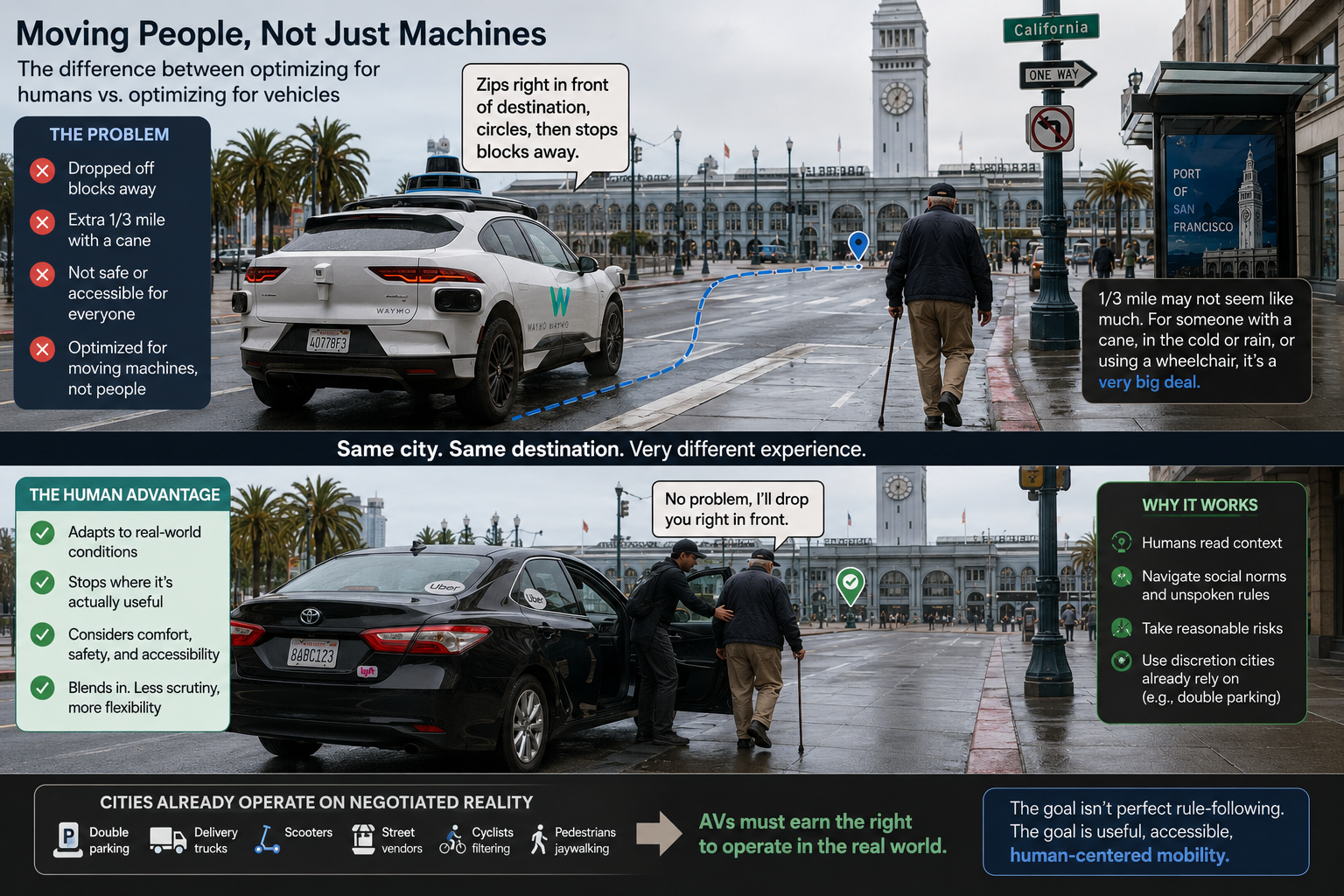
My dad had to walk an extra 1/3 mile the other day. With a cane.
Our Waymo zipped right in front of our destination, circled and then came to a stop a few blocks away.
As is often the case in technology, the designers didn’t have any empathy.
They optimized based on moving machines around, not moving people around. Those are fundamentally different optimization problems. Unlike products at Amazon fulfillment centers, people aren’t payloads. (Most of this post is focused on truly autonomous vehicles; I’ll touch on L2+ like the Mercedes Benz/Nvidia solution later.)
For an able-bodied person in good weather, walking 1/3 of a mile isn’t a big deal. For someone who needs a wheelchair or a cane, it is a very big deal. Others don’t want to step into snow and slush if it can be avoided.
Ride apps like Uber and Lyft have a big advantage: drivers can localize for the conditions based on what they see. A human driver isn’t going to drop you at the bottom of California St. with a 25% grade. (That’s not even the worst in SF; one street goes to 41%.)
In my dad’s case, we would have asked the human driver to stop right in front of the Ferry Building. He’d turn on his flashers, double park or inch his way into the right lane to make that happen.
Waymo has another problem: PR and regulators. Because it’s vehicles are a driving billboard, mistakes like double parking will be posted on social media. Regulators will see the most egregious ones and hear about them.
On the other hand, disability activists will protest that they are being dropped off in places where the service is not useful. That again will get to regulators by way of interest groups.
When I design software products, unnecessary friction means an extra click or a confusing interface. I optimize as many of those out as I can. But when I develop hardware, it’s a whole different problem and the shipping bar is much higher.
Driving is a shared environment. We’ve long had bicyclists, motorcycles, pedestrians and cars sharing the road, curbs and sidewalks. Recently, we’ve added Lyft/Lime scooters. We’re now adding delivery robots and AVs.
In order for this to work in an environment like San Francisco and New York, we have to tolerate things that are technically illegal. If we didn’t, SF and NY would be paralyzed. This is so well accepted that UPS and FedEx get special high-volume rates for their double parking tickets.
Mercedes and Nvidia have the advantage that their vehicles aren’t driving billboards. (There are a view test vehicles that have Mercedes and Nvidia test vehicle markings.) Like Uber and Lyft, they have the benefit of adaptability by humans for the places where it is needed. Also like Uber and Lyft, they are driving in incognito mode.
Whether it is L2+. L3 or higher, we’re going to need to re-negotiate our social contracts. AVs will have to adapt, as will humans.
Although this feature isn’t an industry first, it’s an important improvement. Alaska has had some notable firsts.
From ChatGPT:
First Airline to Sell a Ticket Online (1995)
This is their most famous claim to fame. In 1995, Alaska Airlines became the first airline in the world to allow customers to book and purchase a flight over the internet. This innovation fundamentally changed how travel is sold and paved the way for the modern e-commerce and online travel agency landscape we know today.
First Airline with Online Check-In (1999)
Building on their web-based success, Alaska was the first airline in the world to introduce online check-in. This allowed passengers to check in for their flight and print their own boarding passes from their home or office, a revolutionary convenience that helped passengers bypass long lines at the airport.
Air travel is one of the rare cases where interests are aligned between customers and businesses.
(The information below is based on having flown 2 million mile across dozens of carriers. As with all things travel, there are exceptions and airlines that handle things differently.)
We’ve already seen a lot of innovation in the time I’ve been flying.
Old way
New way
Carry paper ticket
E-ticketing
Wait in line to check in
Mobile boarding passes, online check in, kiosks
Wait in line to drop my bag (in the rare cases I do)
Face recognition to check bags (this is what Alaska just announced)
Wait in longer lines at security for people who rarely travel fumbling for things
TSA Pre✓ and Clear Plus
Wait for a refund
E-tickets mean you don’t have to return paper tickets
Wait in line for an hour for flight changes
Many airlines automatically re-book; if those options don’t work, you can use a mobile app to find alternatives
Stay over a Saturday night to get the best fares
The rise of low-cost carriers all but eliminated Saturday night stay requirements
These changes weren’t just cost cutting — they removed friction for travelers and streamlined operations for airlines.
I see a lot of innovation ahead, some which are starting to take shape.
AI
This is an interesting one because the definition has been so vague and misused. Airlines have been using machine learning and predictive modeling to set price and fleet management for decades.
When I talk about AI, I mean new tools like LLMs and user agents.
The most obvious use for AI for airlines is better answering user customer service inquiries. Unfortunately, most of the tools out there now are dumb bots. They don’t incorporate things like my status, itinerary and previous interactions. The best LLM-linked bots will also incorporate the reference tools airline agents access.
Not much further down the AI path is user agents. Instead of booking through the airline Web site, agents will do the searches on my behalf. (What you see now is dumb AI, which is just a fancy screen scraper. They may be marketed as agents, but they’re not.) Airlines need to be paying attention to agents that use MCP and testing ways to integrate with their systems.
The upside for airlines: ability to cut out OTAs and integrate their direct-connect capabilities. It eliminates fees that GDS’s charge and makes it easier to sell ancillaries like premium seats and lounge access.
One key to AI is to not lose trust. If an AI gives a response, it should be treated just like an agent gave that response.
This is just on the customer side. There is a lot of room for using LLMs in maintenance, pilot resources, irrops strategy and ad targeting.
Mobile
Airlines have been making big leaps using mobile for all areas of the travel experience. On the consumer side, you can manage new bookings, change flights, flight status and more.
Hotel vouchers sent straight to our phones for irrops: Don’t make me stand in a long line for a paper slip after a cancellation. A mobile voucher also tells me the quality of the hotel being offered — no more roulette with substandard properties.
Meal vouchers: Sent to our phones. United already sends you virtual debit cards, though they should be Apple Pay or Google Pay provisioned. (Many merchants don’t know how to type in credit card numbers.)
Delayed baggage: When the airline knows a bag has been left behind at the previous station, send a pre-filled delayed baggage form. This saves the passenger and the baggage service staff time. Vouchers can also be sent. It’s a great time to be looking at this while airlines integrate IATA 753, a mandate on how baggage must be tracked.
CTI (Computer Telephony Integration)
We’re already seen integration between your actions online and the experience you get when you call. With better CTI, that process will become more seamless. This is one of the best cases of aligning interests. Less time on the phone is good for me and the airline.
If you have a phone that is registered to your account:
The agent should have my next reservation already on screen.
If I was recently on the Web site, skip all the prompts and go to an agent who is prepped with what you were trying to do. (I don’t need to hear that you have a Web site, because I was just there.)
Take user state into account. if I just got off a flight and had checked bags, my call may should be handled differently
The caveat here is that caller ID and ANI can be faked. Airlines need to do a basic level of authentication before jumping into the conversation. Increasingly voice authentication can be defeated using AI. Pull up the record, but ask a question that only I know the answer to.
Less time in line or on hold is good for passengers and airlines. The same technology that cuts friction also cuts costs — if airlines use it to build trust instead of deflect service.
Bottom line: Less time in line or on hold is good for passengers and airlines. The same technology that cuts friction also cuts costs — if airlines use it to build trust instead of deflect service.
Digital payments have no doubt had a positive effect. We can transact online and that gets easier and easier. Fraud is continually reduced. Companies like Stripe, Square and Shopify make it easy for small businesses to get online quickly. I was able to set up a shop on Shopify in about 30 minutes.
But with that convenience comes a challenge when you’re traveling.
Online travel agencies like Expedia, Priceline and others often take money upfront from customers by credit card. At check in, the customer is asked to provide a card for “incidentals.”
The problem is that sometimes the card gets charged for the room rate, something the customer has already paid.
The way hotels get paid by OTAs is through virtual cards. With a reservation, they also receive a virtual card to charge the wholesale rate. Hotel systems are designed to split bills. When it works correctly, the room rate is billed to the OTA’s virtual card and incidentals are billed to the card the customer provided at check in.
When it doesn’t work, the customer’s card is also charged the wholesale rate. I had this happen to me at Emeline in Charleston, S.C. I was charged an extra $386.10. It took many phone calls among hotels and with American Express to resolve this.
Unfortunately, there is little that travelers can do to avoid this. The best you can do is check your credit card bills for an extra charge and then complain. Most people at the hotel won’t know what’s you’re talking about. It is an easier conversation if you ask the hotel “did you charge me instead of the virtual card?”
Mapping has gotten so much better since I started working on maps in 2004. The quality of venue data has improved. Road data has improved. We have real-time traffic. The overall detail provided has improved – Apple even shows trees.
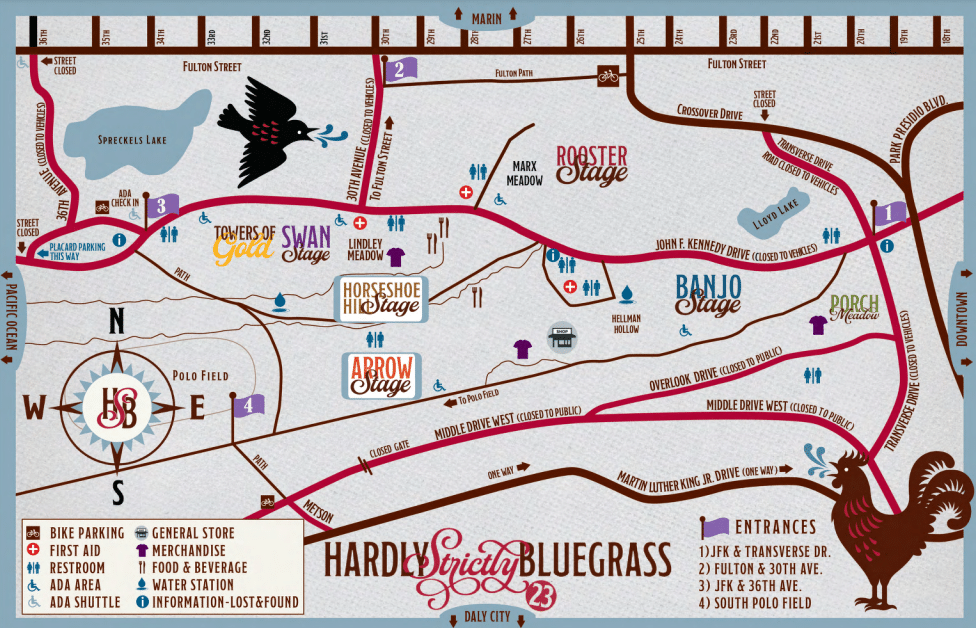
One important thing that hasn’t improved: temporary events. I went to the Hardly Strictly Bluegrass festival over the weekend. The organizers put together the terrible map above.
When I search for “hardly strictly bluegrass” on Google Maps, I get this:
(The pin doesn’t match my search term because apparently Google is pulling the text from a description of Hellman Hollow.)
I’ve got two maps: one that I can use for walking and directions and one that gives me a sense of what’s going on at the festival.
What I need is to marry the two. I want to route (using transit, walking, etc.) via the mapping tools I use normally but still know the details of my temporary event.
It starts from the very beginning: I had a very hard time finding the entrance gates because the event map was zoomed in too far to show the entrances to the park.
Given the source map from the venue, you could marry the roads with the roads in the digital map.
This approach would be useful for concerts, music festivals, marathons and other events. Bonus points for identifying road closures to keep traffic from getting snarled.
I’ve been traveling all of my professional life. As the years have passed, so have the tools I use when I travel.
Here are my 2007 travel gadgets:
And now:
Many of the things in the top picture have been consolidated into my iPhone 6:
Garmin navigation GPS/Palm.
Garmin hiking GPS.
iPod.
Phone.
USB sticks (I just mail or cloud the contents).
Others have been obviated by technology. I no longer carry Ethernet cables or the router to provide WiFi for me.
My current line up includes:
GoPro and accessories. (This is a ski trip; not taken for pure business trips.)
A bunch of cables and accessories stored in a GridIt.
A Lumix DMC-FZ70. 60x optical zoom FTW. (Don’t usually bring my DSLR.)
A power strip. Great for sharing power with others at airports.
A SOL Republic Punk speaker. (It’s smaller than a Jambox.)
A nano SIM cutter. I use this only on international trips, but it’s small enough to leave in my travel bag.
Car power adapter. Always be charging!
A 5-port USB charger. Always be charging! This one has a separate cable to deal with tricky hotel room situations.
Massive Mophie. Always be charging!
LiveScribe 3. It’s the real deal for note taking and syncs great with Evernote.
An Asus Chromebook. Unlike my MacBook Air, I won’t be heartbroken if I lose it at security.
iPad mini 3.
iPhone 6.
I’d probably ditch the Chromebook, but Google gives you 12 free gogo passes with each Chromebook. That alone is worth more than the cost of the Chromebook. Having it lets me stay productive in the air.