Three things I got right as a PM leader

Previous post: Three things I got wrong as a PM leader.

Understanding customer psychology is key

The best products come from the intersection of technology and psychology. Part of the fun of creating new products is trying to figure out things other people haven’t. Imagine someone dumped a pile of small, multi-colored plastic shapes that interlock in front of you in 1948. Dump them in front of someone and they’ll think it is junk.

Put a picture of a houses or airplane on the box and they’ll be able to fill in the gaps. This is what I can do with those Legos. You’ve provided people a framework for understanding and sparking their creativity.

Understanding psychology includes using all of the senses. Incorporate sight, sound, touch, smell and taste. (OK, smell and taste aren’t necessarily applicable to online products.)

I was at a ski resort and their lift ticket scanners would beep when the ticket was scanned. But the beep was just a confirmation that it was scanned, not an indicator of whether it was valid. The liftie had to look at the display to see the ticket status. It could mean moving gloves out in the cold. If I were designing it, the scanner would beep differently based on whether the ticket was valid or not. There would also be big green and red lights on top the scanner.

Haptics are often overlooked, but they can be very useful. When you’re using walking directions, Apple Watch will tap you on the wrist to indicate that you need to make a turn. What they could do better: have a different tap pattern based on whether you need to make a left turn or right. You wouldn’t have to look down at the watch to see the arrow.

Price is not everything

Yes, price matters. But understanding and being able to contextualize price is important. 

We had a feature-rich product that you could use in a lot of different ways — making phone calls, checking email, storing files and sending faxes (!). It was a great set of features, but because it was a new product, people had no understanding of how much it should cost. In fact, we were underpricing it. I was able to create bundles of features that were more widely understood and comparable to how competitors priced things. We were able to double prices and double adoption.

Think carefully about whether you want to charge at all. There is a much bigger psychological difference between $0.00 and $0.01 than between $0.01 and $1.00.

Simplicity of payment also matters. In the Bay Area, there are more than two dozen transit agencies. Each has its own pricing and fare structure. Passes are different. Not only did you have to figure out how much it cost, your had to figure out how to pay. The payment part was simplified by having an NFC card that worked across the systems. 

Some systems have gotten even simpler. In NYC and London, you can use your contactless credit card. No more having to find and buy a separate card.

If you’re shipping physical products, it’s a giant mistake to not incorporate Apple Pay. Apple created a great system to minimize friction in online commerce. Use it. This is especially true if you have low frequency customers.

Whoever sets the defaults controls the world

In general people want to do the least amount of effort, especially things that they aren’t super interested in. They will do whatever is easiest. 

The new tablet-based point-of-sale systems make it easy to tip 15%, 18%, 20% etc. (depending on the system). You can tip less or more, but that usually requires going to a submenu and entering an amount. Not only is picking the pre-filled amounts easier, it tells users that they should tip one of those amounts. (Hey cheapskate!)

Think about walking through a supermarket. The big brands make it convenient to buy their products. They pay slotting fees to grocers to ensure that their products are at eye level or on the end caps. The better values, either in terms of quality or price, aren’t at eye level.

By setting the right defaults, you can push the metrics you want toward your preferred direction.

Three things I got wrong as a PM leader

Listening to customers

Listening to your customers can lead you down the wrong path, whether you are talking about consumer or enterprise customers. People don’t necessarily know what they want. People don’t know what’s possible. Some people want the kitchen sink.

I find focus groups to be essentially useless when testing innovation. If you want to test new fragrances for Tide, go ahead. But if you want to test a brand new concept, focus groups won’t get it. 

Listening to your early adopters is especially dangerous. They might seem like the “best” customers because they came to you first. Unfortunately, that’s a small base and likely unrepresentative of your target market if you’re looking for mass scale.

Better than listening to your customers is understanding your customers. You can watch what potential customers do. Be in their environment. Building a product for restaurant kitchens? Go work the line for a day. Think of it as a mini Undercover Boss. You can often learn more in observing for 15 minutes than two hours of conversation.

I sat looking over the shoulders of people using one of my products. I watched as they cut-and-pasted data from one window to another and then made minor edits. It was tedious. I went back and redesigned it so that my system (the new one) pre-populated the data from the older system.

If you’re testing a new product with real users, watch them use it and see where they get stuck. Try not to help them – you won’t be there to help them when they’re using your product in real life.

Adding too many features

As a nerd, I’ve always wanted more features. I’m the person who went through all of the settings screens to customize every new product or service to exactly my taste. 

What I discovered early on is that most people don’t want more features. In an early product, we had search results pages for news stories. I added in controls to allow you to pick how many stories showed up on a page and how large an excerpt from each story you wanted to see. 

Terrible idea. It complicated the page for users. They had the additional cognitive load of looking at those controls versus seeing what they came for. It also made it harder and slower to render the page. We were better off just stripping all of that code out and delivering the pages faster. 

Product managers might not think of “speed” as a feature, but it’s one of the most critical ones. Take too long to render and people will go elsewhere.

In an early test at Google, customers said they wanted 30 results per page. When it was rolled out, the page with 10 results was the winner. It rendered 0.5 seconds faster.

My own needs have changed over time. I don’t want more features. I don’t want more settings pages. I want things to work out of the box.

Believing you can’t fight City Hall

This one will undoubtedly be controversial. Sometimes the biggest innovation comes from pushing the boundaries. If you had paid strict attention to copyright laws, you might avoid building Google. The search engine literally copied almost everything online, word-for-word. 

A friend had an idea for an on-demand transportation company. After thinking about it, he decided that it would violate local taxi ordinances, employment laws and be a liability nightmare and decided not to pursue it. Uber said “screw it” and went for it. It’s now a $140 billion business.

This is an area where startups have a huge advantage over large companies. BigCo lawyers will say “no” to anything that presents a sizable risk to their core business. It takes 10 people to say “yes” and 1 person to say “no.” See my post “Could YouTube have come from a large company?” (The post is from 2006, so a lot of the questions I asked then have been answered.)

Sometimes, as with YouTube, getting sued can be great for the business.

Startups also need to be wary of people who have spent all of their time in big companies. It may be tempting to hire someone who has 25 years of payments expertise for your payments company. You just need to make sure they don’t have all of the rules and “we can’t do that” baked in.

As my friend and noted angel investor Gokul Rajaram says, it’s important to push the boundaries, just don’t to things that might have you end up in jail. If you do go over the line, you might be joining Elizabeth Holmes and Sam Bankman-Fried.

Part 2: Three things I got right…

I asked ChatGPT to write a PRD…

When I talk to people about AI, they’re convinced that AI will take everyone’s job but theirs.

So I asked ChatGPT to write a PRD based on these broad requirements on streaming.

This is how it went, with my analysis in italics.

>: create a prd

Here’s a condensed version for a Product Requirements Document (PRD) based on the article’s suggestions:

Title: Streaming Service User Experience Enhancements

1. Objective: Improve user experience for streaming services by addressing current pain points related to navigation, search, and content accessibility.

2. Features:

  • Standardized Status Bar: Implement a universal status bar for content streaming, showing key information like time left, volume, etc.
  • Improved Search Functionality: Prioritize free content in search results and maintain uniform keyboard layouts across platforms.
  • Enhanced Content Accessibility: Ensure closed captioning settings are retained across sessions, and respect language preferences.
  • User Interaction Improvements: Introduce a ‘Like’ button for content, allow searches by video length, and streamline temporary connections for guest users.
  • Profile Management: Simplify profile switching and ensure settings are maintained per profile.

3. Requirements:

  • Compatibility: Ensure features are compatible across different devices and platforms.
  • User Settings: Allow users to save and easily modify their preferences.
  • Design: Follow a user-friendly design for all new features to ensure easy navigation and interaction.

4. Success Criteria:

  • Increased user engagement and satisfaction.
  • Positive feedback from usability testing.
  • Decrease in user complaints related to navigation and content accessibility.

This document outlines the initial requirements for the proposed enhancements and will be updated as feedback is received and additional research is conducted.

Point 1 is a reasonable summary of the post. Point 2 is a decent regurgitation of the requirements. Point 3 is “mom and apple pie,” and could be cut-and-pasted in to any PRD. I didn’t expect it to generate success criteria, but that is a reasonable output. (Though still mom and apple pie.)

All in all, not a PRD, but a reasonable outline for a junior PM to build off of.

>: what kind of testing do I need to do

For your streaming service enhancements, you should conduct the following types of testing:

  1. Usability Testing: Evaluate the user interface and user experience with real users to identify any issues in navigation, content accessibility, and overall interaction.
  2. Functional Testing: Verify that all features work as intended across different devices and platforms.
  3. Compatibility Testing: Ensure the service works seamlessly on various devices, operating systems, and web browsers.
  4. Performance Testing: Assess the application’s performance, especially during peak usage times, to ensure it can handle high traffic without degradation.
  5. Security Testing: Check for vulnerabilities, especially in user data handling and payment systems.
  6. A/B Testing: Compare different versions of features, like search algorithms or UI layouts, to determine which ones perform better in terms of user engagement and satisfaction.

Again, generic. Mom and apple pie. But it is a solid checklist. I would add accessibility testing.

>: would a focus group be helpful?

Yes, a focus group would be helpful. It allows for in-depth discussions on user experiences, preferences, and feedback on the new features. This qualitative method complements quantitative data from A/B testing and usability testing, providing richer insights into user needs and behaviors.

This is an accurate answer in that it explores the differences between qualitative and quantitative research. But a lot of things don’t benefit from focus group. The biggest breakthroughs will fail in focus groups because people have a hard time conceptualizing drastic changes.

For consumer online products, I rarely find focus groups useful. If I were running a CPG and testing different fragrances for my laundry soap, that’d be different.

>: on which features?

A focus group would be particularly helpful for features such as the standardized status bar, improved search functionality, user interaction improvements like the ‘Like’ button, and profile management. These are areas where subjective experiences, preferences, and ideas can significantly vary among different users, making them ideal topics for in-depth discussions in a focus group setting.

The status bar is best analyzed using A/B testing. Search result quality on usage metrics such as CTR and increased engagement. Profile management is where you’ll get the most bang for the bunk in focus groups.

Partly because it’s very complicated and expensive to implement and partly because there are so many ways people could use profiles.

>: stack rank the features

Here’s a suggested stack ranking for the features based on potential impact on user experience and implementation complexity:

  1. Improved Search Functionality: Directly impacts user ability to find and enjoy content.
  2. Enhanced Content Accessibility: Important for inclusivity and user satisfaction.
  3. Standardized Status Bar: Improves user navigation and control during streaming.
  4. User Interaction Improvements (e.g., ‘Like’ button): Increases engagement and personalization.
  5. Profile Management: Enhances user experience for households with multiple users.
This is a bit of a trick question. Despite it being in vogue, I am not a big fan of stack ranking. It is too hard, and not particularly useful, to stack rank.

In a reasonably large organization, there will be multiple teams. For this example, you’d probably have separate teams for player, search, personalization and partnerships. At best, you’re ranking within a team’s responsibilities.

Many features are grouped in the way they are implemented. Once you’re under-the-hood of the player, it’s easier to make all the player fixes than to make one fix, close the hood, come back, open the hood, make another fix, etc.

Degree of difficulty and time to value delivered are also a factor in prioritization. I could probably knock the time progression change quickly and deliver compelling, immediate value.

Prioritizing tasks is definitely important. But stack ranking, as it is commonly explained, is mostly a futile exercise.

A PM’s view of Apple Vision Pro

See also: my impressions of Apple Vision Pro and VR/AR in general.

The Apple Vision Pro is the best V1 of a product I’ve seen in a long time. But whenever you’re creating a completely new visual and input interface, you’re going to have some polishing to do.

There are some issues that are just the state of new technology and will get better over the course of time: weight, comfort, cost and stability being at the top of the list.

Eye tracking and gesture tracking is as good as I’ve seen, but it still needs improvement. This problem is exacerbated by the very subtle distinction among selected items. More on that below.

Some have complained that the AVP can cause nausea. I haven’t had that issue. The issue I have run into is the repeated use of the pinch gesture. It can cause my hand to get tired and I fear getting RSI. I had to take a break, not because of the weight of the headset but because my hands got tired. (This may also be an artifact of testing; if I were just watching a movie, this wouldn’t be an issue.)

Putting on my product manager and usability hat, here are the top new features and fixes I would make:

New features

Multiuser support

A $3,500 device should provide multiuser support. I can’t easily share it with my family. At a minimum, I should be able to switch among Apple Family Sharing users. AVP does have a guest mode, but it requires reconfiguration each time.

Importing iPad apps

As with all new hardware, initial software is going to be limited. Apple has some great demos and a few apps built by third-party developers that take full advantage of the AVP interface and features. But you’ll burn through them quickly.

AVP also supports iPad apps. They don’t provide the same rich experience as native apps, but they do provide valuable features. Notably, most of the frequently used Apple apps haven’t been re-written for AVP.

AVP allows you to go through the App Store and manually select iPad apps. It would be better if it provided a list of your most frequently used apps to add them with a few clicks.

Automatic free trials

Out of the box, users should have 7- to 30-days of free access to all of the AVP optimized apps. This would give them the ability to really experience the power of the platform.

I had the same issue with Oculus. In order to fully understand the device, I had to buy a lot of games. I wasn’t going to do that.

Demo/training mode

Unlike most products, it’s hard to teach someone to navigate the interface. AVP already has a screen mirroring feature that allows someone else to see what the AVP pro is seeing.

When I’ve shown friends how to use the AVP, I’ve had to say “look all the way to the right, look down, see that?”

Add a “laser pointer” to that mode. Instead of having to talk the directions, I could have a pointer appear on the screen to guide them. You could all add a reverse pointer, where the trainer could see where the eyes are looking.

Fixes and tweaks

Setting up AVP

For initial setup, the AVP requires that you hold your iPhone near it to download account credentials. It’s unclear how far you need to hold it. I found myself repeatedly moving my arm forward and backward while trying to pair it.

Sample content

When you try AVP in store, there are some gorgeous pictures that are shot for purpose. They show off spatial video and photos, panoramas and other features of the device. At the risk of pulling a U2, those sample images and videos should be included in the Photos app. (Possibly in a folder labeled Sample Content, in much the same way that Windows included sample pictures.)

My initial reaction when I saw those pictures: I need to buy an iPhone 15 Pro so that I can capture spatial photos.

Too little differentiation between items when selecting

This is one of the biggest usability issues. The difference between selected and non-selected items is very slight. For a device that requires looking at an item to pick it and where you don’t have precision control like with a mouse, this is a big problem. It’s especially a pain when using the on-screen keyboard. (See more below.)

I thought this would be changeable in accessibility settings, but I couldn’t find it. Regardless, the default differentiation needs to be greater and some users would benefit from being able to set it even higher.

Keyboard

Hate the on-screen keyboards where you have to navigate with a remote control to enter data? The AVP’s virtual keyboard is at least 10 times more difficult than those. It took me 5 minutes just to enter my Disney+ login information. There were too many misread keystrokes.

For AVP to be a content production device, the keyboard needs to be much better. Yes, you can pair a physical bluetooth keyboard, but that’s yet another accessory to carry with you.

Top left menu item is really difficult to access

AVP has a side panel that is used to navigate among key controls. Selecting the top item was very difficult. Given that the item is “Applications,” this really needs to be improved.

I initially thought it was an eye tracking problem for me, but I had a friend try it and he had the same issue.

Control Center too hard to get to

Similar to the above issue. As with iPhone, the Control Center comes down from the top. The way it is supposed to work is that you look up and can select it. Frequently, I put my head back as far as my neck would allow and I still couldn’t get the Control Center tab to come up. Again, my friend had the same issue.

At other times, it’s a gnat that I can’t swat away.

Lack of progress indicator when launching apps

Sometimes there is a delay when trying to launch an app. Because the background is a passthrough of what your eyes are looking at, it feels like something crashed or that the app didn’t launch. A spinner or loading indicator would make this a more comfortable experience.

Universal transport controls

This isn’t AVP specific, but it has long been on my video wishlist, and with a change to a completely new environment, maybe I can finally get it.

I want rewind, fast forward, play, pause, skip, go back and other transport controls to work the same regardless of which video app I’m in.

I want the numbers on the right side to reflect how much time is left in the video I’m watching. (Showing the total duration isn’t very helpful. It’s also not a good use of space: the number doesn’t change.) When I press skip, I don’t want it to go forward 5 seconds in one player, 15 seconds in another and 30 seconds in another.

My cable TV and DVR remotes didn’t work differently depending on what channel I was watching. This is the same. Transport controls aren’t a competitive differentiator. Unless there is an app-specific feature (like Prime Video’s X-ray), they should work the same.

The only exception is the skip feature during ads. That control can be disable during an ad and not shown on ad-free services.

Out of business? Wouldn’t you like to know?

You’ve done your research, you found the place you want to go, you get there. It’s closed!

What went wrong? It turns out the map is out of date. We didn’t have this expectation when we had paper maps. But online is different! It should be in real-time! (In a future post, I’ll talk about how to make it near real-time.)

I was reminded of this the other day when I tried to go to a McDonald’s. The sign had been dismantled and there was a letter on the door that they had closed. (I only go to McDonald’s for their cheap Diet Coke!)

Even though data sources exist, they didn’t make them to the maps.

Even when the map platforms know that the business is closed, they don’t render it optimally.

Broadly, there are two types of searches in local: category and business name. If the user is searching for a category, such as “restaurants 10018”, closed businesses should be left out. Why show something that you know the user can’t use?

On the other hand, if a user has searched for a specific business name, it’s helpful for the user to know that the business has closed. One thing to keep in mind is that people don’t often know the exact name of the business.

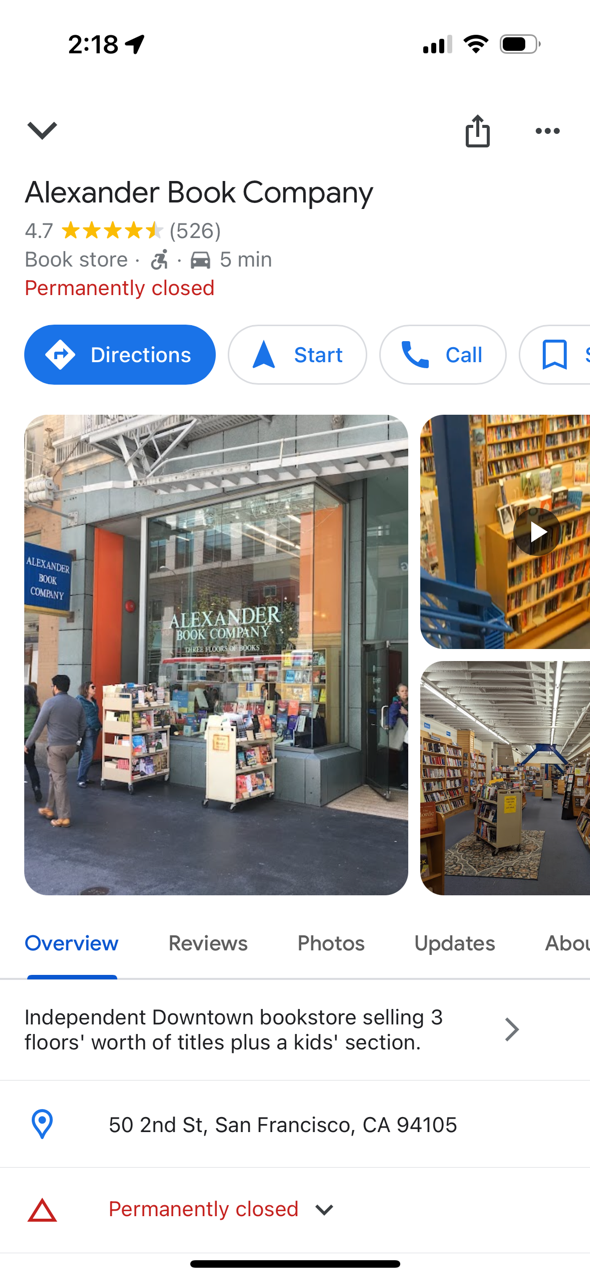
I did a search for “Alexanders books.” The top search results on Apple Maps don’t reflect my search. I get a list of bookstores; only after scrolling through dozens of bookstores do I see Alexander listed and that it is permanently closed.

Google does a better job. (Note that Google pulled up the correct business, even though I didn’t ask for it exactly.) This is the result I got:

But even that isn’t a great experience. Does the user really want to get directions, navigate to or call a business that is permanently closed? Probably not. After learning that their preferred store is closed, the most likely thing the user wants to do is find another bookstore.