20 years of Google Maps

Today marks 20 years since Google changed the online mapping paradigm. Instead of Mapquest’s bitmapped maps, Google allowed superior control within the browser dynamically loading tiles.

I’ve been working in mapping and local products for longer than Google Maps has existed. Here are my observations of the industry, with a focus on Google.

  • The seed of Google Maps was an acquisition of an Australian company called Where 2.
  • Google Earth came from another acquisition, Keyhole.
  • When John Hanke, founder of Keyhole, asked Larry and Sergey to buy better imagery of the US, they asked how much it would cost to buy the whole world. They bought the whole world.
  • Before the acquisition, Keyhole was running out of money. They asked who on the team was willing to trade salary for more equity. Clearly, the latter group made out.
  • When Maps launched, the head of Mapquest at the time would often send all-hands emails to AOL employees about how no one would ever use Google Maps and how poor its traction was. (Somehow Mapquest is still around, but Yahoo! Maps is gone.) A lot of Mapquest’s dev team was based in Lancaster, PA. Lancaster is not the home of prime engineering talent and the product reflected it.
  • I was at a Google shareholder meeting where someone asked why Google was wasting so much money on Maps. The answer was essentially, “it’s our company, next question.” Of course it is now a key differentiator.
  • Amazon’s A9 division launched a version of Street View earlier than Google. Ironically, I was interviewing at Google at the time and one of my interviewers said “that will never scale.” (Even earlier than that, I launched street views for real estate in Minneapolis.)
  • The day Google announced turn-by-turn directions, Garmin shares plummeted. Google might have done Garmin a favor: Garmin instead focused on the more lucrative aviation, marine and sports enthusiast markets.
  • The launch of offline maps put another nail in the coffin of portable navigation devices that used to dot the windshields of cars across the country.
  • Google launched an extensive marketing campaign in Portland for Maps. I guess it wasn’t that successful because it wasn’t deployed elsewhere. I did get a lot of swag and some free drinks out of it.
  • Apple Maps was a disaster when it launched in 2012. I did an interview with NPR’s Science Friday about it. Now it is by far my preferred mapping product.
  • As you would expect from Apple, the visualizations are gorgeous. The integration with Apple Watch and AirPods is brilliant for when I’m walking. I primarily use it when I’m walking, taking transit or renting a car (CarPlay). Unfortunately, the Tesla doesn’t allow CarPlay, so I’m stuck with an ugly version of Google Maps that looks like what Maps did in 2005 and worse than the later generations of PNDs.

Local is one of the most difficult problems out there. Businesses open and close all the time. (POI data is especially hard!) New roads get added. Construction temporarily re-routes roads. Roads are temporarily closed for events like marathons. Traffic data can be inaccurate.

Maps are ever evolving and there’s a long road ahead. Check out some of my wishlist and writings about maps. If you really want to go back through the history of maps on my older blog.

Disclosure: I’m an investor in all of the public companies named. Mapquest is part of a Yahoo!, which is primarily owned by Apollo after another failed content play by Verizon.

Less please… decluttering online maps

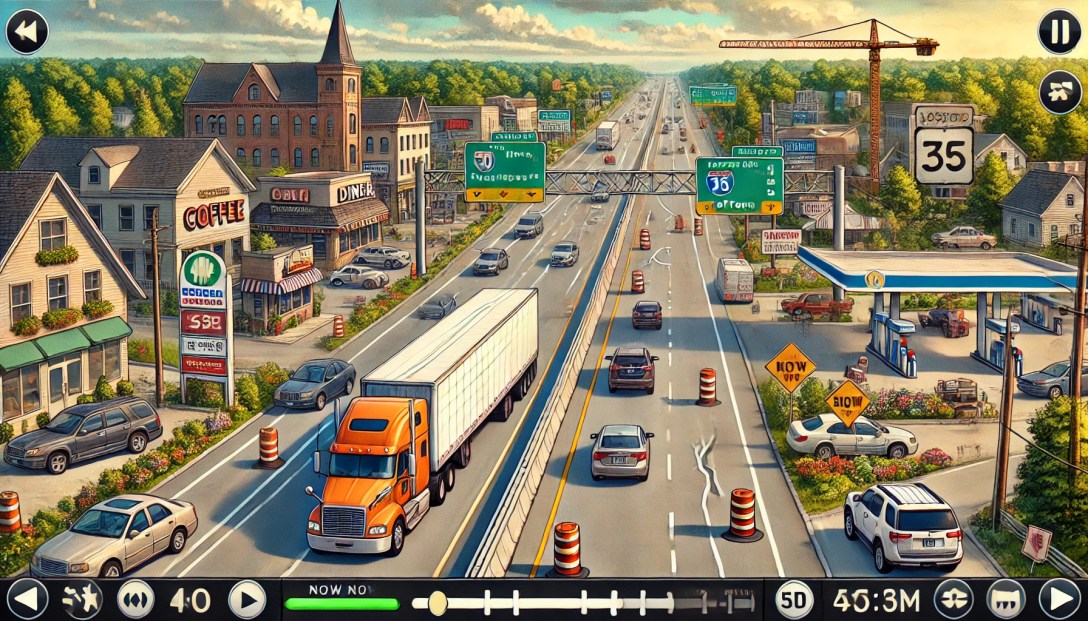
Online maps have revolutionized how we travel. No more unfolding (and worse, refolding) paper maps or flipping through dated Thomas Guides. No driving around in circles because you made a wrong turn. Less getting stuck in traffic.

But as the technology, point-of-interest data and interfaces have improved, we’ve cluttered the user interface. Instead of focusing on what users care about, we’ve added lot of junk.

Consider the map above. How many people are going to randomly decide that they want to go to Floor & Decor, Enterprise Rent-A-Car, Valero (um, I’m driving an EV!), Quality Appliance Repair or Maple Auto Body? I’ve already told the computer my goal: getting to 2860 Spring St.

Maps should show:

  • What the user has searched for.
  • Where the user is.
  • Prominent navigational aids, e.g. near this screenshot you would have passed the airport.
  • Obstacles, e.g. traffic accidents.
  • Traffic lights and stop signs along the user’s route. (Inexplicably, Google Maps still doesn’t do this in the U.S.; Apple does.)

If the business model calls for it, ads can be shown.

Otherwise, get out of the user’s way!

Pin the map… on the map

Mapping has gotten so much better since I started working on maps in 2004. The quality of venue data has improved. Road data has improved. We have real-time traffic. The overall detail provided has improved – Apple even shows trees.

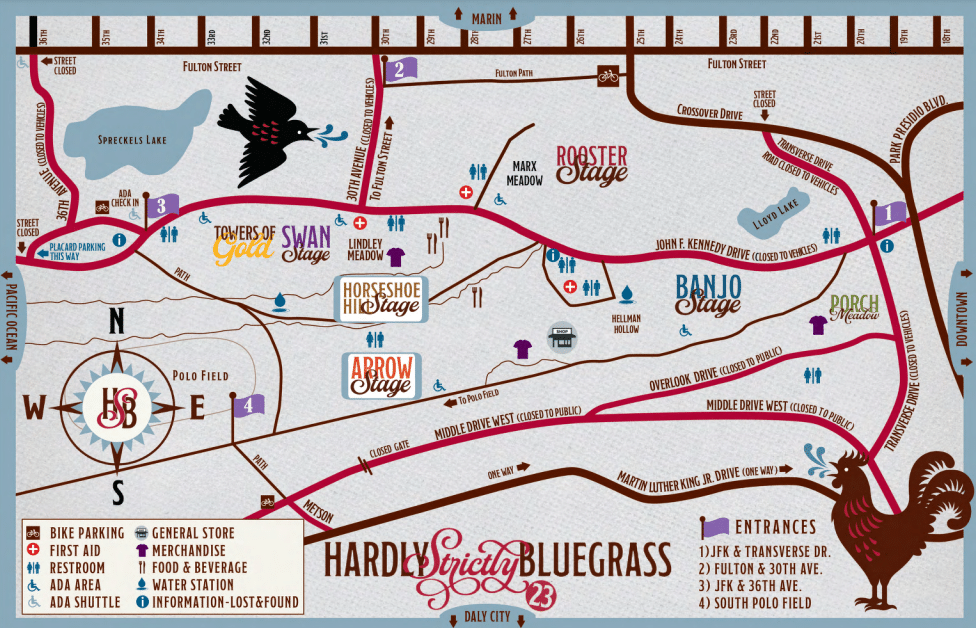
One important thing that hasn’t improved: temporary events. I went to the Hardly Strictly Bluegrass festival over the weekend. The organizers put together the terrible map above.

When I search for “hardly strictly bluegrass” on Google Maps, I get this:

(The pin doesn’t match my search term because apparently Google is pulling the text from a description of Hellman Hollow.)

I’ve got two maps: one that I can use for walking and directions and one that gives me a sense of what’s going on at the festival.

What I need is to marry the two. I want to route (using transit, walking, etc.) via the mapping tools I use normally but still know the details of my temporary event.

It starts from the very beginning: I had a very hard time finding the entrance gates because the event map was zoomed in too far to show the entrances to the park.

Given the source map from the venue, you could marry the roads with the roads in the digital map.

This approach would be useful for concerts, music festivals, marathons and other events. Bonus points for identifying road closures to keep traffic from getting snarled.

Google and Apple could make circling for parking a thing of the past

Imagine this: You’re in San Francisco and you drive to the Mission, ready for a giant, juicy burrito. The first step is to find parking.

After driving a few blocks, you see an open space. Uh, oh, driveway! A few minutes later, you get your hopes up – another empty space. Fire hydrant! You finally find an open spot and park. As you walk to the taqueria, you see a sign: “Residential Permit Parking.” San Francisco and New York City residents don’t have to imagine; this is an everyday scenario.

An estimated 1/3 of traffic congestion in cities is caused by cars circling looking for street parking. Traffic-data firm INRIX estimates that searching for parking costs the UK £23.3 Billion a year. That is a lot of wasted time and a lot of unnecessary tailpipe emissions!

Imagine this alternative scenario: you put in the amount of time you need to park. The map shown on CarPlay shows you the areas that have the highest likelihood of parking spaces for that duration. The calculation would take into account the current time, day of week, street cleaning rules, residential parking rules, commuter lanes, etc.

Extra credit for taking into account the size of the car. When I drove a Mini, I had a few bonus parking spaces that only small cars could fit in. On the other hand, someone who drives an F-150 has a lot fewer options.

This is doable: much of the data already exists and in digital form. Many cities use GIS tools like those from ESRI to track this information. Here’s a map from San Francisco, which has some of the most complicated restrictions in the United States. The database is captured at the individual parking meter level. Six o’clock and the loading zone is now available to everyone? Show it on the car’s display.

Google’s Street View vehicles capture images of all of these obstacles.

If I park my car and go to my hotel room in a hurry, I use Street View to check parking rules. The parking restrictions are legible.

The dashboard can also warn about traps: In San Francisco, the only holidays for meters are New Year’s Day, Thanksgiving and Christmas Day. Even on Independence Day, you’re not free from parking tickets.

You can go even deeper: many cities have switched to parking apps to allow people to pay for meters. The status of the spot or zone could be added to the map. (This is not definitive because a car may have left the space or someone might have paid in another way.) See my related post on adding real-time information to maps.

Google and Apple can’t create parking spaces, but they can make it much easier for you to find them. In the process, they can help improve the air in cities. That’s a big win that could also be helpful from a public policy point-of-view.

Making local real time

Monk creating a map

Keeping location data accurate is a Herculean (almost Sisyphean) task. Stores go out of business and new ones take their place. Snowstorms and pandemics temporarily shutter a business. Bars stay open later on a Sunday for the Super Bowl.

It used to be that business information was updated once a year. Data companies would ship Yellow Pages overseas and people would type in the information and send it back to the companies to sell them. Consumers could buy them as CDs or DVDs to generate mailing lists.

That bar has gone up dramatically. With everything else being on their phones being real-time, consumers expect location data to be as well. Plenty of friends (including tech savvy friends) assume that what Google, Apple, OpenTable, etc. tell them is gospel.

It’s not so. I tell them to call to verify. I’ve been to plenty of “fully booked” restaurants that are actually quite empty. OpenTable charges restaurants for each reservation. That gives restaurants a disincentive to make those times available when they would otherwise be full. Bowling alleys might be full of people, but that’s because it’s league night. The typical customer can’t walk in and bowl.

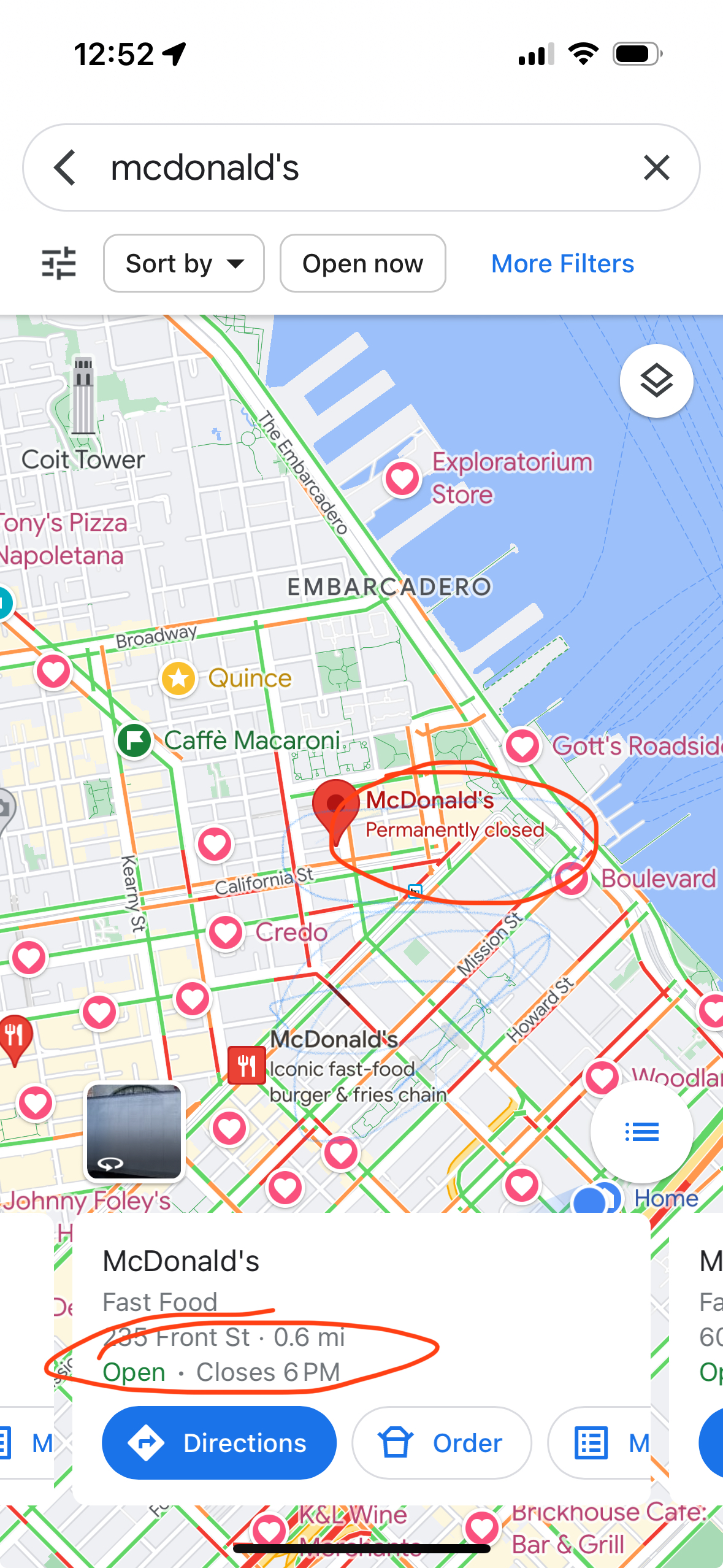
I’ve been to plenty of places where Google’s “live now” data is inaccurate. (In both directions.) Here is a recent example:

The location on the map (POI for mapping nerds) shows that the McDonald’s is “Permanently closed,” but the “live” information says it is “Open”. Both things can’t be true. If you walk by (what local nerds call “ground truth”), you will find that it is permanently closed.

There are a number of ways to improve timeliness and data quality:

  • Have the facilities update their information individually. Google has an extensive set of tools at Google My Business for companies to manage their profiles. Small business owners and government agencies are usually heavily pressed for time or don’t know about these tools.
  • Have users submit corrections. There are a lot more users than there are business owners. I submitted the McDonald’s correction to Apple and it was updated within a few days. The challenge with this approach is that there is fraud. Competing businesses might report a business closed. People create fake emergency rooms (yes, this a real example). Yelp has been frequently bombed with reviews when a business is in the political spotlight
  • Get information feeds from businesses and government. Chains could submit corrections through feeds. But even this information isn’t timely. The McDonald’s app still listed the above McDonald’s as open for at least a week after it closed. Ironically, this is one of many ways Mapquest blew it. Their initial business was store locators; they would charge businesses to put a store search on the store’s Web site. This presented a channel conflict: they didn’t want to feed it in to the consumer site because it could potentially cannibalize the store locator business. (There is precedent for doing this right: Transit agencies provide real-time data through GTFS.)
  • Use anonymized cell-phone location data to predict the number of people are at a business. A key problem is that in many urban areas there is so much density that even the most advanced GPS isn’t good enough. Indoor spaces are another problem.

The best way to keep data “live” is to use real-time transaction data. In the developed world, most businesses take credit cards. A lot of cash businesses use point-of-sale systems like Square. Restaurants are using online ordering. (Disclosure: I was an early board advisor to Olo until its IPO, which powers the ordering for Google Food, as well as restaurants like P.F. Chang’s, Five Guys, Qdoba.)

In the McDonald’s example above, the store locator was inaccurate, but if you tried to order something, you were told it was closed.

There are many advantages to transaction data:

  • If people are transacting, there is a very strong likelihood that a business open. If you don’t see any transactions, you can make a strong inference that the business is closed.
  • You can approximate cost based on transaction value. For restaurants, you could make reasonable estimates for groups of 2, 4, etc.
  • If the data source has SKU information (like from Olo or Square), you can get the full menu and the actual most popular items.
  • Depending on the level of anonymity, you can determine how frequently people visit a place. Frequent visits is a good indicator of NPS.

The rapid uptake of Apple Pay gives Apple an advantage here.

Transaction data won’t tell you if the trail you wanted to hike is closed due to snow, but business search will be a lot better than it is today.

Out of business? Wouldn’t you like to know?

You’ve done your research, you found the place you want to go, you get there. It’s closed!

What went wrong? It turns out the map is out of date. We didn’t have this expectation when we had paper maps. But online is different! It should be in real-time! (In a future post, I’ll talk about how to make it near real-time.)

I was reminded of this the other day when I tried to go to a McDonald’s. The sign had been dismantled and there was a letter on the door that they had closed. (I only go to McDonald’s for their cheap Diet Coke!)

Even though data sources exist, they didn’t make them to the maps.

Even when the map platforms know that the business is closed, they don’t render it optimally.

Broadly, there are two types of searches in local: category and business name. If the user is searching for a category, such as “restaurants 10018”, closed businesses should be left out. Why show something that you know the user can’t use?

On the other hand, if a user has searched for a specific business name, it’s helpful for the user to know that the business has closed. One thing to keep in mind is that people don’t often know the exact name of the business.

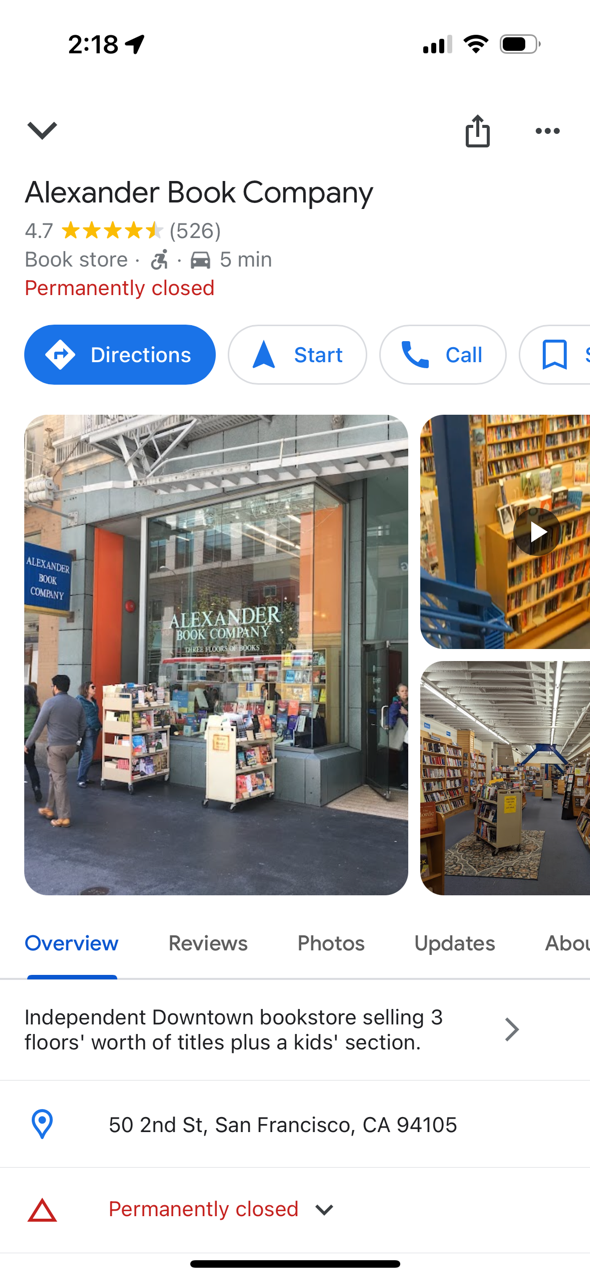
I did a search for “Alexanders books.” The top search results on Apple Maps don’t reflect my search. I get a list of bookstores; only after scrolling through dozens of bookstores do I see Alexander listed and that it is permanently closed.

Google does a better job. (Note that Google pulled up the correct business, even though I didn’t ask for it exactly.) This is the result I got:

But even that isn’t a great experience. Does the user really want to get directions, navigate to or call a business that is permanently closed? Probably not. After learning that their preferred store is closed, the most likely thing the user wants to do is find another bookstore.

redesign | ux: How would you improve this Google Maps experience?

This quiz if focused on the items shown in the picture, specifically Budget and Avis. (Judging from the Twitter answers, that was unclear.)

Frequent travelers often rent cars. This involves picking up the car and eventually returning the car. Google could automatically track where you began your rental (in my case, Avis). When you want to return to the airport, instead of directing you to the airport terminal, it could automatically guide you back to the rental car return. One way to do this is to use GPS trace data. i.e. look at the paths of people who have rented from Avis and look at where they return the car.

Bonus points for showing me the last gas station on the route so that I don’t get stuck paying $9 a gallon to have the car rental company refill the tank. (Travel tip: You should almost never accept the prepaid fuel option.)

Some Twitter answers that reflect other issues with Google Maps.

https://twitter.com/Very_QC/status/555793461761564673