Today marks 20 years since Google changed the online mapping paradigm. Instead of Mapquest’s bitmapped maps, Google allowed superior control within the browser dynamically loading tiles.
I’ve been working in mapping and local products for longer than Google Maps has existed. Here are my observations of the industry, with a focus on Google.
The seed of Google Maps was an acquisition of an Australian company called Where 2.
Google Earth came from another acquisition, Keyhole.
When John Hanke, founder of Keyhole, asked Larry and Sergey to buy better imagery of the US, they asked how much it would cost to buy the whole world. They bought the whole world.
Before the acquisition, Keyhole was running out of money. They asked who on the team was willing to trade salary for more equity. Clearly, the latter group made out.
When Maps launched, the head of Mapquest at the time would often send all-hands emails to AOL employees about how no one would ever use Google Maps and how poor its traction was. (Somehow Mapquest is still around, but Yahoo! Maps is gone.) A lot of Mapquest’s dev team was based in Lancaster, PA. Lancaster is not the home of prime engineering talent and the product reflected it.
I was at a Google shareholder meeting where someone asked why Google was wasting so much money on Maps. The answer was essentially, “it’s our company, next question.” Of course it is now a key differentiator.
Amazon’s A9 division launched a version of Street View earlier than Google. Ironically, I was interviewing at Google at the time and one of my interviewers said “that will never scale.” (Even earlier than that, I launched street views for real estate in Minneapolis.)
The day Google announced turn-by-turn directions, Garmin shares plummeted. Google might have done Garmin a favor: Garmin instead focused on the more lucrative aviation, marine and sports enthusiast markets.
The launch of offline maps put another nail in the coffin of portable navigation devices that used to dot the windshields of cars across the country.
Google launched an extensive marketing campaign in Portland for Maps. I guess it wasn’t that successful because it wasn’t deployed elsewhere. I did get a lot of swag and some free drinks out of it.
As you would expect from Apple, the visualizations are gorgeous. The integration with Apple Watch and AirPods is brilliant for when I’m walking. I primarily use it when I’m walking, taking transit or renting a car (CarPlay). Unfortunately, the Tesla doesn’t allow CarPlay, so I’m stuck with an ugly version of Google Maps that looks like what Maps did in 2005 and worse than the later generations of PNDs.
Local is one of the most difficult problems out there. Businesses open and close all the time. (POI data is especially hard!) New roads get added. Construction temporarily re-routes roads. Roads are temporarily closed for events like marathons. Traffic data can be inaccurate.
Disclosure: I’m an investor in all of the public companies named. Mapquest is part of a Yahoo!, which is primarily owned by Apollo after another failed content play by Verizon.
Online maps have revolutionized how we travel. No more unfolding (and worse, refolding) paper maps or flipping through dated Thomas Guides. No driving around in circles because you made a wrong turn. Less getting stuck in traffic.
But as the technology, point-of-interest data and interfaces have improved, we’ve cluttered the user interface. Instead of focusing on what users care about, we’ve added lot of junk.
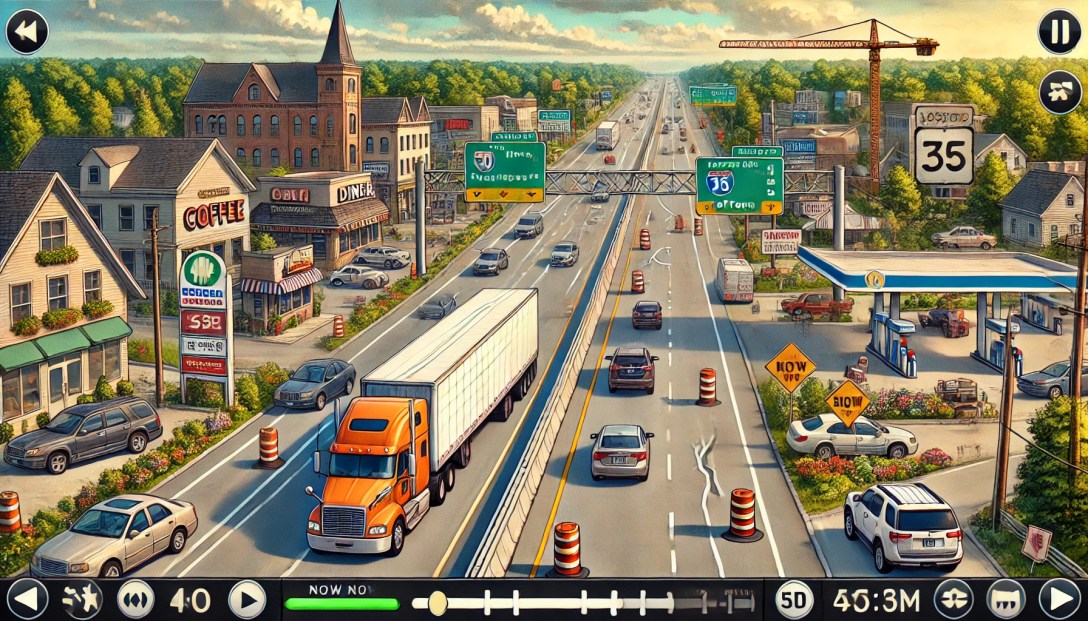
Consider the map above. How many people are going to randomly decide that they want to go to Floor & Decor, Enterprise Rent-A-Car, Valero (um, I’m driving an EV!), Quality Appliance Repair or Maple Auto Body? I’ve already told the computer my goal: getting to 2860 Spring St.
Maps should show:
What the user has searched for.
Where the user is.
Prominent navigational aids, e.g. near this screenshot you would have passed the airport.
Obstacles, e.g. traffic accidents.
Traffic lights and stop signs along the user’s route. (Inexplicably, Google Maps still doesn’t do this in the U.S.; Apple does.)
If the business model calls for it, ads can be shown.
Mapping has gotten so much better since I started working on maps in 2004. The quality of venue data has improved. Road data has improved. We have real-time traffic. The overall detail provided has improved – Apple even shows trees.
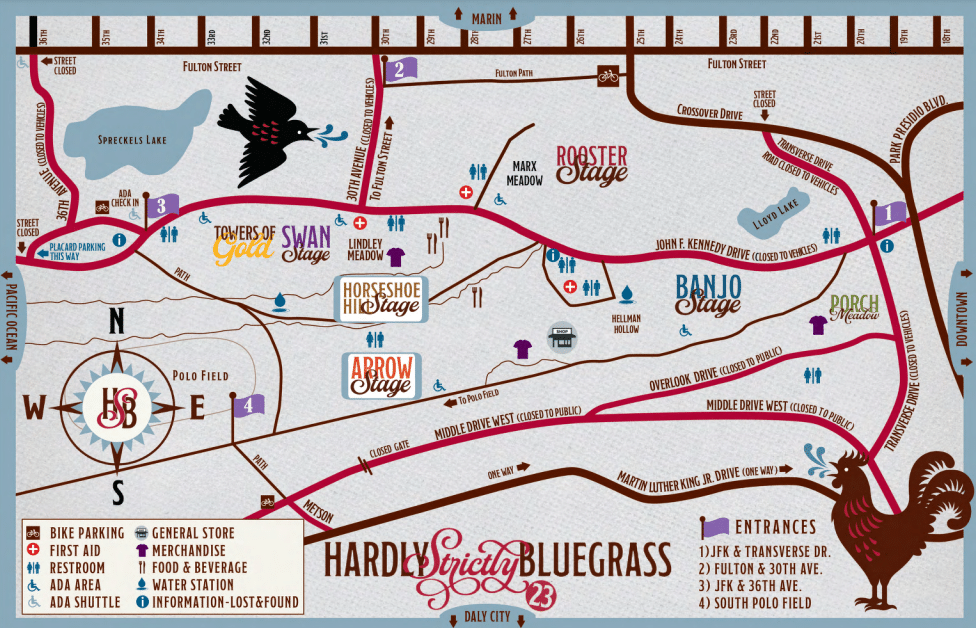
One important thing that hasn’t improved: temporary events. I went to the Hardly Strictly Bluegrass festival over the weekend. The organizers put together the terrible map above.
When I search for “hardly strictly bluegrass” on Google Maps, I get this:
(The pin doesn’t match my search term because apparently Google is pulling the text from a description of Hellman Hollow.)
I’ve got two maps: one that I can use for walking and directions and one that gives me a sense of what’s going on at the festival.
What I need is to marry the two. I want to route (using transit, walking, etc.) via the mapping tools I use normally but still know the details of my temporary event.
It starts from the very beginning: I had a very hard time finding the entrance gates because the event map was zoomed in too far to show the entrances to the park.
Given the source map from the venue, you could marry the roads with the roads in the digital map.
This approach would be useful for concerts, music festivals, marathons and other events. Bonus points for identifying road closures to keep traffic from getting snarled.
Imagine this: You’re in San Francisco and you drive to the Mission, ready for a giant, juicy burrito. The first step is to find parking.
After driving a few blocks, you see an open space. Uh, oh, driveway! A few minutes later, you get your hopes up – another empty space. Fire hydrant! You finally find an open spot and park. As you walk to the taqueria, you see a sign: “Residential Permit Parking.” San Francisco and New York City residents don’t have to imagine; this is an everyday scenario.
An estimated 1/3 of traffic congestion in cities is caused by cars circling looking for street parking. Traffic-data firm INRIX estimates that searching for parking costs the UK £23.3 Billion a year. That is a lot of wasted time and a lot of unnecessary tailpipe emissions!
Imagine this alternative scenario: you put in the amount of time you need to park. The map shown on CarPlay shows you the areas that have the highest likelihood of parking spaces for that duration. The calculation would take into account the current time, day of week, street cleaning rules, residential parking rules, commuter lanes, etc.
Extra credit for taking into account the size of the car. When I drove a Mini, I had a few bonus parking spaces that only small cars could fit in. On the other hand, someone who drives an F-150 has a lot fewer options.
This is doable: much of the data already exists and in digital form. Many cities use GIS tools like those from ESRI to track this information. Here’s a map from San Francisco, which has some of the most complicated restrictions in the United States. The database is captured at the individual parking meter level. Six o’clock and the loading zone is now available to everyone? Show it on the car’s display.
Google’s Street View vehicles capture images of all of these obstacles.
If I park my car and go to my hotel room in a hurry, I use Street View to check parking rules. The parking restrictions are legible.
The dashboard can also warn about traps: In San Francisco, the only holidays for meters are New Year’s Day, Thanksgiving and Christmas Day. Even on Independence Day, you’re not free from parking tickets.
You can go even deeper: many cities have switched to parking apps to allow people to pay for meters. The status of the spot or zone could be added to the map. (This is not definitive because a car may have left the space or someone might have paid in another way.) See my related post on adding real-time information to maps.
Google and Apple can’t create parking spaces, but they can make it much easier for you to find them. In the process, they can help improve the air in cities. That’s a big win that could also be helpful from a public policy point-of-view.
The Agrawal family cars over the years. The Pontiac Catalina was our family’s first car when we immigrated to the United States. The Mini Cooper is my current car. (These are images gleaned from Google search, not my actual cars.)
What will cars look like 30 years from now? That’s a question I’ve been talking to friends about recently.
One way to assess the future is to look back at the past. My memories go back to when my parents drove us 35 years ago.
Safety features: shoulder belts, airbags, antilock brakes, crumple zones, electronic traction control, reinforced door beams, LATCH anchors. A passenger side mirror was an option; these days it’s standard. Third brake light. Xenon headlights. Tire pressure monitoring system. Some cars have wipers for lights. (Relatively rare.) LED brake lights. Back up sensors and back up cameras. High end cars can have night vision, pedestrian protection. Many of these changes are because of regulations, but they started because of new product development. For example, airbags were in some cars before they became mandatory. Backup cameras aren’t required today, but they’re in a lot of vehicles. But in 2018, they will be required.
Convenience features. Power locks/windows, air conditioning have become standard on all but the cheapest cars. Remote to lock/unlock. Reading lights, vanity lights. Rear defogger. Mid-level cars with keyless entry, power mirrors, power seats, auto dimming rear view mirror, heated seats, push button start. Garage door opener. Rain sensor. Automatic climate control, dual-zone climate control. Memory seats/mirrors. Voice recognition. Carplay, Android Auto, High end cars add self-opening glove box (really!), heated steering wheel, seat coolers, a zillion seating controls, massaging seats, electronic air freshener (really!)
Automation. Only 4% of cars sold today in US are stick shift. (vs. 31% 30 years ago.) Auto stick, paddle shifters. Cruise control, intermittent wipers. Power steering, power brakes. High-end cars have adaptive cruise control, blind spot warning, lane departure warning systems, automatic lane changing, automatic braking, self parking.
Infotainment/telematics. Tape decks have gone away, CD players replaced them and on Teslas, there isn’t even a CD player. Nav systems available on mid-high end cars. Minivans for a while had DVD players built into roof for kids. Bluetooth. Not widely adopted, but available: satellite radio, OnStar. Some cars can be managed by an app.
Infotainment/telematics. Tape decks have gone away, CD players replaced them and on Teslas, there isn’t even a CD player. Nav systems available on mid-high end cars. Minivans for a while had DVD players built into roof for kids. Bluetooth. Not widely adopted, but available: satellite radio, OnStar. Some cars can be managed by an app.
Repairability. Cars have become more difficult for the weekend mechanic to repair. Some things are still easy, like oil changes and filter changes. But a lot of the car is controlled by complex electronics instead of mechanical parts.
Software and connectivity. Cars are increasingly run by software. This can create problems when cars are poorly designed; recent Jeeps could be remotely controlled because hackers went to the CAN-bus through the infotainment system. Software can be upgraded. Some Fords can be upgraded through the USB port. Teslas update wirelessly and the company can add significant new features. The industry has standardized on the OBD-II connector. That sounds like it’s not important — but it’s provided a pathway for innovation. For example, my car insurance is charged per mile and I can get speed information via a dongle that plugs into the OBD-II port. The dongle also provides diagnostic data that I can read on my insurance app.
Pollution. Our first car ran on leaded gasoline. Now, most cars run on unleaded gasoline. Unless they’re running on electric, which has zero-emissions. On gas-powered engines, CO2 emissions are a fraction of what they were 30 years ago. Fuel economy has nearly doubled from 13.1 MPG to 24.7 MPG.
Design. New form factors like SUV and minivan. Station wagons rare. Color keyed bumpers. (I miss chrome!) Hood ornaments have disappeared in place of badges on the front of the car. Antenna design has become increasing sophisticated and the antennas have become less visible. Vinyl tops have gone away. (Thankfully!) Cars have become much more aerodynamic.
Etc. More/better diagnostics. Instead of simply dummy lights, many mid+ cars have engine computers. Digital speedometers instead of analog. (Some cars.) Outside temperature sensor. Vinyl to cloth seats. Bench seats in front replaced with bucket seats. Fold down seats with trunk access. Cigarette lighters are less common. Even on my ’95 Nissan Altima, the lighter element was missing. (A 12V power plug was there, but the lighter was an accessory.) With the decline of smoking, ashtrays have become less common. We see USB ports, auxiliary inputs and iPhone connecters.
And, of course, cup holders!
It’s important to note that this is based on the U.S. market. Despite globalization of the auto industry, there is significant variation from market-to-market. Manual transmissions are very common in Europe and Asia; they’re rare in the U.S. Emissions standards are different. There is also right drive vs. left drive.
So what does this tell us about the future? It says cars evolve slowly.
But I expect that the pace of innovation to speed up for a number of reasons:
Increasing competition from other car manufactures. The “big three” aren’t as dominant as they used to be. Chrysler is merely a brand. GM has shuttered Oldsmobile, Pontiac. Saturn was created and shuttered in that time frame.
Cars are now designed using software, making it easy to test variations before going through the expense of tooling.
Standardized parts suppliers. In the old days, car manufacturers had captive parts arms. Now companies like Continental, Alpine and Johnson Controls provide many of the parts. This allows innovation to spread faster. To some extent, car companies are systems integrators.
Of course, the biggest push toward automation is being driven by Google with its focus on automation.
But there are also a lot of factors that slow innovation. Despite the fact that technology can improve quickly, the regulatory environment doesn’t because of the slow pace of legislative change.
The basic process of buying a car has been virtually unchanged. You go into a dealership and haggle with a guy (still mostly guys) who then “talks to his manager” to “see what he can do” to “put you in that car today.”
Behind the scenes, many car dealers are really owned by the same companies despite having localized brands. Heard of Penske Automotive? Probably in the context of auto racing. Penske owns 243 dealerships generating $15B in annual revenue. Single rooftop dealers are much rarer.
With today’s market, the right way to sell cars is direct-to-consumer by manufacturers. But dealers control state legislatures with promises of campaign contributions and local jobs. In some states, you have to go through machinations to buy a Tesla.
Politics plays a role in other ways. In Florida, a candidate used an ad to attack an opponent for supporting self-driving cars. Scaring the shit out of seniors is a time-honored practice. Never mind that self-driving cars would give seniors with vision problems, reduced reaction times and limited mobility a lot more freedom.
Some regulation is done on a state-by-state basis. Legally, a car can’t drive itself across the country.
There is much work to be done. In the road ahead, I’ll look at the effects of automation on the design of cars themselves and the effects on society.
A lot of companies have been spending a lot of time and effort in location-based services over the last couple of years. Whether it’s local search or check ins, the race to get people connecting with local businesses is on.
One ongoing challenge has been identifying where consumers are. GPS has issues with power consumption, time to first fix and doesn’t work indoors. Cellsite-based location is not precise enough. Even WiFi triangulation, which is the most effective way currently, isn’t precise enough given current deployments. In densely packed urban areas, you can still come up with a hundred or more businesses that you would have to pick through.
One way that Google (or Facebook or anyone with a strong brand) could solve this problem is to send WiFi beacons to local businesses. This is roughly how it would work:
Routers are sent to businesses. The MAC address of the router is recorded and correlated with the address that it’s shipped to.
The business receives it and plugs it into a wall outlet.
The router then transmits its information to nearby phones.
Those phones can narrow the list of potential businesses based on that information.
This doesn’t even require the business to have an Internet connection. The only requirement is that the device be powered. At scale, the device could be custom designed to eliminate the Ethernet jacks on routers. This reduces costs and makes the device look less intimidating to folks who aren’t tech savvy. If you wanted to get fancy, you could shape the device so it didn’t look like a router at all — maybe something like the Open sign that Google is giving away. This would have the added benefit of branding to the business’s customers.
With a per device cost of approximately $15 and a service life of about 3 years, we’re looking at a cost of $5/year. If you sent them to 500,000 businesses (the focus should be bars/restaurants in high density urban areas), it’s still a modest cost of $7.5 million to tap into the local market.
The pitch to local businesses would be something along the lines of “make it easier for Google users to find you.” It could be presented as part of a small business starter kit, complete with Google Places window decals, a guide to online advertising, personalized information on how the business is currently rated on Google and online advertising credit for use on Google. It could also serve as the validation mechanism for businesses to claim their Places page. In my experience, packages are more likely to be opened than typical direct mail pieces.
While there has been a lot of talk about NFC for searching or tagging, it would require a change in user behavior and is likely to take 2-3 years before a sufficient number of NFC-enabled phones are in use in the United States.
Not only would this sort of network enable easier local search and check ins, it could be used to generate real time maps of where the most popular places in a city are. People could also use it to generate automatic check ins when they reach selected favorite places.
The biggest challenge with this approach is the risk of bad press given the kerfuffle regarding StreetView vehicles capturing WiFi data by mistake. Although this is in no way equivalent, the media have a hard time understanding that. (Not to mention that the original issue was really blown out of proportion.) This could be offset if Google made the database open to the public. Not only would this improve results for Google applications, but could be used by a wide range of devices to improve position accuracy. It would be the equivalent of Google launching satellites for the public’s benefit.
SFO is a hotbed of foursquare activity. Creative Commons image by Håkan Dahlström.
With the increasing use of mobile applications such as Yelp and foursquare, it’s becoming possible to pull ideas from thin air. Users of these apps can leave tips for others to find that are linked to a specific location.
In most places there aren’t enough tips yet to make filtering an issue. San Francisco International Airport, with more than 57,000 checkins on foursquare, is an exception. It offers a glimpse of what we can expect as these services become more popular. The airport is the perfect petri dish for tips: it serves a technically savvy audience and people often find themselves there with plenty of time on their hands.
The SFO tips page contains dozens of notes including places to eat, complaints, ground transportation, wifi and power availability. Mixed in to all of this are ads, other spam and random observations. Some examples:
have a corned beef sandwich at max’s if you’re flying southwest. the best! well, really good
When you enter short term parking do it as far to the right as you can (lvl 2) & then immediately head to lvl 1. There is always parking next to gate and that is the lvl that connects to the terminal
Free wifi at the Continental lounge in Terminal 1- be warned, it’s located outside Security
Smoking hot brunette woman at gate 20. Stop by and smile at her. She is so lovely!
Bart to Millbrae gets you within 1 block of an in n out burger. Great for 3+ hour layover!
Heading to wine country? Take a moment to stop by St. Supery in the heart of Napa on Hwy 29. Mention this to get a 2 for 1 tasting.
Sorting through the volume of tips can be overwhelming. As the volume increases, we’ll need ways to filter them. Among the ways to filter:
Social network. Among the tips were tips from people I follow on Twitter, including Danny Sullivan and Adam Lasnik. Being able to surface these would increase relevance.
Ads vs. not ads. Sometimes people want ads, especially if it can save them money.
Keyword search.
Places like airports are especially complex because they’re really collections of places, sometimes with other groupings and physical restrictions. Being able to filter tips by terminal would also be useful. But then maybe that’s best left to GateGuru.
Embedding location in a tweet the hard way in 2007
and today:
Embedding location in a tweet in 2010
In 2007, I used a third-party application from Where to include my location. Clicking on that link would take you to a map on Where’s site showing the address. (The link in the original post no longer works.)
With the launch of Twitter Places, the search is done within the Web browser (and soon in Twitter’s mobile applications). You can select where you are from a list of nearby places. Clicking on the place name brings up the map above and the option to view tweets about that place.
Although the difference between the two may seem subtle, they are significant:
Because the place is metadata, it doesn’t count toward the 140 character limit.
Place names are human readable, unlike addresses and latitude/longitude. Knowing the name of a place makes it much easier to find than just a street address, especially in dense metropolitan areas.
Places are unique to a specific venue. Doing a pure location-based search would return tweets from surrounding businesses or businesses that have since disappeared.
Integration in to the main Twitter experience means broad exposure and eventual standardization of place identifiers. That has been a longstanding challenge in the local space.
Twitter’s geo APIs have been available for several months and third parties like bing have created interesting applications like Twitter Maps. With the availability of places across the Twitter platform, we can expect to see more interesting applications including both real-time applications (ride sharing and ticket exchanges) and historical (restaurant reviews, past events).
Once Twitter allows owners to claim their Place and associate it with a Twitter account, we could see official tweets of announcements and offers incorporated into a Place’s search results.
When pictures are tagged to a Place (instead of a lat/long), we’ll have the ability to visually browse a venue in Twitter.




 redesign | mobile