you don’t integrate with your ordering system. Customers should be able to navigate to an order and share that information within the chat. Amazon does a great job with this. Their self-service bot is one of the few that can actually resolve issues. Of the items on this list, this is the toughest to implement, but it’s also one of the most important.
don’t “ding” when the agent sends a response. Given how long some tasks and research takes, you need to be able to trigger a system sound that indicates that the agent has responded. Most consumers are multi-tasking, not staring at the chat window. Often the chat window will timeout and the customer will have to restart the chat and provide all of the information form the beginning. It’s a waste of user time and a waste of agent time.
don’t have agents read information that was provided, especially when an issue is transferred. The user shouldn’t have to retype and explain the problem. The agent can scroll back and get details, including the research done by the previous agent. This would be hard to do in real-time on a phone call because it’s too time consuming for the second agent to listen. On text, this is simple.
don’t give chat agents the authority to do what phone agents can do. Customers don’t want to spend 15 minutes with an agent only to be told they have to call. Then they have to navigate a phone menu designed to deflect them. Once they go through the process, they will have to explain the issue again.
don’t allow the user to upload photos. In many cases, a customer sending a picture or a screenshot provides a lot of information. Instead of customer saying “the item had a big dent on the right corner,” she can just upload a picture. I’ve had cases where the agent says “OK, go to Twitter, upload a picture of the item and then return to the chat.” Obviously this doesn’t work for people who don’t have Twitter.
get rid of the chat box when the customer switches pages on your site. Often they may be researching orders, alternative items, different flight, etc. They should be able to navigate without losing the chat. American Express keeps their chats persistent. Customers can go back and review chats about previous issues.
don’t automatically email me a transcript of the chat. When a chat is completed, the customer should receive an email with the exact conversation. Even better if you highlight the final action the agent is performing.
follow up on resolution aftera few days. In many cases, I can only immediately comment on the politeness and perceived helpfulness of the agent. I don’t know if the actual issue is resolved until my plane ticket is re-issued, refund shows up on my credit card, item shows up at my door, etc.
Every day we get closer to Christmas, the more important omnichannel becomes. For those unfamiliar with the term, omnichannel is the seamless integration of online and physical commerce. For those in the business, it’s also called BOPIS: Buy Online, Pick-Up In Store.
Here’s the ideal omnichannel experience:
Search for the item on the retailer’s site or mobile app.
See real-time availability at stores near you.
Place the order with immediate confirmation.
Get a notification when the order is ready.
Find your way to the pick up spot.
Press a button in the app to indicate where you are waiting.
Someone from the store comes and brings it out to you.
I’ve been following omnichannel since before it became a word. The dearly departed Circuit City (closed in 2009) was an early leader in the experience. In one humorous experience, someone went to the check out register to purchase an item and was told that the item they were holding was out of stock. It was “out of stock” because I’d purchased it online and their system subtracted it from salable inventory!
Retailers have gotten better over the years as omnichannel has become more common, both at messaging and at execution. (Though the race condition will always exist. It’s near-impossible to guarantee that an employee will have a picked an item before a store shopper grabs it.)
In the past year, I’ve tried omnichannel experiences at Walmart, Target, Walgreen’s and Best Buy.
At Walmart, there wasn’t any signage that made it obvious where to go. I only found the pick up location by driving around the building. The items were brought out promptly, but one was damaged in a very obvious way that they should have noticed. Ideally there would be obvious signage in the parking lot and the app would navigate you directly to the pick up area.
At Target, an overworked employee took too long to bring the items out.
The experience was similar at Walgreens. She also had multiple orders in the shopping cart she brought out and had to separate the orders curbside.
Best Buy had the best experience: the item was brought out promptly, directly to my car.
Omnichannel provides a number of advantages over the traditional retail experience:
Consumers don’t have to deal with inclement weather. I liked not having to walk out in the rain to Best Buy.
For people with young children, it eliminates the hassle of unbuckling the kiddos from the car seat, getting them into the store and then reversing the process. And, of course, it eliminates the fighting over whether to buy candy in the checkout.
Consumers know, with a high likelihood, that the products they want will be there.
Retailers benefit from something that Amazon (mostly) can’t offer: immediate access. Sure, if you’ve got two days to spare, you can wait for Prime delivery. If you’ve got one day, you can pay extra for overnight. But same day is much harder.
Consumers also get the benefit of convenient purchasing of items that are too expensive to ship, such as soda.
If you’re racing for gifts on Christmas Eve check out the omnichannel experience.
Imagine this: You’re in San Francisco and you drive to the Mission, ready for a giant, juicy burrito. The first step is to find parking.
After driving a few blocks, you see an open space. Uh, oh, driveway! A few minutes later, you get your hopes up – another empty space. Fire hydrant! You finally find an open spot and park. As you walk to the taqueria, you see a sign: “Residential Permit Parking.” San Francisco and New York City residents don’t have to imagine; this is an everyday scenario.
An estimated 1/3 of traffic congestion in cities is caused by cars circling looking for street parking. Traffic-data firm INRIX estimates that searching for parking costs the UK £23.3 Billion a year. That is a lot of wasted time and a lot of unnecessary tailpipe emissions!
Imagine this alternative scenario: you put in the amount of time you need to park. The map shown on CarPlay shows you the areas that have the highest likelihood of parking spaces for that duration. The calculation would take into account the current time, day of week, street cleaning rules, residential parking rules, commuter lanes, etc.
Extra credit for taking into account the size of the car. When I drove a Mini, I had a few bonus parking spaces that only small cars could fit in. On the other hand, someone who drives an F-150 has a lot fewer options.
This is doable: much of the data already exists and in digital form. Many cities use GIS tools like those from ESRI to track this information. Here’s a map from San Francisco, which has some of the most complicated restrictions in the United States. The database is captured at the individual parking meter level. Six o’clock and the loading zone is now available to everyone? Show it on the car’s display.
Google’s Street View vehicles capture images of all of these obstacles.
If I park my car and go to my hotel room in a hurry, I use Street View to check parking rules. The parking restrictions are legible.
The dashboard can also warn about traps: In San Francisco, the only holidays for meters are New Year’s Day, Thanksgiving and Christmas Day. Even on Independence Day, you’re not free from parking tickets.
You can go even deeper: many cities have switched to parking apps to allow people to pay for meters. The status of the spot or zone could be added to the map. (This is not definitive because a car may have left the space or someone might have paid in another way.) See my related post on adding real-time information to maps.
Google and Apple can’t create parking spaces, but they can make it much easier for you to find them. In the process, they can help improve the air in cities. That’s a big win that could also be helpful from a public policy point-of-view.
Keeping location data accurate is a Herculean (almost Sisyphean) task. Stores go out of business and new ones take their place. Snowstorms and pandemics temporarily shutter a business. Bars stay open later on a Sunday for the Super Bowl.
It used to be that business information was updated once a year. Data companies would ship Yellow Pages overseas and people would type in the information and send it back to the companies to sell them. Consumers could buy them as CDs or DVDs to generate mailing lists.
That bar has gone up dramatically. With everything else being on their phones being real-time, consumers expect location data to be as well. Plenty of friends (including tech savvy friends) assume that what Google, Apple, OpenTable, etc. tell them is gospel.
It’s not so. I tell them to call to verify. I’ve been to plenty of “fully booked” restaurants that are actually quite empty. OpenTable charges restaurants for each reservation. That gives restaurants a disincentive to make those times available when they would otherwise be full. Bowling alleys might be full of people, but that’s because it’s league night. The typical customer can’t walk in and bowl.
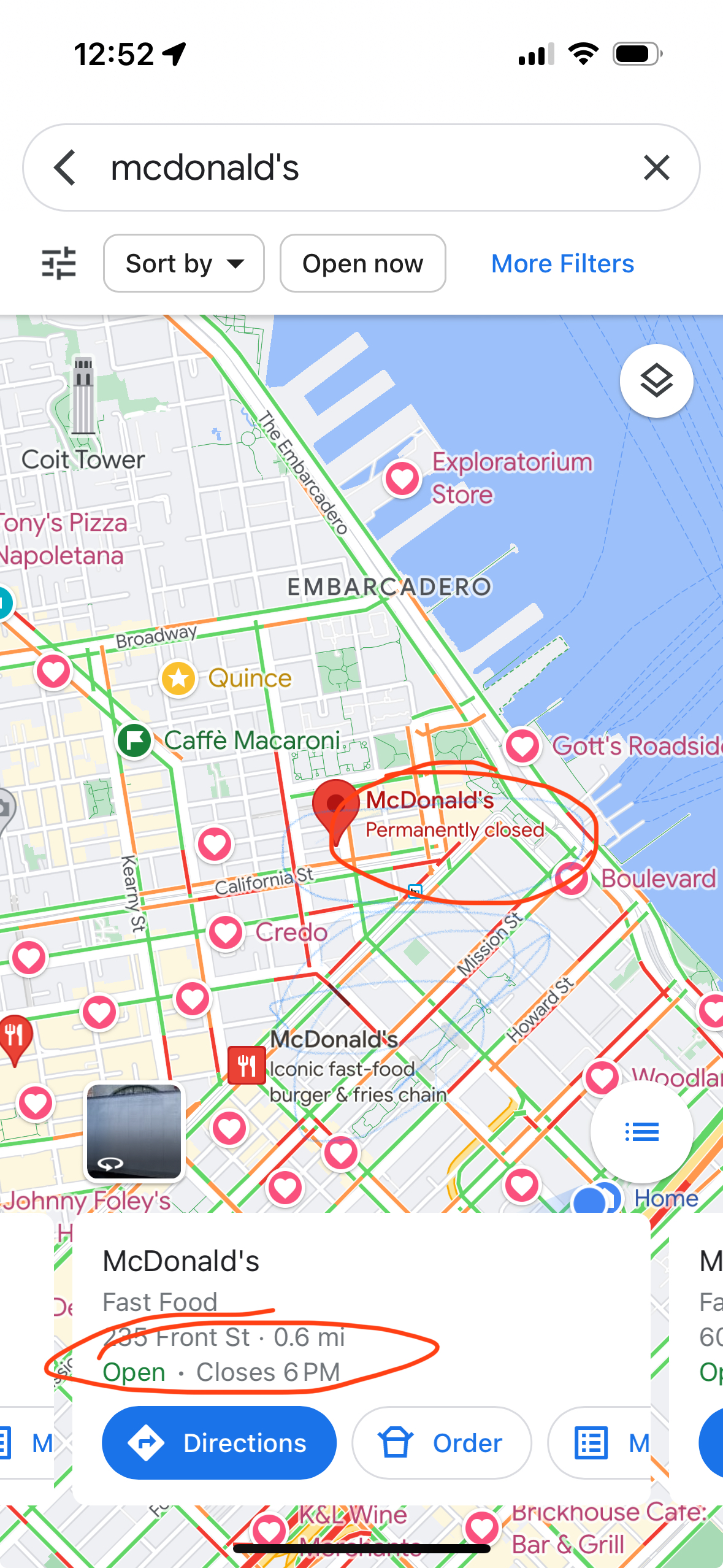
I’ve been to plenty of places where Google’s “live now” data is inaccurate. (In both directions.) Here is a recent example:
The location on the map (POI for mapping nerds) shows that the McDonald’s is “Permanently closed,” but the “live” information says it is “Open”. Both things can’t be true. If you walk by (what local nerds call “ground truth”), you will find that it is permanently closed.
There are a number of ways to improve timeliness and data quality:
Have the facilities update their information individually. Google has an extensive set of tools at Google My Business for companies to manage their profiles. Small business owners and government agencies are usually heavily pressed for time or don’t know about these tools.
Have users submit corrections. There are a lot more users than there are business owners. I submitted the McDonald’s correction to Apple and it was updated within a few days. The challenge with this approach is that there is fraud. Competing businesses might report a business closed. People create fake emergency rooms (yes, this a real example). Yelp has been frequently bombed with reviews when a business is in the political spotlight
Get information feeds from businesses and government. Chains could submit corrections through feeds. But even this information isn’t timely. The McDonald’s app still listed the above McDonald’s as open for at least a week after it closed. Ironically, this is one of many ways Mapquest blew it. Their initial business was store locators; they would charge businesses to put a store search on the store’s Web site. This presented a channel conflict: they didn’t want to feed it in to the consumer site because it could potentially cannibalize the store locator business. (There is precedent for doing this right: Transit agencies provide real-time data through GTFS.)
Use anonymized cell-phone location data to predict the number of people are at a business. A key problem is that in many urban areas there is so much density that even the most advanced GPS isn’t good enough. Indoor spaces are another problem.
The best way to keep data “live” is to use real-time transaction data. In the developed world, most businesses take credit cards. A lot of cash businesses use point-of-sale systems like Square. Restaurants are using online ordering. (Disclosure: I was an early board advisor to Olo until its IPO, which powers the ordering for Google Food, as well as restaurants like P.F. Chang’s, Five Guys, Qdoba.)
In the McDonald’s example above, the store locator was inaccurate, but if you tried to order something, you were told it was closed.
There are many advantages to transaction data:
If people are transacting, there is a very strong likelihood that a business open. If you don’t see any transactions, you can make a strong inference that the business is closed.
You can approximate cost based on transaction value. For restaurants, you could make reasonable estimates for groups of 2, 4, etc.
If the data source has SKU information (like from Olo or Square), you can get the full menu and the actual most popular items.
Depending on the level of anonymity, you can determine how frequently people visit a place. Frequent visits is a good indicator of NPS.
The rapid uptake of Apple Pay gives Apple an advantage here.
Transaction data won’t tell you if the trail you wanted to hike is closed due to snow, but business search will be a lot better than it is today.
You’ve done your research, you found the place you want to go, you get there. It’s closed!
What went wrong? It turns out the map is out of date. We didn’t have this expectation when we had paper maps. But online is different! It should be in real-time! (In a future post, I’ll talk about how to make it near real-time.)
I was reminded of this the other day when I tried to go to a McDonald’s. The sign had been dismantled and there was a letter on the door that they had closed. (I only go to McDonald’s for their cheap Diet Coke!)
Even though data sources exist, they didn’t make them to the maps.
Even when the map platforms know that the business is closed, they don’t render it optimally.
Broadly, there are two types of searches in local: category and business name. If the user is searching for a category, such as “restaurants 10018”, closed businesses should be left out. Why show something that you know the user can’t use?
On the other hand, if a user has searched for a specific business name, it’s helpful for the user to know that the business has closed. One thing to keep in mind is that people don’t often know the exact name of the business.
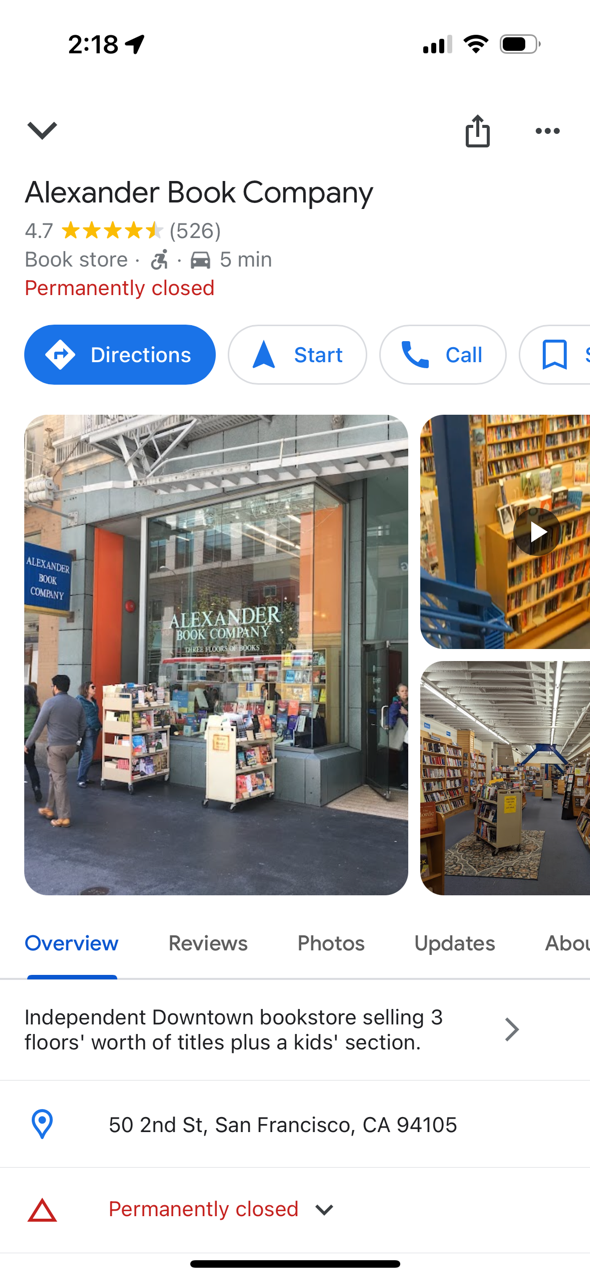
I did a search for “Alexanders books.” The top search results on Apple Maps don’t reflect my search. I get a list of bookstores; only after scrolling through dozens of bookstores do I see Alexander listed and that it is permanently closed.
Google does a better job. (Note that Google pulled up the correct business, even though I didn’t ask for it exactly.) This is the result I got:
But even that isn’t a great experience. Does the user really want to get directions, navigate to or call a business that is permanently closed? Probably not. After learning that their preferred store is closed, the most likely thing the user wants to do is find another bookstore.
Are you building the right product? It’s an important question whether you are a startup or a big company. Good research can help guide you. Doing it incorrectly and you’ll go down the wrong path.
There are two basic types of research: qualitative and quantitative. Qualitative generally involves asking people what they want or their experiences with existing products. Quantitative using hard numbers from your users.
Quantitative research can help you answer questions like “What features do I need to add to my product?” “What features can I remove from my product?” “How is my user base generating revenue?” “Where is there fraud and abuse?” (There is some overlap; I’ll do a separate post on qualitative research.)
Some caveats to look out for when doing quantitative analysis:
Data talk, but people hear it in different ways. Given the same set of facts, people can come to multiple interpretations.
Interpretation of some metrics can and should change over time. At the very least, acceleration will change over time.
A single metric can easily be gamed, either by accident or intent (conning investors).
These are some of my favorite things in quantitative analysis. This is by no means a complete list.
A/B testing
This is commonly used to test different messages or designs. Two variants (A and B) are presented to different users. Marketing emails commonly use A/B testing. Take a small portion of your subscriber list and send one subject line to half and another subject line to another half. With the data on open rates that you get from these emails, you can send the one with the better conversion to the rest of your list. There can be more than two; you can have A/B/C.
1% testing
This is a variant of A/B testing. It’s commonly used to test different features, especially in complicated products or products so well established that you don’t want to change the experience overnight.
Take Facebook’s News Feed. This is a product that is used by billions of users around the world. Adding a new feature without testing can cause a lot of grief and negative feedback. Before you roll it out widely, you present the new feature to a tiny percent of the user and track how it performs. Do people use it? How often do people use it? Does it add or subtract from other features people use. (I call it 1% testing, but in Facebook’s case, it might be 0.001% testing.)
Market segmentation
One of the challenges with data is that averages can mask important differences. You can dig into data to identify segments that you want to go after. If you’re running a credit card business and find that 15% of your overall spend is travel, that tells you one thing. But when you look deeper, you find that a group of customers spend $50,000 a year on travel. This might lead you to create products for that lucrative customer.
You can also use data to figure out who your profitable and unprofitable customers are. In many products, you’ll find that some customers are unprofitable. They could be doing too many returns. (E-commerce.)
Fraud/abuse analysis
Detecting fraud (illegal behavior) and abuse (legal behavior but not within your business model) is a great way to use data.
I worked for a company that sold long distance calls. When we looked at the usage data, we found that we had a very large amount of usage to Tuvalu. Given that it’s a tiny nation, this didn’t make sense. A closer look found that there was an error in our rate tables and we were selling something for 10 cents that cost us $2.00. As you’d expect, people from Tuvalu told each other about it and we became the calling service of choice for them. (Some of the details here have been changed.)
Another use case is finding the outliers in all-you-can-eat plans. Think about cell phone data plans. In the AYCE model, some customers might use 1 GB of data and others use 100GB. Your business model and network capacity is based on average usage of 5 GB of data. The 100GB user hogs capacity and slows things down for everyone else. With data, you can develop new policies: the * that says data rates will be slowed down after 25 GB of use.
Search analysis
Looking at what people search for but you haven’t delivered is important to product planning and improving the experience. After all, they came to you for it.
Let’s say you run a ride app. When someone launches the app, they might be an area where you don’t offer service. Tracking those requests gives you insight on markets that you might want to look at when developing expansion plans.
It’s also a way to improve the product to suggest alternatives that the user might want. If someone is in New York City and searches for “In-N-Out,” you might respond “There are no In-N-Out burgers in New York City, but here are some McDonald’s.” Just kidding. I’d probably return Shake Shack, but In-N-Out is so much better.
Cohort analysis
The key to a successful business is that lifetime value is greater than customer acquisition cost. (Often written as LTV > CAC). You want to make sure that, on average, you make more from customers over their lifetime than it costs to get them.
Look at the customers that signed up for your service 1 year ago and how much they spent and when. For customers that sign up today, can you use the historical data to model what the new customers are likely to do?
When looking at data, you also have to weigh the cost of the analysis against the value of the data. If you’re using data to analyze how people navigate through your site, it may be sufficient just to track data on a small subset of users. Adding too much tracking can add to latency in your site or app.
Also, if you’re trying to decide whether or not to implement something that will take 2 days, it doesn’t make sense to spend 2 weeks to build a system to get the data.
There are a variety of tools you can use for quantitative analysis, depending on what you’re trying to get at. Marketing tools like HubSpot handle A/B testing for email campaigns. Google and Facebook have their own tools for ad performance analytics. Google Analytics and Adobe Analytics allow you to analyze user behavior. For complex feature-level data, you will likely have to create your own database and run SQL queries against it.
COIVD-19 Caveat: For most businesses, I don’t recommend doing quantitative research based on data beginning in March 2020, unless you’re using it to compare the impact of COVID-19. If you try to project based on data from March 2020 on, you’re likely to over or underestimate behavior post COVID-19.
Grammar trivia: Data is plural, not singular. (Plural of datum.) It’s one of those weird English things that doesn’t seem right, but is. Like how a person who runs a restaurant is a restaurateur, not a restauranteur.
It’s 2020’s Holy Grail: the coronavirus vaccine. Large parts of the country and the world are shut down in a deadly pandemic. Scientists around the world are racing for a vaccine to end the suffering and re-start the economy.
Let’s say you found it. After 9 months of hard work, you have the answer to the world’s problems. What do you charge for it?
(Unlike most strategy and pricing questions I pose, there isn’t what I believe to be a “right” answer. This post is a framework for you to think about pricing in general. In all likelihood, you’re not developing a vaccine. But, if you do, I’ll help you think through pricing in exchange for a lifetime supply of your vaccine.)
Some factors to consider:
What is the value to the customer?
What is the cost of developing and producing the vaccine?
How quickly am I delivering it?
What’s the frequency of use?
What impact does the pricing have on my brand?
What are the regulatory impacts?
How does this affect other products I have?
Consumer value
No doubt the value is here. At a country level, we should be willing to pay $1 trillion — we’re spending more than that in the current bailout and recovery packages, with an unknown amount of misery to go. From an overall health of the country and the economy, the government should write a big check that covers all 350 million people.
It’s when it comes down to consumer pricing, it becomes a lot tougher, In this scenario, I’d be willing to write a check for $100,000 to solve this for me and my spouse. Some would pay more; most could only afford a fraction of that. In economic terms, this is largely a price inelastic good. But I don’t get any meaningful benefit unless the bulk of the population is immune. (You can’t go to restaurants, go to a bar or get a haircut.) The price needs to be set so that the average person can buy it.
This is different from a drug like Sovaldi, where a 1-month, $28,000 treatment can cure you of Hepatitis C. There aren’t dependencies on the behavior of the rest of the population.
Cost of development
Cost + margin is a common (and lazy) way to develop prices.
In the case of drugs, the first pill costs you $2 billion and the next one costs you 5 cents.
The cost of R&D is less material if you’re Pfizer than if you’re a biotech startup. Pfizer might want to do it at a loss for other reasons; a startup that may only have one big drug in its lifetime needs to price differently.
Delivery timeline
One of the challenges in pricing is that people assume that if something takes longer, it is worth more. Clearly it involved more effort. So it’s “fair” that you charge me more. That’s how most industries work and how employees generally work.
In this case, a solution today is much better for society (and the individual) than a solution 6 months from now.
I would pay a higher “delivery” fee for my meal if it showed up immediately in my apartment versus waiting 45 minutes for it. But that’s not how most people think about these things.
Frequency of use
If one use cures or prevents the disease, then the pricing should reflect the lifetime value because you have to get it all up front. See the Sovaldi example earlier.
On the other hand, if you need to use it weekly or monthly, you can charge less because you have a long term revenue stream.
Brand impact
Depending on your pricing strategy, you could have a positive or negative impact on the brand. Some people say that if Pfizer discovered a vaccine, they should give it for free immediately to everyone because they would be remembered forever as the savior of the world.
But does the brand matter? In the case of drug companies, it really doesn’t, for two reasons. First, very few people know what companies make what drugs. Without Googling, what drugs does AbbVie make? Even if you do Google it, the first page of results don’t tell you what it makes. (You have to click on a link.)
The second is that pharmaceutical companies have a monopoly on the branded drugs they make and someone else gates what you purchase. Your doctor is going to prescribe whatever drug the hot pharma sales rep who took him to lunch told him about the drug that is the best for your condition.
There will be some initial PR blowback, but in the long term, it won’t matter. This is partly how doses of insulin cost hundreds of dollars – and the price keeps going up – despite the fact that the patent for insulin was once sold for $1. Eli Lilly, Novo Nordisk and Sanofi just don’t care what you think of their brands.
The brand impact matters more if you’re Target, Walmart or Pepsi.
Regulatory impact
For a coronavirus vaccine, this is probably the biggest constraint on pricing. Charge too much and the government may pay the bill to get the pandemic under control and then start probing every other aspect of your business.
In some cases, some governments will say, “Screw you and your patent. We’re going to make it ourselves.” This is especially true of developing countries. In a pandemic, this isn’t a hard decision to make.
Impact on other products
“This is an important life-saving drug and everyone should get it for free.”
Well, that may be true. But there are a lot of life-saving drugs. Do you give all of the life-saving drugs out for free and only make your profits on the quality-of-life drugs?
Have you undercut your entire business and the way people think about healthcare? (Leave aside the issue of whether pharmaceuticals should be a for-profit business.)
As I said at the beginning, this is not a guide to pricing your coronavirus vaccine. But these principles apply in pricing most things. As tech becomes a much deeper part of society, we’ll have to pay more attention to regulatory impact than we have so far.
For most products, competitive pricing will also matter.
There has been a lot written about how to be a great product person. The skills for being a product leader are different. Here are some of the things I’ve tried to do in my time as a product leader. (Many of these skills apply to leadership in general.)
Represent product in leadership meetings. Any organization will have many competing priorities. This includes business strategy, customer needs, marketing campaigns and financial situation. All of these contribute to what the organization needs from the product organization. It’s your job to listen to these competing needs and provide direction to the rest of the organization to ensure that the expectations from executive leadership are realistic.
Go beyond buzzwords. The CEO wants AI in the product? Sounds sexy. But what does that actually mean? Delve into the details. If the CEO wants something that can’t be built with today’s technology, it’s the product leader’s job to say that.
Clearly communicate priorities. Once priorities are decided, it’s up to you to make sure that everyone on your team knows what they are and how they fall into the schedule and affect the roadmap. Priorities can and will change and the changes need to be communicated quickly to the team, with direction on what other work needs to be delayed or canceled.
Empower people. “Empowerment” is a buzzword too often used in job descriptions, with little to back it up. As a product leader, you can’t make all the product decisions yourself — there are way too many. If you do, you will fail at the other aspects of your job such as working with company executives on overall strategy.
Let product managers make decisions. Many decisions often have little consequence to the overall success of the product. Is the right timeout for a login 1 day or 3 weeks? In most cases, you won’t know until you try it. Clearly, the right answer isn’t 10 seconds or 10 months. The goal is to build it in such a way that you can change it later.
Be prepared to step up into the weeds when something critical comes up, but don’t stay there. I’ve had to do QA when the QA team couldn’t replicate a problem that a large enterprise customer was experiencing. That should be the exception. On average, it should be a QA person making $70,000 a year do that work instead of a leader getting paid $400,000.
Make decisions quickly. Inevitably, there will be disagreement among the members of the product team or between product and design. When these come about, it’s your job to make a decision. It’s better to resolve these quickly with the knowledge that most decisions are reversible once you have more knowledge on how customers respond. Don’t let decisions drag out with weeks or months.
Elevate the skills of your team. Every team member will have strengths and weaknesses. Help your team members up their game. I’ve spent a lot of time teaching teammates on elements of product design, how to do customer research and how to communicate, among many other things. Some of this had been in the form of classes for the team, others have been in writings. (You can also find a lot of my writings on product management and customer experience on this blog.)
Congratulate in public, criticize in private. You’ll have successes and failure. Celebrate the successes in public so that the team can share in the joy and excitement. When things go wrong, don’t criticize or berate people in pubic. Things will fail; that’s the nature of launching products. Failure is great, if you learn from it.
Embrace risk taking. If people are afraid of taking risks because they fear public flogging, your products may end up being too saccharine.
Hire great product people. If your company is growing, you’ll need to hire more. As important as skills are, fit is more important. You can teach someone how to do market research; it’s much harder to convince them to care.
There are different types of roles in product organizations. Some are more structured and repetitive. Some require creativity. Put the wrong person in the wrong role and they will be unhappy and unproductive.
Say “No.” This is probably the most underrated. Humans generally want to make others happy. Product leadership requires balancing every aspect of the organization. It’s easy to string people along, but it’s a bad idea. It’s better to clearly say no. It’s not possible with the schedule. The technology doesn’t exist. You’d need to spend a lot of money on AWS. Whatever the reason, put it out there. If someone doesn’t accept your “no,” then take it to the executive team for a resolution. You’ll get more done faster and are less likely to burn relationships.
These are, of course, general guidelines. You need to be aware of the specifics of your situation. If you’re in a highly regulated industry, it may have serious consequences if you fail; it’s the product leader’s job to understand that.
You’ve launched your product. You’re getting some adoption. People seem to like it. You start to get some feedback. TechCrunch does a write up on your site. You get lots more feedback.
Sounds great, right? In many ways, yes. But feedback can destroy your company, if you let it causes you to thrash in what you are doing.
Your earliest adopters tend to be the most geeky, the techies who probably don’t represent your target customers. (Unless your target customer is techies.) The feedback they give you isn’t going to matter to the general market.
I heard Stewart Butterfield, the founder of flickr, talk about this early on. Some of his users wanted that ability to geotag photos by uploading tracklogs from Garmin hiking GPSes and syncing their timestamps with the timestamps on their pictures. Great idea. I loved it and would’ve used it. But me and 10 other people. It turned out not to be necessary in the long term because cell phones (which are the source of the vast majority of pictures online) automatically embed GPS information.
In the short term, geeks like me found tools like GeoSetter and iTag to embed GPS date into EXIF fields on photos.
There are a few other problems with customer feedback:
It’s not prioritized, even by the person giving feedback. Generally they don’t tell you whether it’s really important to them or just an “it would be nice.” Would it affect their likelihood of sticking around? Would they pay more for your service? Would it help you get the word out to more people? Who knows? Most feedback doesn’t come with that level of detail.
You don’t know who they are how they use the product. Without understanding the customer’s persona, feedback is less valuable.
It’s rarely the case that more small features will make or break your product. There are rapidly diminishing returns on many features. In a lot of cases, there are negative returns.
They are unlikely to know what your business model and goals are.
In order to make the most of the feedback you get, you need to organize it. See how much of a certain type of feedback you get. Group similar feedback. Have your product and business teams decide where it falls within the business goals.
This is especially true of business-to-business companies. You’re having one-on-one interactions with the buyer. He’s giving you some interesting ideas. Sales tells you that if you had “one more feature,” they’d close the deal.
Wait. When there are a small number of big customers, you risk becoming a captive development arm. You definitely don’t want to be that. It makes it easy to lose track of your other customers. If your product becomes too specialized for a specific customer, it can hurt your valuation.
You want to take in feedback and harmonize it with feedback you get from other customers and potential customers.
It can be hard when you’re working closely with someone to say “no.” Your sales team might keep nagging you for that feature. (In a future post, I’ll discuss how to deputize your sales team and sales engineers into mini product managers.)
Stay strong. Make sure what you’re doing aligns with your roadmap and will appeal to other customers.
There are somethings early customers will ask for that are no-brainers. Examples are GDPR compliance and SSO. You don’t have to do these right away, but be sure to have an answer prepared on how you will solve these problems.
Yesterday, I sent some feedback to the CEO of a company I’m looking to invest in. It’s an incredible feature. I know it will help them sell to new customers. Of course he should take my feedback: I’m a potential investor, reasonably well-known writer, have decades of product experience and I run UX quizzes on Twitter that people seem to value.
His response?
Sounds like a good idea.
That’s something that we can think about adding to the system. Thanks for the feedback.
That’s exactly the right response. It increases the likelihood that I will invest.