Opt in vs. opt out in tipping

To tip or not to tip
To tip or not to tip?, that is the question

The tip line. A somewhat passive-aggressive solicitation for money. It’s long been the norm at full-service restaurants, but it also appears at many places where I wouldn’t ordinarily tip. If I order and pick up my food at the counter, a tip seems unnecessary. If I pay cash, there is no default expectation of a tip. (Though there might be an easily ignored tip jar somewhere.) But paying by credit card, the tip is closer to an opt out. I have to explicitly draw a line through the tip line and write in a total. I’ll admit to tipping at places I wouldn’t ordinarily tip because of the subtle pressure. Sometimes I’ll pay with cash to avoid the situation.

Changes in payment systems are changing this dynamic. Increasingly, credit card companies aren’t requiring signatures for low-value transactions. With MasterCard’s Quick Payment Service, transactions under $50 can be processed without a signature. It’s faster for the consumer, moves the line quicker, but removes the opportunity to tip on plastic.

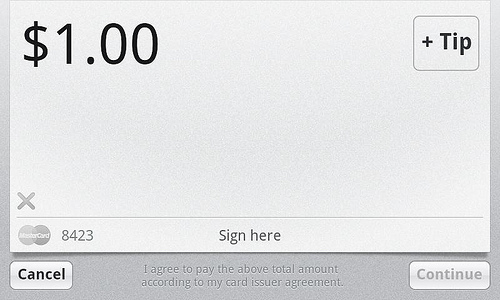
Square’s payment service offers a tip option:

Square's tip button is off to the side

This implementation is the equivalent of the physical tip jar: if you go through the normal transaction flow and just sign, there is no tip. You have to explicitly click the box in the upper right corner to add a tip. (I haven’t seen what the tip experience is like with Square’s new Card Case.)

Is that the right experience? It depends on whom you ask.

One merchant I talked to would prefer that the tip was part of the default transaction flow, as it is with a credit card slip. On a $5 food cart transaction, even a $1 tip is huge. As a consumer, I prefer the opt in experience. As a product designer, this is a great example of how even small changes can have big impacts.

Either way, the customer doesn’t have to do math. That’s already a huge improvement over the paper experience.

What Square’s new Register and Card Case means for small businesses

Square today announced its Register and Card Case products to complement the existing Square reader and smartphone applications. While Square has been focused on the merchant experience, this move expands its role on the consumer side. (Consumers have been able to receive receipts by email or text message when making purchases at Square merchants.)

With the new application, customers will be able to search for nearby Square merchants, see what’s on their menu and view receipts for previous transactions. Customers can also pay right from their mobile phone and the payment is confirmed on the merchant’s iPad.

Merchants will have the ability to accept a payment without swiping a card. They can also keep better track of what they’re selling. A loyalty program allows businesses to reward loyal customers. Unlike check in based systems which involve users to self-report, this system would be harder to cheat.

One open question is whether these transactions will be treated as card present transactions for Square. I expect that Square will charge merchants the swipe rate for these transactions. If they’re paying out the card-not-present rates, this will eat into their margins.

What we’re seeing here is only the beginning. There are a lot of important problems that can be solved with the data that Square will be collecting:

Consumer problems

  • It’s 2 a.m. and I’m hungry. What’s open? This is a problem that search generally handles poorly. Yelp has done the best job of collecting this among anyone I’ve seen. (Google tries, but its data is less comprehensive.) Even when the data are collected, they are often inaccurate. (Holidays, business was slow so we closed early, etc.) The Square Register could contain a virtual Open and Closed indicator that is visible to consumers.
  • I have a craving for a dosa. Where can I get one? With menu item data, Square could answer that question — at least for its merchants.
  • I have a receipt, but I can’t remember who I was with. The Square app could allow users to flag tax-related transactions and record notes like who you ate with.
  • I want to tell someone about a place I ate at, but can’t remember the name. (And want credit.) People are generally bad at remembering place names. Merchants could also offer rewards for new customer referrals, much like online merchants do.
  • I’m in a hurry and I need an order to go. Consumers could order right from their mobile phones, the order would pop up on the merchant’s screen and the merchant could select an estimated pickup time. For the merchant, this also reduces the risk of nonpayment for phone orders that aren’t picked up.

Merchant problems

  • Updating Web sites is hard. Most local business Web sites I go to are horribly out-of-date. Menu items and pricing can be more than a year old. Hours are often wrong. Maps are hard to find. Square could take the data from the Register system and generate Web pages with dynamic information, including today’s specials and hours. Some card issuers and payment processors have offered Web site creation, but these have mostly been low quality efforts.
  • I don’t have a mobile presence. Very few local businesses have dedicated mobile sites. At best, you get a hard-to-read version of the main site. At worst, you see sites created by incompetent flash designers who knew nothing about user experience. These render blank on an iPhone. Square-generated mobile Web pages would provide easy access to key info such as location, hours and menus. Google says about 40% of searches on mobile devices are local in nature — as a result, this is becoming increasingly critical.
  • I don’t have time to enter data multiple times. Square could also generate a PDF that could be printed for in-store menus. Data entered once gets used for POS, paper menus, Web site, mobile site and promotions. This not only saves on work, it eliminates inconsistencies which can cause customer service problems. Getting a bit crazier and thinking further out into the future, a Square app on an Apple TV could show promotions in store.
  • I want to get people to try new items. Square could use transaction history to entice regular customers to try things on the menu that they haven’t tried before. With promotions, you want to spend your promotion dollars on transactions that wouldn’t happen otherwise. Paper coupons are dumb in this regard. Say you’ve got a raspberry tart that you think is amazing. You could find all of the customers who haven’t ordered it and send them a promotion.
  • I want to know what my customers think of me. An email after the fact could prompt users for feedback and generating a net promoter score. It can also be a way of drumming up more business. For example: “Would you recommend us to a friend?” If the customer says, no, you can ask why. If yes, you can ask for friends right then and there. “Whom would like to recommend us to?” The referral can be coded so that the business can thank the original customer for the referral. A Square app could also provide more actionable data than the typical Yelp review — a restaurant would know when they ate, what they ordered, etc. This would make it easier to identify problem employees or dishes.
  • I want to know how I’m doing compared with other businesses in my area. I charge $3.50 for a slice of pizza. How does that compare with others? How does my revenue compare? Of course, this all needs to be done in a way that protects business anonymity. Data would only be available when there is enough participation so that a single businesses’ information can’t be identified. Participation should be opt in, with the carrot being access to data. The key here is that data needs to be in a meaningful context. I’ve seen many startups that just want to throw data at businesses. That’s not good enough. Square will also need to answer the “So what?” What decisions should I make based on that data?

See also:

Shop talk: Square and Groupon

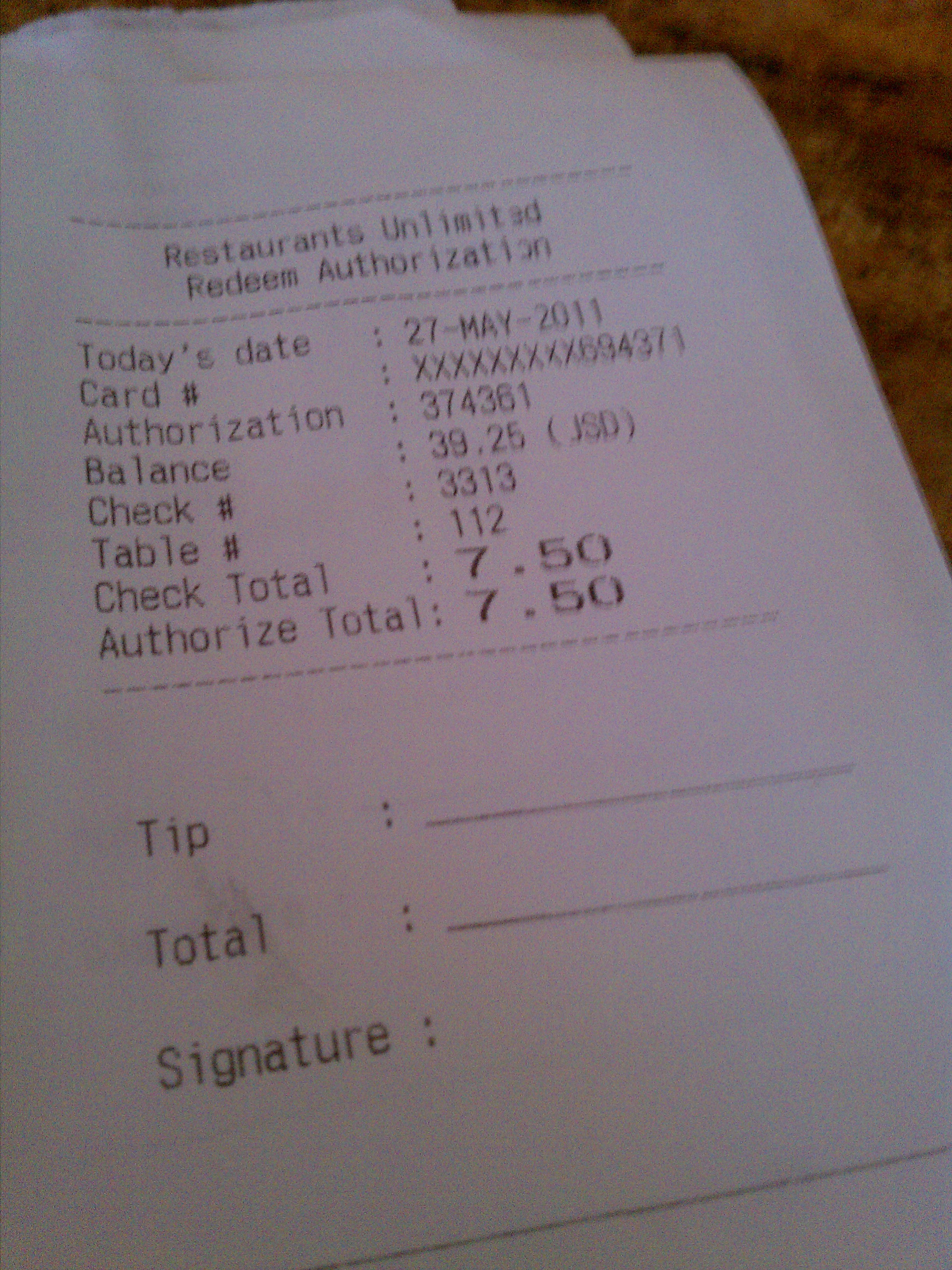
Today I had the opportunity to talk with Dave from Chili Inside / Chili Outside a food cart operating in Portland. Chili Inside recently ran a Groupon and also uses Square to take credit card payments.

The key takeaway here is that simplicity sells. The credit card acceptance market has been complicated to understand, with setup fees, monthly fees, minimums, upcharges for certain types of cards, etc.

Not only does simplicity make the initial sale, it makes it easier for those customers to evangelize your product because they’re comfortable explaining it to others.

Square

  • Dave found out about Square when his son, Alex, spotted it at another food cart in Portland.
  • Other providers “seemed more daunting to even look into.”
  • “When Square came along and it looked easy and simple. It was.”
  • Before Square, he would try to get customers to pay with cash on hand or direct them to a mini-mart to get cash. One of Chili Inside’s older Yelp reviews says, “Only cons were they are not set up to take cards which cost me $2.50 around the corner to use the ATM.”
  • Customers have reacted very positively to seeing the iPhone with the Square reader. “Most everybody is pretty dazzled by it. It’s really fun to show it off.” Dave also showed me his technique to get it to swipe the first time every time.
  • He uses the Square reader daily. About 1/3 of his transactions are by credit card. During the time I was at the cart, at least three people paid with Square.
  • Square’s pricing was lower and less complicated than other vendors.
  • He is pleased with the real-time reporting capability. “We’ve got real time feedback virtually on every credit card swipe we take.” He showed me the screen with transactions that had just happened.
  • He was pleasantly surprised that a Square representative gave him a phone number to call with questions.
  • He would like to see the tipping option more prominent in the interface.
  • He has evangelized Square to other businesses locally. Square sent him a bunch of readers and he has been handing them out.

Groupon

  • Chili Inside ran a Groupon promotion on the same day as several as other Portland food cards.
  • 533 Chili Inside Groupons were sold. A normal day is 20-30 customers. Groupons were about a month worth of business.
  • In the week since the Groupon ran, about 35 have been redeemed. Dave estimated that 20 of them were from people who hadn’t heard about Chili Inside before.
  • Dave’s primary goal in running the Groupon was to introduce customers to his food and inspire repeat business. As a new business in the area, it was important to reach an audience. (See 5 cases when it makes sense to run a Groupon.) “Most of the people that purchased the Groupon didn’t know we were here and they live within blocks. We believe when people have our food, they’ll come back.”
  • Chili Inside uses an iPhone to scan the bar code on Groupons to redeem them.
  • He had approached Groupon months ago and never heard back. Then a rep called him about the food cart day.
  • Groupon has approximately 500,000 people on its mailing list in Portland. Chili Inside sales were 0.1% of that.
  • He has been approached by other deals sites, including LivingSocial.
  • Dave wouldn’t disclose the terms of the Groupon deal.

Google

Other

  • His wife monitors Yelp reviews and updates Facebook and Twitter pages.
  • Dave wasn’t aware of foursquare.

Note: As with most such research, when I mention that someone isn’t aware of something, it isn’t a criticism. It’s meant to highlight that even though people in the industry talk regularly about services like they’re ubiquitous, they aren’t.

See also:

Amazon offers up a new Kindle

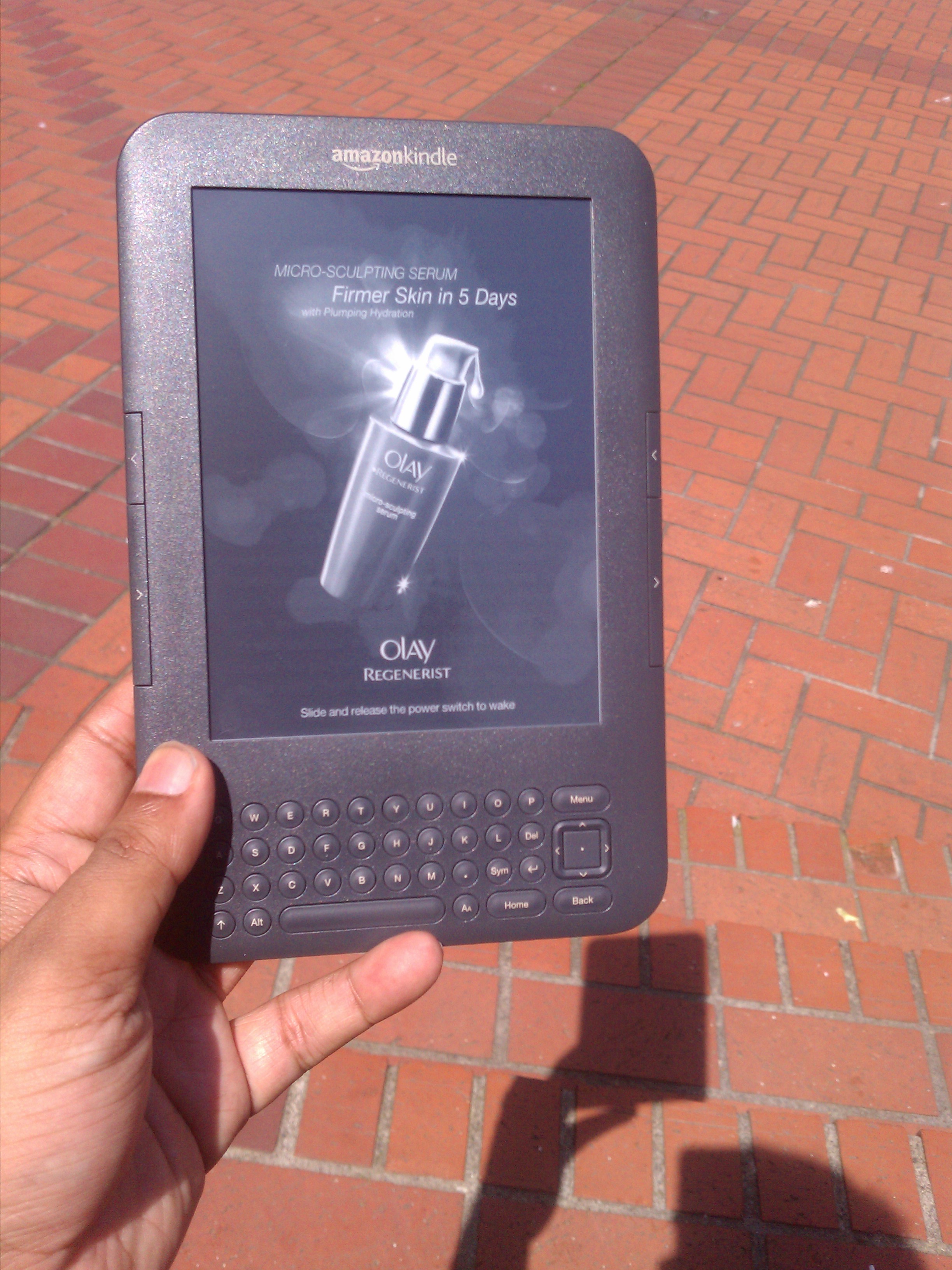
A Kindle ad for Oil of Olay
A Kindle ad for Oil of Olay. The creative looks splotchy on the Kindle's e-ink display. Why this ad shows for a 30-something male is another matter.

I received my Kindle with Offers on Friday. It’s Amazon’s latest attempt to take on a somewhat new market. The name “Kindle with Offers” is a bit misleading, but it sounds better than “Kindle with Ads”.

Many of the ads aren’t offers at all. Here is the initial set I’ve seen:

  • An ad for Buick.
  • An ad for Oil of Olay.
  • An ad for the Amazon VISA card touting 3x rewards points on Amazon purchased. (This is their standard rate.)
  • An offer for a $10 credit if you register your VISA card as the default card for Kindle purchases and buy a Kindle book from a select list.
  • An offer for a $20 Amazon gift certificate for $10.

For people used to Web ads that flash, blink and otherwise overwhelm content, the Kindle ads are barely present. One appears on a small portion of the home screen, similar to a banner ad. The other format (shown in the picture) takes over the entire lock screen of the device if you haven’t been reading for a while.

The ads are disappointing. Amazon hasn’t done anything unique or interesting with them. Some of the ads on the Kindle were clearly repurposed.  Ads for Oil of Olay makes extensive use of gradients, which look terrible on the Kindle’s e-ink display. I thought my screen had become defective until I cleared the ad.

I really shouldn’t even see the Oil of Olay ad (not female) or Buick ad (not old enough). Amazon should know that neither ad provides value to me or the advertiser. The ads I see on Amazon.com are much more relevant than these.

In terms of offers, VISA is trying hard to be at the forefront of mobile payments. A similar promotion ran when Starbucks launched payments on the iPhone; if you registered your VISA card and bought Starbucks credit with it, you received a $5 bonus. VISA also recently invested in Square.

The $20 Amazon certificate is similar to the promotion that LivingSocial ran earlier. Except this time Amazon is footing the bill for the promotion.

Acting on an offer is a bit clumsy. After selecting an offer, you get an email with all of terms and instructions on how to redeem it.

Kindle with Offers is priced at $25 less than the comparable Kindle. The discount on the Amazon gift card is effectively another $10 loss. That brings the Kindle with Offers discount to $35. For comparison, Google makes less than $20 per year per user (on average) for its massive advertising engine.

For a media play, Kindle will need a lot more advertisers. Or it will need an aggressive revenue share on real offers like Groupon has.

Otherwise, it’s just a way to get Kindles in the hands of more price sensitive customers without repricing the base product. That itself is not a bad goal.

6 cases when it makes sense to run a Groupon

There has been a lot of discussion of late on the pros and cons of running Groupon offers for businesses. Here are five cases where running Groupons make the most sense:

  1. You have a new business. If you’re a brand new business and don’t have existing connections in the market, Groupon can help introduce you to your local community. A good example of this is the Globe, a pizza place in Portland that recently opened in a troubled location. A new business also avoids a significant cost that many businesses forget when doing the Groupon math: margin lost on existing customers who instead use a Groupon, turning a full-price sale into a 75% off sale.
  2. Your business has a subscription model or high lifetime value. This category includes gyms, yoga studios, flight schools. Many of these businesses already regularly run introductory specials, such as the first month for $30 (regular price $120). Converting a onetime flight lesson into thousands of dollars in ongoing schooling makes a lot sense. In cases such as gyms and yoga studios, the incremental cost of serving customers is small. Even in these cases, you need to be sure to cap the deal at a manageable number. You don’t want overcrowding that frustrates your loyal full-price customers.
  3. You have fake pricing to begin with. Many businesses have fake pricing. If you shop at FTD, furniture stores, mattress stores or the Gap and pay full price, you’re a chump. The regular discount levels at these sorts of outlets run 30%-50% off. Starwood Hotels offers a 50% off certificate that you can buy with 1,000 Starpoints. But the discount is valid only off the “rack rate,” not the prevailing rate. In 12+ years, I’ve only found the “discount” to be valuable once or twice. Even then, it amounted to 5-10% off the regularly offered rate. If you have fake pricing, Groupons can work for you. But don’t push it too far — FTD wound up not smelling so good when Groupon customers discovered that in order to use their discount, they had to go to a special site which had even higher prices than FTD’s regular site.
  4. You have a third-party really footing the bills. Magazines and newspapers fit into this category. The real goal here is to sell eyeballs to advertisers. For newspapers, auditors will count it as paid circulation if the customer pays even one cent per issue.
  5. You are running an event with excess capacity. If you have an event like a theatrical performance, concert, etc., with a fixed cost of production and you’re unlikely to sell out, Groupon or other deal providers can help fill the audience.
  6. You are going broke anyway. A Groupon can be the ultimate Hail Mary. With Groupon, you get your share of the deal within 60 days. Maybe the extra cash flow will help you smooth over tough times. If it works, great. If it doesn’t, well, you were going out of business anyway.

PayPal + Where set to take on Square

eBay announced today its purchase of Where, a mobile location service. Where has been in the mobile location space for a long time — well before today’s media darlings. (See my initial Where story from 2007.) While others have sucked up much of the media oxygen, Where has been the little engine that could, hitting 4 million unique users per month.

It has a large installed base of users across not only smartphone platforms like iPhone and Android, but also featurephones. Where has gone through a number of incarnations, including a local portal, local platform provider, mobile ad network and buddy finder. Its current consumer product offers a wide array of location-based services. Where has also been experimenting with Groupon-like deals.

The combined resources of Where and PayPal would give eBay a terrific way to attack the multibillion-dollar untapped local opportunity that Square has been gunning for.

As I’ve written before, payments processing isn’t the end game for Square — it’s an entry point into the much more lucrative demand-generation space.

Payments processors generally take between 1% and 3% of the sale. Demand generators, like Groupon, are currently taking 50%. (I expect that this will drop dramatically, but there’s still a lot of room in between.)

At its current pricing, Square is likely to be losing money on each transaction because it no longer charges a fixed rate per swipe.

Square’s merchant offerings are excellent. It offers a dead simple way for small and micromerchants to take credit cards. Its recently announced presence in Apple retail stores makes signing up for Square even simpler than it already was.

But we haven’t seen much activity on the consumer side. Consumers get an elegantly formatted receipt, but there’s no other mechanism for interacting with them. (Square is undoubtedly amassing a mailing list to do this in the future.)

A combined Where and PayPal would give eBay the ability to offer both payments processing and demand generation. With an existing base of more than 4 million users, Where is a good way to prime the pump. Local merchants who take PayPal could be highlighted in search results. They could have ads placed automatically across Where’s ad network.

The key thing to remember about local merchants is that they are incredibly pressed for time. A simple, integrated offering would have tremendous appeal.

Have doubts about eBay’s ability to succeed in mobile? Erase them. They’re already claiming to generate nearly $2 billion in mobile purchases a year.

See previous coverage of Where.

Disclosure: I have consulted for Where in the past. I know the team, including Walt, Dan and Ivan. Congratulations, guys!


How Color can chart a course to avoid being the next Wave

Yesterday, I wrote about Color, a new app that has the promise to become a ubiquitous, location-aware sensor network. It’s first incarnation is as a photo sharing application available on iPhone and Android.

The initial launch has met with much criticism, including comparisons to Wave — a doomed social effort from Google.

Consider the similarities:

  • Enormous expectations. Wave was hyped by Google and given high profile executive attention at Google I/O. Color’s expectations have been set by having raised $41 million.
  • Poor out-of-the-box experience. Both Wave and Color have poor first experiences for the casual user. Even industry luminaries are scratching their heads.
  • Big change in user behavior. Both Wave and Color go against established patterns of user behavior. Wave tried to replace email. Color is challenging the notion of manually creating friend lists.

Google made a number of key execution mistakes in the launch of Wave. Fortunately, Color has avoided the biggest one: Wave was opened slowly on an invite-only basis. Despite the fact that the product was based on group interactions, you couldn’t get enough invites. I know. I tried to get my entire team to use Google Wave, but I couldn’t secure enough invites. Color doesn’t require a special invite.

The Color app should provide an easy way for viewers to see where a picture was taken.

There are a couple of other key mistakes Google made. Here’s  how Color can avoid them:

  • Lack of notifications. When I would make a change in Google Wave, the other participants had no way of knowing that I made the change. (Short of logging back into the service.) After I did this a few times and got no response, I stopped using it. The same exists with Color. I will see people’s photos randomly added to my Color application, but I don’t get notified when it happens. Getting notified when other people nearby are using Color would increase usage because you wouldn’t feel like you were talking to an empty room. It would also make face-to-face interactions easier. Notifications are an important part of ramping up any social network. At some point, your product will become so popular that people will use it all day unprompted. (I shut off Facebook email notifications long ago.) Until then, you need to nudge people to use it.
  • Lack of clear use cases. Most people have a really difficult time adopting radically new product concepts. You need to hold their hands and show them how it could apply to their lives. Wave didn’t do that. You were dumped into a blank canvas with a lot of unfamiliar controls. Color is much the same. There’s little guidance as to how Color can improve your life. The initial controls are so tight that you also can’t easily see how other people are using the product.

Then there a few things that are specific to Color and its goals that should be improved:

  • Lack of location/time liquidity. Color matches you with people based on photos being taken at the same place at the same time. That’s overly restrictive. Outside of major events and cities like San Francisco, this is going to be infrequent at best in this stage of the product’s adoption. It’s as if you launched foursquare and could only see tips left by users in the last 5 minutes. Older content has value. A few years ago, I took a set of pictures at Liberty Tavern. These pictures are valuable even now. And they’re certainly better than showing nothing. Showing older content would also encourage more people to take pictures. If privacy is a concern, older pictures with faces could be excluded with face detection software.
  • Locations aren’t visible. For a product that is focused on location, it doesn’t do a good job of showing it. I have random people in my Color feed, but I don’t know where I might have bumped into them — I have to guess at that. It would be better if I could select a person and see a map of where I met them with the date and time. Someone commented on one of my pictures asking where it was taken. That’s not a question they should have to ask. The data is already in the network; it should be accessible. (With the caveat that private places should be obscured so that someone doesn’t follow you home.)
  • People can’t connect with experts. One of the big reasons for the success of Twitter is that it works even if you don’t have any friends. When I’ve done user research on social products in the past, I inevitably had people who said “I don’t have any friends” or “my friends are stupid.” Social products need to work even in these scenarios. In fact, most of my real friends aren’t on Twitter. But I can still derive value from the people who are. With any social product, you’ll have a few people who are on the bleeding edge who can seed content for you. Exploit that. To fit into Color’s model of not requiring explicit follows, they could be added automatically if someone browses their pictures.

See also:


Color me impressed — the big idea behind Color

There’s been a lot of head scratching in the past week about Color having raised $41 million for another photo sharing application. One questioner on Quora asked “How does the Color photography app compare to Picplz, Path and Instagram?”

Although on the surface, Color seems to be another mobile photo sharing app, it is really the first incarnation of a ubiquitous location-aware sensor network.

Today’s cell phones are in many ways more powerful than laptops and desktops because they are packed with sensors. A modern smartphone has GPS, WiFi, Bluetooth, compass, gryoscope, light sensor, microphone and camera — at a minimum. All of these data can capture data to be analyzed.

Ever wonder how Google can show you traffic on side streets? It’s by crunching location data sent out by Android phonesSkyhook Wireless has used its WiFi location look up system to create visualizations that correlate location with time of day. (Scroll down on that page to watch a video of user flows in and out of Manhattan.)

Color is trying to take all of those inputs and layer social networks on to them.

If Color’s vision is fully realized (or my vision of Color’s vision), we can expect to see applications like these:

  • Breaking news. By detecting abnormal usage spikes, Color could quickly identify where news is happening. Because the app is automatically location aware, it’s possible to distinguish between people who are actually at the scene and those elsewhere who may be reacting to the event. See my post Adding Color to breaking news.
  • Security line timers. Get accurate times for various security checkpoints. Copenhagen International Airport is deploying technology that will use WiFi signals to track passenger traffic flows.
  • Race finders. Marathons and similar events today use chips to track runners. Imagine that Color is able to identify all of the spectators and runners with the app during Bay to Breakers. Based on your previous social interactions, Color would know who your favorite runners are. Not only would you be able to track their position on a map, you’d be able to zero in on the pictures that are being taken in the vicinity of those runners. It would also be able to provide you a map to reconnect after the race.
  • Person-to-person transactions. Going to a game at AT&T Park, but don’t have a ticket? Fire up Color and see people nearby who have tickets for sale. Tickets from people you know would be prioritized. Instead of sitting next to strangers, you might end up next to friends who have an extra seat.
  • Person recognizer. This could be a huge boon to people with a poor memory for faces. The person at the party looks vaguely familiar. You know you’ve seen them before, but you’re too embarrassed to ask for the name. Pull up previous interactions and find out their name and the contexts in which you’ve met.
  • Bar finder. When I go out, I often have a mood in mind. I may want to be really social or I may want to chill. With Color, I could pull up a bar and see what the feel is right now by looking through the photostream. If there are no pictures, I could potentially ping someone there and ask them to take to a picture. (It gives new meaning to “Would you mind taking a picture for me?”) Foursquare is providing a variant of this with Foursquare 3.0’s recommendations.
  • Search and rescue. Missions could be tracked automatically, making for more efficient operations. Pictures from a location could be used to identify victims, discover who may still be missing and to notify next of kin.
  • CalTrain tracker. Instead of the horribly inaccurate data provided by CalTrain, Color users would automatically crowdsource the data. You wouldn’t even have to check manually for updates. They would be automatically pushed to you.

That’s the grand vision. In order for Color to accomplish any of these things, it will have to reach large scale. This is a challenge because Color is a seaparte application and not built in to the OS. Google can use Android phones to detect traffic because it’s baked into the OS. Likewise, Google and Apple get location and WiFi network information based on other things that people do on their devices.

Color needs to create an application that provides enough value that people launch it and enable all of those sensors. The application that’s out right now falls short of that goal. It doesn’t deliver an instant wow experience and by most accounts is confusing. Color has tremendous potential, we just need to see that demonstrated better.

See also:

CNN testing QR codes on TV

CNN began testing QR codes on air this weekend to direct people to a site where they can help Japanese earthquake and tsunami victims.

CNN QR code

The code was easy to scan, even without pausing the broadcast. It worked fine from across the room. Just launch a barcode scanner and it will decode the URL and give you the option to open it in the browser. If you have a scanner, you can scan it off the image above. If not, click to go to the Impact Your World mobile site.

This is a great implementation of the often over-hyped QR-code technology. Print ads have occasionally featured QR codes which take you to an advertiser’s URL.

Some other applications I’d like to see:

  • In movie trailers. Scan it and it gets added to your movies to see list, possibly with a calendar entry dropped on the release date. Or an option to add to your Netflix queue for movies that are less interesting.
  • In TV promos. Scan it and it gets added to your recordings list. (The better implementation would be that the DVR itself would recognize a tag and prompt you.)
  • In TV commercials and on billboards. Scan to go to the advertiser’s site.
  • On CNN. Scan to get more information on a story.

QR-codes have a number of advantages over other technologies. They are free to generate, don’t require any hardware beyond a camera, hold more data than a standard bar code, are easy to replicate, work across a distance and have a built-in call-to-action (scan me!). QR-codes can also hold structured data; scanning the QR code on Rakeshagrawal.com will load up my contact information.

But it’s not the ultimate technology for every application. As much as people in the technology industry like to claim that one technology will take everything, that rarely happens.

Artwork at MoMA scanned with Google Goggles
Artwork at MoMA scanned with Google Goggles. In this case, it was a scan of a picture of the painting on flickr.

Here are some other applications where other technologies work just as well or better.

  • Identifying artwork. Many paintings in the MoMA’s collection can be identified just by taking a picture of it with Google Goggles. Let’s face it, QR codes are ugly. They’re designed to be easily readable by machines, not to be pretty. I should point out that the wacky kids in Dubai are trying to turn them into architecture with a QR-code hotel. Still, it’s not my taste in architecture.
  • Payments. Because they are easy to reproduce, QR codes (and bar codes in general) aren’t well suited for payment applications. They only work when you don’t really care about security.
  • Scanning books or products. One discussion that came up recently was using QR codes in stores like Barnes & Noble to identify whether a book is available in nook format. That’s overkill — you can do this perfectly well with the bar code already printed on the book. Heck, you can take a picture of the cover and that’ll work.
  • Print ads. URLs can be detected with simple OCR software. No need to clutter your creative with an ugly QR code. The key here is to use a simple font against a high contrast background and leave space around it. That’s a good practice anyway to ensure that human eyes can read it.
  • Checking in to a business. WiFi and GPS positioning do a reasonably good job of this without requiring businesses to do any extra work. This could be improved, but it works OK.
Plain text URLs work just fine in Google Goggles.

Flipboard makes news worth flipping through

Photo spread in Flipboard.

I wrote earlier about why iPad magazines aren’t selling well. The short version: they weren’t designed to meet the needs of readers, they were designed to meet the dreams of publishers.

Flipboard is designed around the optimal consumer experience. It offers a visually compelling personalized magazine edited by you, your friends and others you trust.

While Twitter has been offering personalized news streams for years, it’s as visually compelling as classified ads: scroll through a long list of  terse text-only snippets with bizarre abbreviations to find something you like.

Flipboard takes content from your Twitter, Facebook, Google Reader and other feeds and renders it automatically with photos, call outs and other design elements that were sadly lost with the transition to the Web and personalized information. It can even generate beautiful photo spreads like the one at right.

I’ve looked at many iPad news apps and Flipboard is the one I come back to. I frequently mark content on my laptop to read later using Flipboard. It is one of the first apps that I check when I get up and the last one that I use before I go to sleep.

Flipboard hits the key elements that are important to the future of news:

  • It’s personalized. The days of one-size-fits-all newspapers are numbered. Prepackaged content from a bunch of people I’ve never met (and who have never met me)  just isn’t compelling. People have diverse interests and differing intensity in those interests. I couldn’t care less about what Lindsay Lohan is up to or what’s going on on Jersey Shore. But I can’t get enough of what’s going on in location-based services. Mass publications are catering to a mass audience that is rapidly disappearing. Magazines do better at this because many are catered to niche audiences, but even they can’t get deep enough for some.
  • It’s hyperpersonal. When I worked in the newspaper business, there was a rule of thumb for what made the front page. The further away it was from us, the more people had to die for it to make A1. With hyperpersonal, things like a friend completing a triathlon, having a baby or getting married can make my own A1. I discovered the power of social and hyperpersonal when I was on a business trip to Dublin. I shot a video of our VP chugging a Guinness and posted it online. Within minutes, that video had circulated all over the offices in Dublin and back in Virginia.
  • It’s social. My interests overlap with the interests of my friends. As a result, I get news that is likely to be of interest to me through Flipboard.  Even the incongruities are helpful. They add a bit of serendipity to news that professional editors seek to provide. Seeing friends’ comments also adds to my understanding.
  • It’s timely. Weeklies and dailies might as well be fortnightlies. With Flipboard, the content is up to the minute.
  • It’s free. People will only pay for very limited types of news. The vast majority of authors will have to find other ways to make money. That’s a challenge. And it’s a challenge that is exacerbated by many talented people who are willing to write for free.

Flipboard has the opportunity to reset the focus on content. One thing that has jumped out at me is how much I enjoyed reading content in tablet form. It wasn’t just the use of touch or the lack of a keyboard. The big reason: the content wasn’t struggling for attention against SEO links and ads for refinancing homes I don’t own.

SEO links have cluttered up many news sites. Content is surrounded by links whose sole purpose is to feed the search engine crawlers. Navigation on many sites is next to impossible. Ironically, this just drives people back to search because it’s much easier to find what you’re looking for there.

Ads, especially remnant ads, have a similar effect. Publishers have chased remnant ads for revenue. (“Even a fraction of a cent is better than nothing.”) As RPMs have gone down, publishers have piled on more ads. In the end, this does a disservice to everyone. It’s the tragedy of the commons. Instead of grass, the common good being destroyed is the attention of readers.

Flipboard is in a rare position to help bring better economics to publishers and a cleaner experience to users. It’s already working with some publishers on specialized content presentations.

As much as I like the existing product, there are a few areas for improvement:

  • Personal prioritization. Even with the limited number of sources I have in Flipboard, I don’t have time to read everything. One of the functions of editors at newspapers and magazines is to help decide what’s important. Flipboard doesn’t yet do this. It would be nice if it would algorithmically determine what were the most important stories and topics to focus my attention on.
  • De-duplication of content. In the current implementation, you can have the same story repeated multiple times. This could be used as a signal in prioritizing content.
  • Aggregation of friends’ comments. Related to the above, when multiple people have shared a story, collapse them into one. And then show the comments from all friends.
  • Better content extraction. When it lays out pages, the snippet that is rendered is often nonsensical. This could be done with site-specific crawling, by offering publishers guidelines for Flipboard optimization or both.
  • Better photo placement. Flipboard will sometimes place horizontal photos into vertical spaces and vice versa, poorly cropping the pictures. At a minimum, photos should use the right aspect ratio. Eventually, I could see Flipboard using techniques like facial recognition to more intelligently crop photos.
  • Publication of personal magazines. It’s so easy to create personal magazines that I want to be able to share with others. For example, I quickly created a Portland food magazine. (This might finally give Twitter lists a raison d’etre.)
  • Filtering out topics. There are times when my friends are all talking about something I’m not interested in and it just floods my stream. An easy way to get rid of these items (e.g. everything related to SXSW) would significantly improve the experience.

Disclosure: I worked for Flipboard founder Mike McCue when I was at Tellme. Before jumping fully into the online world, I worked at washingtonpost.com and launched startribune.com.