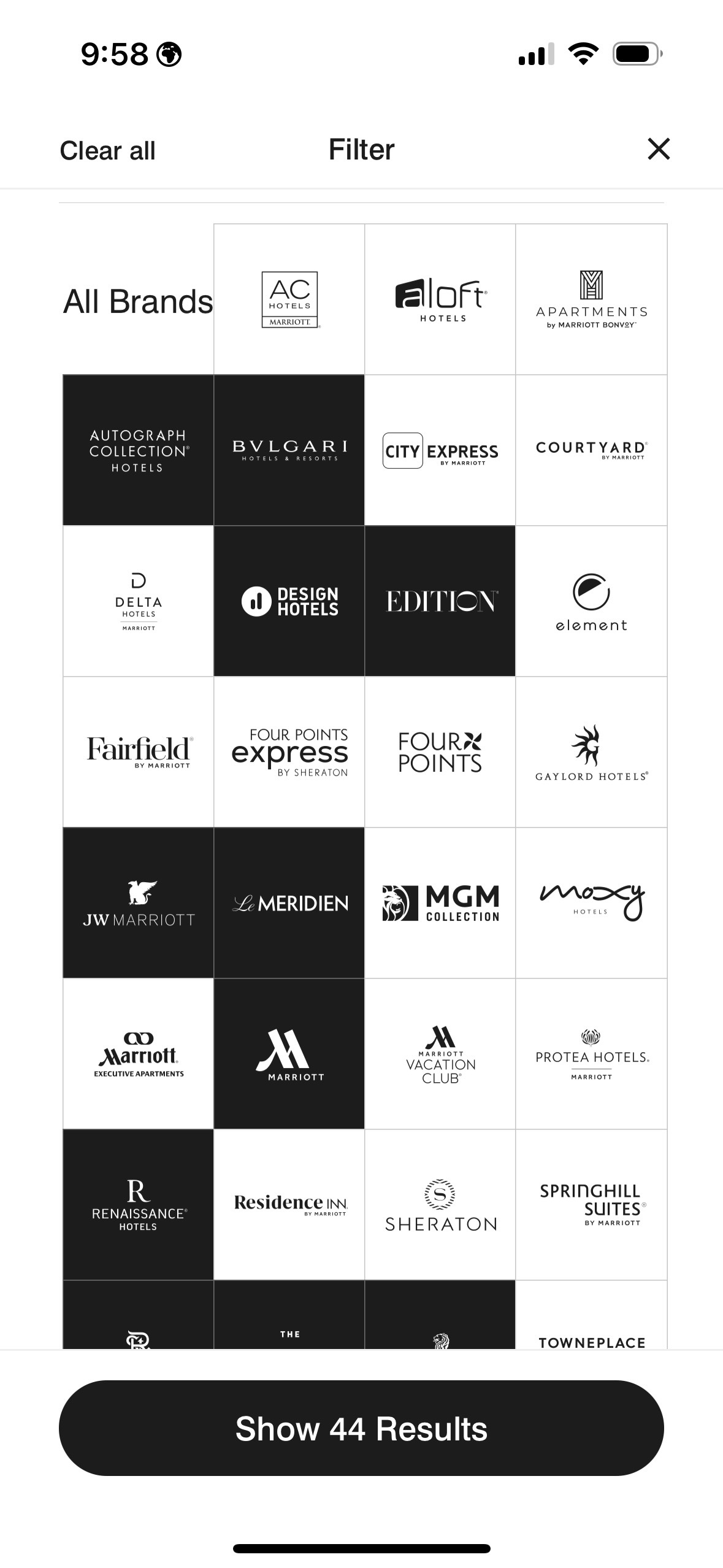
The Marriott mobile app has one of the worst search features out that. Marriott has 30 brands that run the gamut from Fairfield Inn to St. Regis. There are some that I will stay at, some that I won’t.
By default, it shows you all 30. When I do a search for NYC, it returns 199 hotels. If I filter it to just the hotels I would consider staying at it drops to a more manageable 44.
The problem is that it resets when you do a search. I have to go back in every time and select the brands.
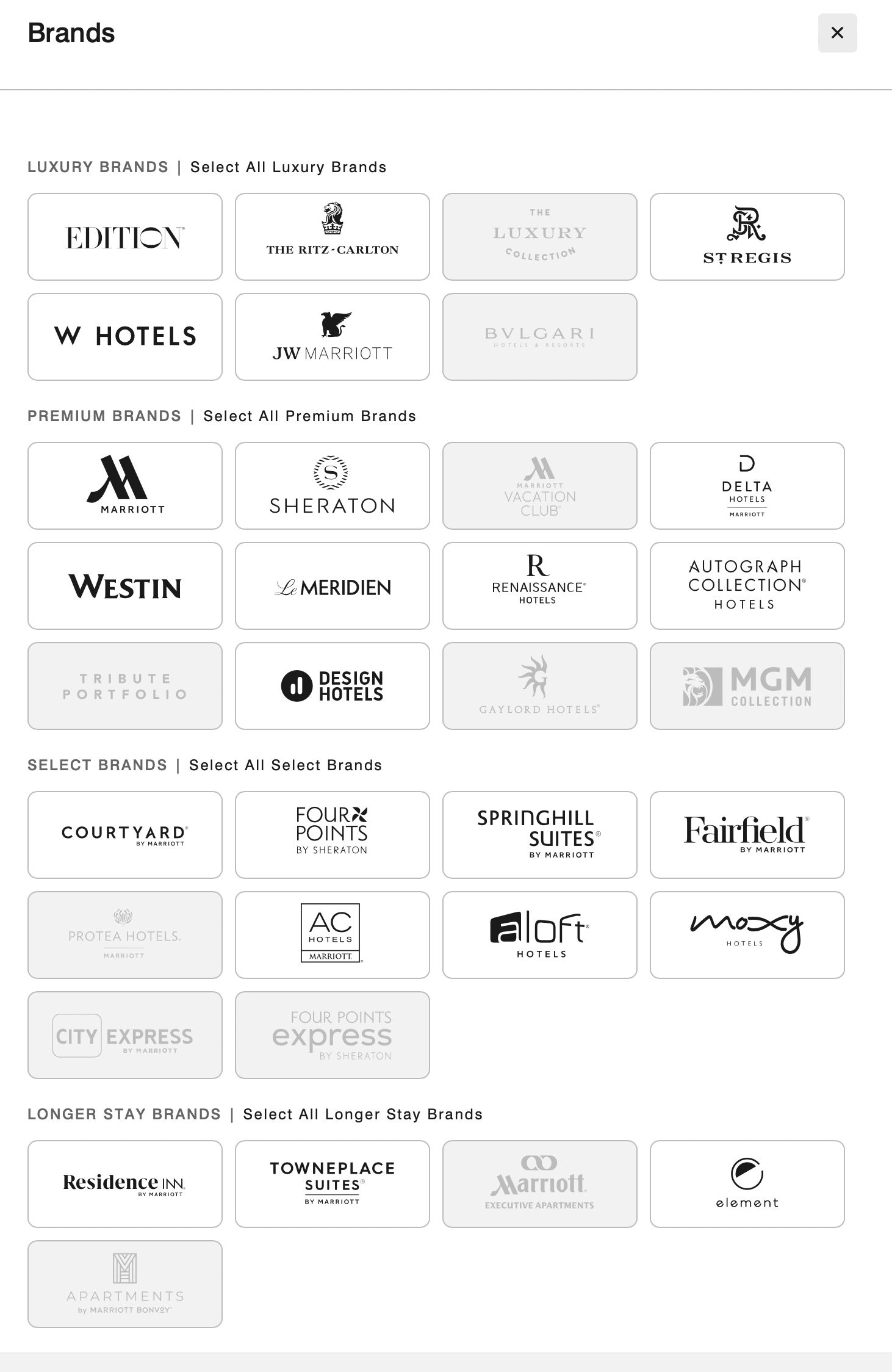
They’re not even grouped logically, making choice even harder.
Marriott app filter tool
At least they do the grouping correctly on Web site.
Here’s a condensed version for a Product Requirements Document (PRD) based on the article’s suggestions:
Title: Streaming Service User Experience Enhancements
1. Objective: Improve user experience for streaming services by addressing current pain points related to navigation, search, and content accessibility.
2. Features:
Standardized Status Bar: Implement a universal status bar for content streaming, showing key information like time left, volume, etc.
Improved Search Functionality: Prioritize free content in search results and maintain uniform keyboard layouts across platforms.
Enhanced Content Accessibility: Ensure closed captioning settings are retained across sessions, and respect language preferences.
User Interaction Improvements: Introduce a ‘Like’ button for content, allow searches by video length, and streamline temporary connections for guest users.
Profile Management: Simplify profile switching and ensure settings are maintained per profile.
3. Requirements:
Compatibility: Ensure features are compatible across different devices and platforms.
User Settings: Allow users to save and easily modify their preferences.
Design: Follow a user-friendly design for all new features to ensure easy navigation and interaction.
4. Success Criteria:
Increased user engagement and satisfaction.
Positive feedback from usability testing.
Decrease in user complaints related to navigation and content accessibility.
This document outlines the initial requirements for the proposed enhancements and will be updated as feedback is received and additional research is conducted.
Point 1 is a reasonable summary of the post. Point 2 is a decent regurgitation of the requirements. Point 3 is “mom and apple pie,” and could be cut-and-pasted in to any PRD. I didn’t expect it to generate success criteria, but that is a reasonable output. (Though still mom and apple pie.)
All in all, not a PRD, but a reasonable outline for a junior PM to build off of.
>: what kind of testing do I need to do
For your streaming service enhancements, you should conduct the following types of testing:
Usability Testing: Evaluate the user interface and user experience with real users to identify any issues in navigation, content accessibility, and overall interaction.
Functional Testing: Verify that all features work as intended across different devices and platforms.
Compatibility Testing: Ensure the service works seamlessly on various devices, operating systems, and web browsers.
Performance Testing: Assess the application’s performance, especially during peak usage times, to ensure it can handle high traffic without degradation.
Security Testing: Check for vulnerabilities, especially in user data handling and payment systems.
A/B Testing: Compare different versions of features, like search algorithms or UI layouts, to determine which ones perform better in terms of user engagement and satisfaction.
Again, generic. Mom and apple pie. But it is a solid checklist. I would add accessibility testing.
>: would a focus group be helpful?
Yes, a focus group would be helpful. It allows for in-depth discussions on user experiences, preferences, and feedback on the new features. This qualitative method complements quantitative data from A/B testing and usability testing, providing richer insights into user needs and behaviors.
This is an accurate answer in that it explores the differences between qualitative and quantitative research. But a lot of things don’t benefit from focus group. The biggest breakthroughs will fail in focus groups because people have a hard time conceptualizing drastic changes.
For consumer online products, I rarely find focus groups useful. If I were running a CPG and testing different fragrances for my laundry soap, that’d be different.
>: on which features?
A focus group would be particularly helpful for features such as the standardized status bar, improved search functionality, user interaction improvements like the ‘Like’ button, and profile management. These are areas where subjective experiences, preferences, and ideas can significantly vary among different users, making them ideal topics for in-depth discussions in a focus group setting.
The status bar is best analyzed using A/B testing. Search result quality on usage metrics such as CTR and increased engagement. Profile management is where you’ll get the most bang for the bunk in focus groups.
Partly because it’s very complicated and expensive to implement and partly because there are so many ways people could use profiles.
>: stack rank the features
Here’s a suggested stack ranking for the features based on potential impact on user experience and implementation complexity:
Improved Search Functionality: Directly impacts user ability to find and enjoy content.
Enhanced Content Accessibility: Important for inclusivity and user satisfaction.
Standardized Status Bar: Improves user navigation and control during streaming.
User Interaction Improvements (e.g., ‘Like’ button): Increases engagement and personalization.
Profile Management: Enhances user experience for households with multiple users.
This is a bit of a trick question. Despite it being in vogue, I am not a big fan of stack ranking. It is too hard, and not particularly useful, to stack rank.
In a reasonably large organization, there will be multiple teams. For this example, you’d probably have separate teams for player, search, personalization and partnerships. At best, you’re ranking within a team’s responsibilities.
Many features are grouped in the way they are implemented. Once you’re under-the-hood of the player, it’s easier to make all the player fixes than to make one fix, close the hood, come back, open the hood, make another fix, etc.
Degree of difficulty and time to value delivered are also a factor in prioritization. I could probably knock the time progression change quickly and deliver compelling, immediate value.
Prioritizing tasks is definitely important. But stack ranking, as it is commonly explained, is mostly a futile exercise.
The streaming revolution has entirely changed the way we consume video content. At our fingertips, in most parts of the world, we have access to large libraries of content.
Way more content than we could ever watch from MVPDs, much less OTA broadcasts. We can watch on-demand content from around the world. By aggregating niche interests and diasporas, it makes it more economically viable to create content. In our house, much of the content we watch is in Hindi and is original content created by Netflix. (Ironically, the Netflix hit Indian Matchmaking wasn’t available in Hindi last I checked. I expect that’s because there is a high degree of English fluency among Indians who watch that show.)
Despite the pandemic-era jokes about having watched all of Netflix (which according to estimates would take more than four years of nonstop viewing), you could never do it because new content is added all of the time.
You can watch something that will be interesting any time of day. You’re not stuck with infomercials if you’re up at 3 a.m.
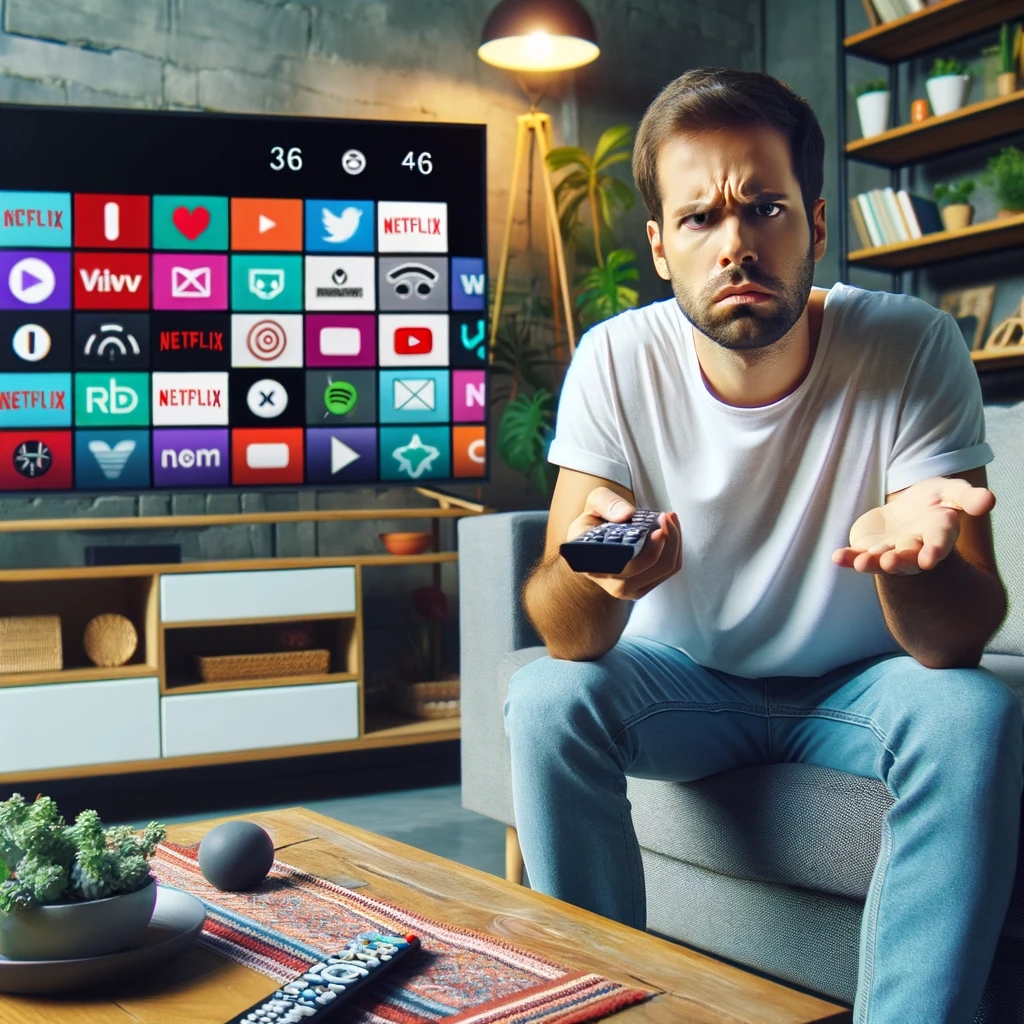
The big tradeoff has been degradation of the user experience. It used to be simple: want to go forward? Press the forward button. Rewind? Press rewind. Closed captioning? There was a button for that. It didn’t matter what channel you were watching or what program. It all worked the same.
Now each button – if there is even a button – works differently from device to device and from service to service. In some services, pressing skip goes forward 10 seconds; others 30 seconds. Want to turn on subtitles or a secondary audio track? Go digging through layers of menus, which again vary be service. And they might change when the service decides to redesign their app.
I’m an edge case for sure. On the device front, I have Apple TV, Chromecast, Roku, TiVo, Amazon Fire TV, Apple Vision Pro and the streaming services integrated into my Samsung TV. (Probably more in the junk drawer.) For services, I have Netflix, Apple TV+, Hulu, Disney+, Peacock, Max and YouTube. I’m also the only known subscriber to Paramount+.
The best user experiences feel invisible to the user. That’s definitely not the case in the streaming world.
There are a lot of ways to improve the streaming interface. (Personalization is a much more complex issue that I’ll visit in a future post.)
Here a few ideas:
Revisit the status bar
It drives me nuts that most video players, including YouTube, show how long a show is.
If something takes up space, it should provide meaningful information. The length of the video doesn’t change no matter how many times I look at it. What does change is how much of the video is left. It’s much more helpful to know that I have 0:35 remaining than that the video is 1:56 long.
Pick QWERTY or ABC
This is one more in the “drives me nuts” category. Pick QWERTY or ABC for searches. It shouldn’t vary when I search on different services. Again, there’s no competitive differentiation here.
My preference is QWERTY because the breaks are the same and ingrained from all of the typing we do. If you use ABC, I have to spend time looking around when you use 3 columns, 4 columns, etc.
I would expect that this has been A/B tested to death, but there is little reason to expect that the audiences would be so different across services.
Theoretically, the faster option would be speech. Unfortunately, speech recognition technology still works poorly in a namespace this broad. (Disclosure: I worked with Alexa speech recognition technology when I was at Amazon.)
Makes fast forward / rewind / skip / pause all work the same
The standard transport controls should perform the same. A skip is a skip. Pause is a pause.
There are two notable exceptions:
With AVOD (Ad-supported video on demand), the license might require you to disable skip during commercials.
Amazon Prime’s X-ray feature which provides information about the actors in the current scene. (Disclosure: I worked with X-Ray team when I was at Amazon.)
Retain state on closed captioning
When I switch from one service to another, the captioning should stay on (or off.) I shouldn’t have to find the controls (which are different) to turn it on or off. Ideally there would be a physical button.
This is another feature we’ve lost in the transition from a TV-driven interface to app-specific interfaces.
Store preferences for language
A lot of content comes in multiple languages. Some have multiple subtitles available, some have multiple audio tracks, others have both. I should be able to set a preferred language, instead of again having to search through menus. Regardless of what content I choose, the service should pick the language(s) I understand.
Like button
One of the hallmarks of our social world is the Like. Whether it’s a thumbs up, a like or a favorite, it’s an expression that we value something.
Platforms should have a physical Like button on their remote controls. TiVo started with thumbs up / thumbs down buttons on their iconic peanut remote. (Unfortunately the company is a shadow of its former self and has deprecated that functionality.)
Beyond providing data for personalization engines, the Like button could be turned into a social experience. In social co-watching environments, pressing the button could have an icon jump on the screens of the people I’m watching with.
Search by video length
This is especially important for the in-flight use case. I have 45 minutes left in my flight. What can I finish watching before touchdown?
To date, this has mostly applied to IFE systems. But with airlines like Delta and United adding bandwidth that supports streaming, this will become more important to online streaming services.
Even at home, I might want a 30-minute watch before I pick up the kids.
Have searches default to free
If I’m doing a search, I want free. Just because you can sell me a piece of content doesn’t mean I want to buy.
If it’s $5 on VOD, but available on a Subscription Video On Demand (SVOD) I have, I want the free one. You don’t even have to ask.
There are often business reasons/pressures to optimize for the one that generates revenue, but this would be very high up on the list of dark-pattern design. Charging people for things they should get for free has brand and regulatory risk.
Easy temporary connection
Another travel-related use case. More and more hotels are incorporating streaming services into their in-room TVs. Some even have dedicated Netflix buttons on the remote.
The difficulty comes in connecting your account, assuming you even have an account. You should be able to buy a day pass. (The service might even credit the cost of the day pass toward a subscription.)
Better profile handling
Platforms have profiles. Services have profiles. It’s a confusing mess. I can be logged into my Chromecast profile and my spouse’s Netflix profile. Ideally, if I log into my Chromecast profile, it logs into my Netflix profile.
Unlike the other improvements I’ve talked about, this has a lot of hair on it. There might not be a one-to-one matching of services and profiles. Some accounts aren’t shared, others are. Cost and service limitations might restrict some combinations.
All of this leads to poor personalization. My spouse and I share an Audible account. My spouse listens almost exclusively to romance titles; I mostly listen to books on product design, tech and finance. You can imagine what our personalization looks like!
There’s a reason I saved this one for last. Solving this is a lot harder than solving the rest.
Will these things ever happen? I hope so. At the same time, I’m not hopeful. Improving user experience is a cost, with the benefit harder to measure. It’s even more complicated when there are dozens of companies involved. Consumer Electronics Control (CEC) was introduced nearly 20 years ago and barely works today.
In the meantime, I’ll give you the same advice that I give to people who ask me how they should design their video apps: copy Netflix. It may not be the best in every area. But it’s the one that the most users have become most accustomed to.
Update: I asked ChatGPT to write a PRD based on this post. Here’s how it went.
The Apple Vision Pro is the best V1 of a product I’ve seen in a long time. But whenever you’re creating a completely new visual and input interface, you’re going to have some polishing to do.
There are some issues that are just the state of new technology and will get better over the course of time: weight, comfort, cost and stability being at the top of the list.
Eye tracking and gesture tracking is as good as I’ve seen, but it still needs improvement. This problem is exacerbated by the very subtle distinction among selected items. More on that below.
Some have complained that the AVP can cause nausea. I haven’t had that issue. The issue I have run into is the repeated use of the pinch gesture. It can cause my hand to get tired and I fear getting RSI. I had to take a break, not because of the weight of the headset but because my hands got tired. (This may also be an artifact of testing; if I were just watching a movie, this wouldn’t be an issue.)
Putting on my product manager and usability hat, here are the top new features and fixes I would make:
New features
Multiuser support
A $3,500 device should provide multiuser support. I can’t easily share it with my family. At a minimum, I should be able to switch among Apple Family Sharing users. AVP does have a guest mode, but it requires reconfiguration each time.
Importing iPad apps
As with all new hardware, initial software is going to be limited. Apple has some great demos and a few apps built by third-party developers that take full advantage of the AVP interface and features. But you’ll burn through them quickly.
AVP also supports iPad apps. They don’t provide the same rich experience as native apps, but they do provide valuable features. Notably, most of the frequently used Apple apps haven’t been re-written for AVP.
AVP allows you to go through the App Store and manually select iPad apps. It would be better if it provided a list of your most frequently used apps to add them with a few clicks.
Automatic free trials
Out of the box, users should have 7- to 30-days of free access to all of the AVP optimized apps. This would give them the ability to really experience the power of the platform.
I had the same issue with Oculus. In order to fully understand the device, I had to buy a lot of games. I wasn’t going to do that.
Demo/training mode
Unlike most products, it’s hard to teach someone to navigate the interface. AVP already has a screen mirroring feature that allows someone else to see what the AVP pro is seeing.
When I’ve shown friends how to use the AVP, I’ve had to say “look all the way to the right, look down, see that?”
Add a “laser pointer” to that mode. Instead of having to talk the directions, I could have a pointer appear on the screen to guide them. You could all add a reverse pointer, where the trainer could see where the eyes are looking.
Fixes and tweaks
Setting up AVP
For initial setup, the AVP requires that you hold your iPhone near it to download account credentials. It’s unclear how far you need to hold it. I found myself repeatedly moving my arm forward and backward while trying to pair it.
Sample content
When you try AVP in store, there are some gorgeous pictures that are shot for purpose. They show off spatial video and photos, panoramas and other features of the device. At the risk of pulling a U2, those sample images and videos should be included in the Photos app. (Possibly in a folder labeled Sample Content, in much the same way that Windows included sample pictures.)
My initial reaction when I saw those pictures: I need to buy an iPhone 15 Pro so that I can capture spatial photos.
Too little differentiation between items when selecting
This is one of the biggest usability issues. The difference between selected and non-selected items is very slight. For a device that requires looking at an item to pick it and where you don’t have precision control like with a mouse, this is a big problem. It’s especially a pain when using the on-screen keyboard. (See more below.)
I thought this would be changeable in accessibility settings, but I couldn’t find it. Regardless, the default differentiation needs to be greater and some users would benefit from being able to set it even higher.
Keyboard
Hate the on-screen keyboards where you have to navigate with a remote control to enter data? The AVP’s virtual keyboard is at least 10 times more difficult than those. It took me 5 minutes just to enter my Disney+ login information. There were too many misread keystrokes.
For AVP to be a content production device, the keyboard needs to be much better. Yes, you can pair a physical bluetooth keyboard, but that’s yet another accessory to carry with you.
Top left menu item is really difficult to access
AVP has a side panel that is used to navigate among key controls. Selecting the top item was very difficult. Given that the item is “Applications,” this really needs to be improved.
I initially thought it was an eye tracking problem for me, but I had a friend try it and he had the same issue.
Control Center too hard to get to
Similar to the above issue. As with iPhone, the Control Center comes down from the top. The way it is supposed to work is that you look up and can select it. Frequently, I put my head back as far as my neck would allow and I still couldn’t get the Control Center tab to come up. Again, my friend had the same issue.
At other times, it’s a gnat that I can’t swat away.
Lack of progress indicator when launching apps
Sometimes there is a delay when trying to launch an app. Because the background is a passthrough of what your eyes are looking at, it feels like something crashed or that the app didn’t launch. A spinner or loading indicator would make this a more comfortable experience.
Universal transport controls
This isn’t AVP specific, but it has long been on my video wishlist, and with a change to a completely new environment, maybe I can finally get it.
I want rewind, fast forward, play, pause, skip, go back and other transport controls to work the same regardless of which video app I’m in.
I want the numbers on the right side to reflect how much time is left in the video I’m watching. (Showing the total duration isn’t very helpful. It’s also not a good use of space: the number doesn’t change.) When I press skip, I don’t want it to go forward 5 seconds in one player, 15 seconds in another and 30 seconds in another.
My cable TV and DVR remotes didn’t work differently depending on what channel I was watching. This is the same. Transport controls aren’t a competitive differentiator. Unless there is an app-specific feature (like Prime Video’s X-ray), they should work the same.
The only exception is the skip feature during ads. That control can be disable during an ad and not shown on ad-free services.
Spend even 30 minutes with the Apple Vision Pro and you’ll be impressed. I’ve largely given up trying new hardware at launch because it is hard to set up, buggy and overall so frustrating that it’s not worth the hassle.
It’s the best V1 of a new product that I’ve seen in a long, long time. The included demos are amazing. You can feel yourself walking alongside dinosaurs or walking on a rope suspended above water. You can watch a Disney movie inside the Disney theater in Hollywood; the movie is presented on a giant screen around a model of the theater.
(Incidentally, I was part of market research study sponsored by Apple a few years ago. Based on the tests they did and the scans they took of my face, it was most likely for development of the AVP.)
The current headset is roughly 1 1/2 pounds. It’s a bit uncomfortable to wear for more than 30 minutes. Some people have complained that they feel nauseated from the experience, but I didn’t have that issue. (If you get dizzy watching IMAX movies or at Disneyland video rides like Avatar, you might want to sit this one out.)
Apple, true to form, nickel and dimes you. A case is $200. A belt clip is $50. Both are necessary. Without a case, you could easily end up with a $2,500 repair bill. This is not a device you just want to throw in your backpack. You’ll need the belt clip if you want to stand up and walk around.
The biggest challenge, besides the price, is the lack of software. Once I finished with the awe-inspiring demos, I was left with the question “what next?” What can I do that is significantly better than on other devices that don’t cost $3,500? The answer today is not much. Certainly not enough for me to keep the device. (I’ll be returning it to Apple.) But I envision a lot of use cases as the price comes down, the device gets lighter and it becomes more comfortable.
Video
With the gorgeous screens, it’s a great device for entertainment. But only if you like Apple TV+, Disney or Max. Want Netflix, YouTube or Peacock? You’re out of luck. If I’m Netflix, I hold back launching on AVP. Apple needs them. It’s a great leverage point for negotiations to reduce the vig Apple takes on in-app subscriptions. Right now, it’s not like Netflix is going to get additional subscribers by launching on AVP. If you can throw down $3,500 for an AVP, there is a very strong chance you already have Netflix.
Usage of in-home video consumption has changed dramatically over the last decade. It’s no longer immersive. People are frequently multitasking, using second and third screens to check email, engage with social media and play games. Video consumption is also frequently done with other people – each person in a family using a $3,500 headset seems unlikely. It’s not as immersive, but I can buy a 65″ OLED TV, premium Sonos sound system and Chromecast for less than that, and everyone in the room can watch.
I also had trouble drinking while wearing the headset because the can bumped up against it.
Games
Any device this powerful will inevitably be used for games, the screens alone will create an immersive experience.
The big challenge here is that it’s competing with Oculus. There are hundreds of games already available. At 1/10 the price of an AVP. The price dramatically reduces the TAM for game developers. Unless you can port a game from Oculus for next to free, it’s not worth doing it yet.
Another challenge is the lack of controllers. Apple’s pinch interface isn’t suitable for a lot of games. I expect that eventually Apple will support other gestures and controllers.
Training
This is where I see the biggest bang for the buck at today’s price. To the extent that it can reduce the costs or improve the quality of training, it can pay for itself.
Imagine applications like training surgeons or auto mechanics. They could practice in a realistic space without damaging real equipment or needing a lot of cadavers.
Travel
I love to travel. I’ve visited hundreds of cities around the world, awed at the spray and noise of Iguazu Falls in Argentina and hiked to Machu Picchu. Unfortunately, not everyone has the time, resources or physical ability to do that.
Apple has created a maps product that in most ways exceeds Google Maps in the United States. I’m surprised that Apple didn’t create at least a beta version of the 3D views it has captured for Apple Maps. Not only would it show off the AVP, it would show off how much further ahead Apple Maps has gotten.
Work
I’m not a believer in the widely discussed sit-around-in-a-virtual-conference-room use case for AR/VR that is often touted. It isn’t additive. People already tire of Zoom meetings where the only impression on them is a camera. Add in a 1 1/2 pound headset? No way.
But there are plenty of other applications that would actually use the capabilities. Imagine a surgeon seeing an overlay of an MRI on her patient in the OR. An air traffic controller guiding planes in real time with a 3D view of aircraft and terrain. (I 😂 as I write this given how ancient the technology FAA uses is, but a guy can dream.)
More immediate use cases:
Architects placing renderings of a building in a downtown to show to zoning boards.
Urban planners showing residents what a new park would look like.
Utility workers identifying buried power lines.
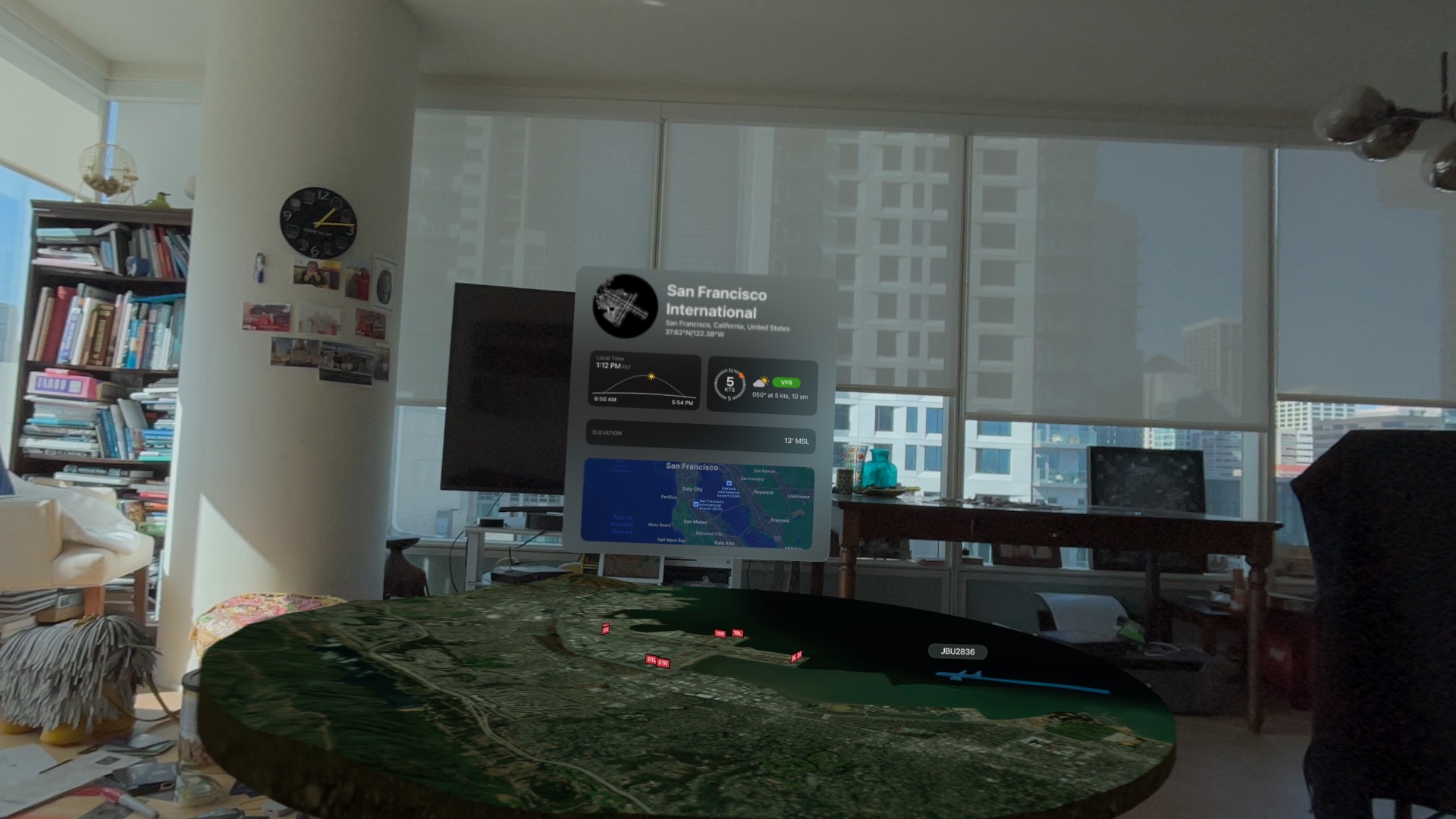
AR view of a flight tracker app on Apple Vision Pro.
Porn
(Feel free to skip this section; I include it for completeness.)
Let’s face it – porn will be a common use for the AVP. Porn has driven the adoption of many emerging technologies, including the VCR, DVD players and even the Internet itself. I expect point-of-view porn to be especially compelling.
Because it is a closed ecosystem, you’re unlikely to get native porn. Just like with iPhone and iPad, Apple won’t allow developers to create porn apps. For now, the Web browser or Photos app will have to suffice.
Although most Web pages are 2D, there are emerging toolkits that will allow 3D. The Photos app in AVP displays 3D spatial photos and videos. If I were shooting porn today, I’d use an iPhone 15 Pro to capture spatial video so that I have a library ready to go as adoption of the AVP increases.
I can envision so many other possibilities for the Apple Vision Pro. If we get even half of them, Apple will has pushed the world forward.
you don’t integrate with your ordering system. Customers should be able to navigate to an order and share that information within the chat. Amazon does a great job with this. Their self-service bot is one of the few that can actually resolve issues. Of the items on this list, this is the toughest to implement, but it’s also one of the most important.
don’t “ding” when the agent sends a response. Given how long some tasks and research takes, you need to be able to trigger a system sound that indicates that the agent has responded. Most consumers are multi-tasking, not staring at the chat window. Often the chat window will timeout and the customer will have to restart the chat and provide all of the information form the beginning. It’s a waste of user time and a waste of agent time.
don’t have agents read information that was provided, especially when an issue is transferred. The user shouldn’t have to retype and explain the problem. The agent can scroll back and get details, including the research done by the previous agent. This would be hard to do in real-time on a phone call because it’s too time consuming for the second agent to listen. On text, this is simple.
don’t give chat agents the authority to do what phone agents can do. Customers don’t want to spend 15 minutes with an agent only to be told they have to call. Then they have to navigate a phone menu designed to deflect them. Once they go through the process, they will have to explain the issue again.
don’t allow the user to upload photos. In many cases, a customer sending a picture or a screenshot provides a lot of information. Instead of customer saying “the item had a big dent on the right corner,” she can just upload a picture. I’ve had cases where the agent says “OK, go to Twitter, upload a picture of the item and then return to the chat.” Obviously this doesn’t work for people who don’t have Twitter.
get rid of the chat box when the customer switches pages on your site. Often they may be researching orders, alternative items, different flight, etc. They should be able to navigate without losing the chat. American Express keeps their chats persistent. Customers can go back and review chats about previous issues.
don’t automatically email me a transcript of the chat. When a chat is completed, the customer should receive an email with the exact conversation. Even better if you highlight the final action the agent is performing.
follow up on resolution aftera few days. In many cases, I can only immediately comment on the politeness and perceived helpfulness of the agent. I don’t know if the actual issue is resolved until my plane ticket is re-issued, refund shows up on my credit card, item shows up at my door, etc.
Every day we get closer to Christmas, the more important omnichannel becomes. For those unfamiliar with the term, omnichannel is the seamless integration of online and physical commerce. For those in the business, it’s also called BOPIS: Buy Online, Pick-Up In Store.
Here’s the ideal omnichannel experience:
Search for the item on the retailer’s site or mobile app.
See real-time availability at stores near you.
Place the order with immediate confirmation.
Get a notification when the order is ready.
Find your way to the pick up spot.
Press a button in the app to indicate where you are waiting.
Someone from the store comes and brings it out to you.
I’ve been following omnichannel since before it became a word. The dearly departed Circuit City (closed in 2009) was an early leader in the experience. In one humorous experience, someone went to the check out register to purchase an item and was told that the item they were holding was out of stock. It was “out of stock” because I’d purchased it online and their system subtracted it from salable inventory!
Retailers have gotten better over the years as omnichannel has become more common, both at messaging and at execution. (Though the race condition will always exist. It’s near-impossible to guarantee that an employee will have a picked an item before a store shopper grabs it.)
In the past year, I’ve tried omnichannel experiences at Walmart, Target, Walgreen’s and Best Buy.
At Walmart, there wasn’t any signage that made it obvious where to go. I only found the pick up location by driving around the building. The items were brought out promptly, but one was damaged in a very obvious way that they should have noticed. Ideally there would be obvious signage in the parking lot and the app would navigate you directly to the pick up area.
At Target, an overworked employee took too long to bring the items out.
The experience was similar at Walgreens. She also had multiple orders in the shopping cart she brought out and had to separate the orders curbside.
Best Buy had the best experience: the item was brought out promptly, directly to my car.
Omnichannel provides a number of advantages over the traditional retail experience:
Consumers don’t have to deal with inclement weather. I liked not having to walk out in the rain to Best Buy.
For people with young children, it eliminates the hassle of unbuckling the kiddos from the car seat, getting them into the store and then reversing the process. And, of course, it eliminates the fighting over whether to buy candy in the checkout.
Consumers know, with a high likelihood, that the products they want will be there.
Retailers benefit from something that Amazon (mostly) can’t offer: immediate access. Sure, if you’ve got two days to spare, you can wait for Prime delivery. If you’ve got one day, you can pay extra for overnight. But same day is much harder.
Consumers also get the benefit of convenient purchasing of items that are too expensive to ship, such as soda.
If you’re racing for gifts on Christmas Eve check out the omnichannel experience.
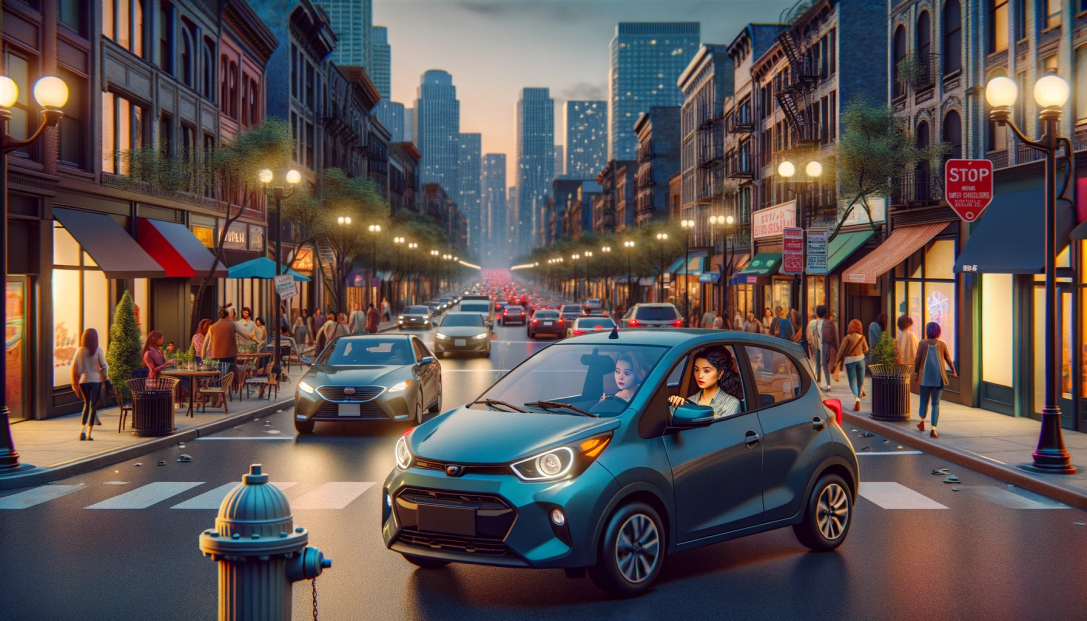
Imagine this: You’re in San Francisco and you drive to the Mission, ready for a giant, juicy burrito. The first step is to find parking.
After driving a few blocks, you see an open space. Uh, oh, driveway! A few minutes later, you get your hopes up – another empty space. Fire hydrant! You finally find an open spot and park. As you walk to the taqueria, you see a sign: “Residential Permit Parking.” San Francisco and New York City residents don’t have to imagine; this is an everyday scenario.
An estimated 1/3 of traffic congestion in cities is caused by cars circling looking for street parking. Traffic-data firm INRIX estimates that searching for parking costs the UK £23.3 Billion a year. That is a lot of wasted time and a lot of unnecessary tailpipe emissions!
Imagine this alternative scenario: you put in the amount of time you need to park. The map shown on CarPlay shows you the areas that have the highest likelihood of parking spaces for that duration. The calculation would take into account the current time, day of week, street cleaning rules, residential parking rules, commuter lanes, etc.
Extra credit for taking into account the size of the car. When I drove a Mini, I had a few bonus parking spaces that only small cars could fit in. On the other hand, someone who drives an F-150 has a lot fewer options.
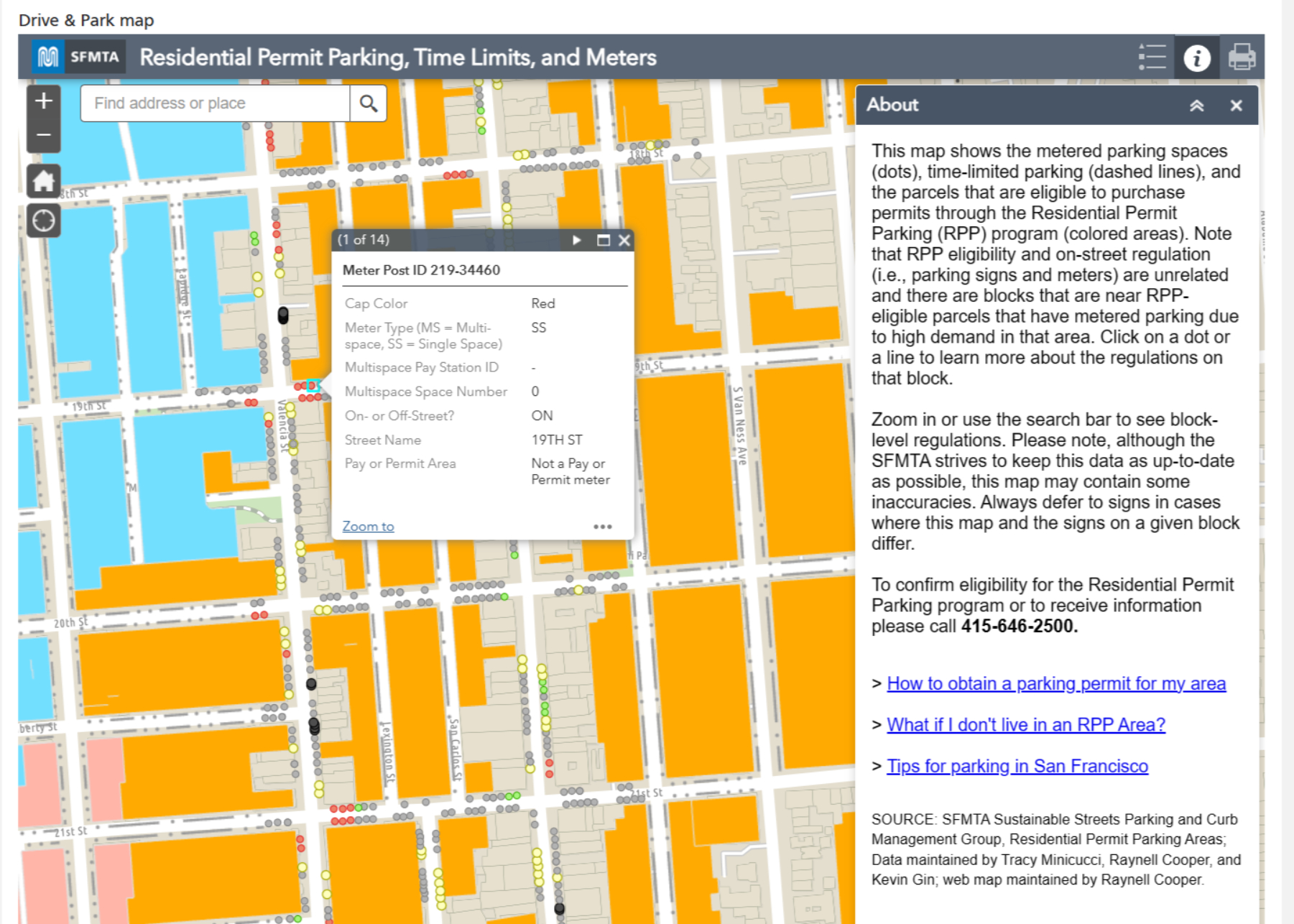
This is doable: much of the data already exists and in digital form. Many cities use GIS tools like those from ESRI to track this information. Here’s a map from San Francisco, which has some of the most complicated restrictions in the United States. The database is captured at the individual parking meter level. Six o’clock and the loading zone is now available to everyone? Show it on the car’s display.
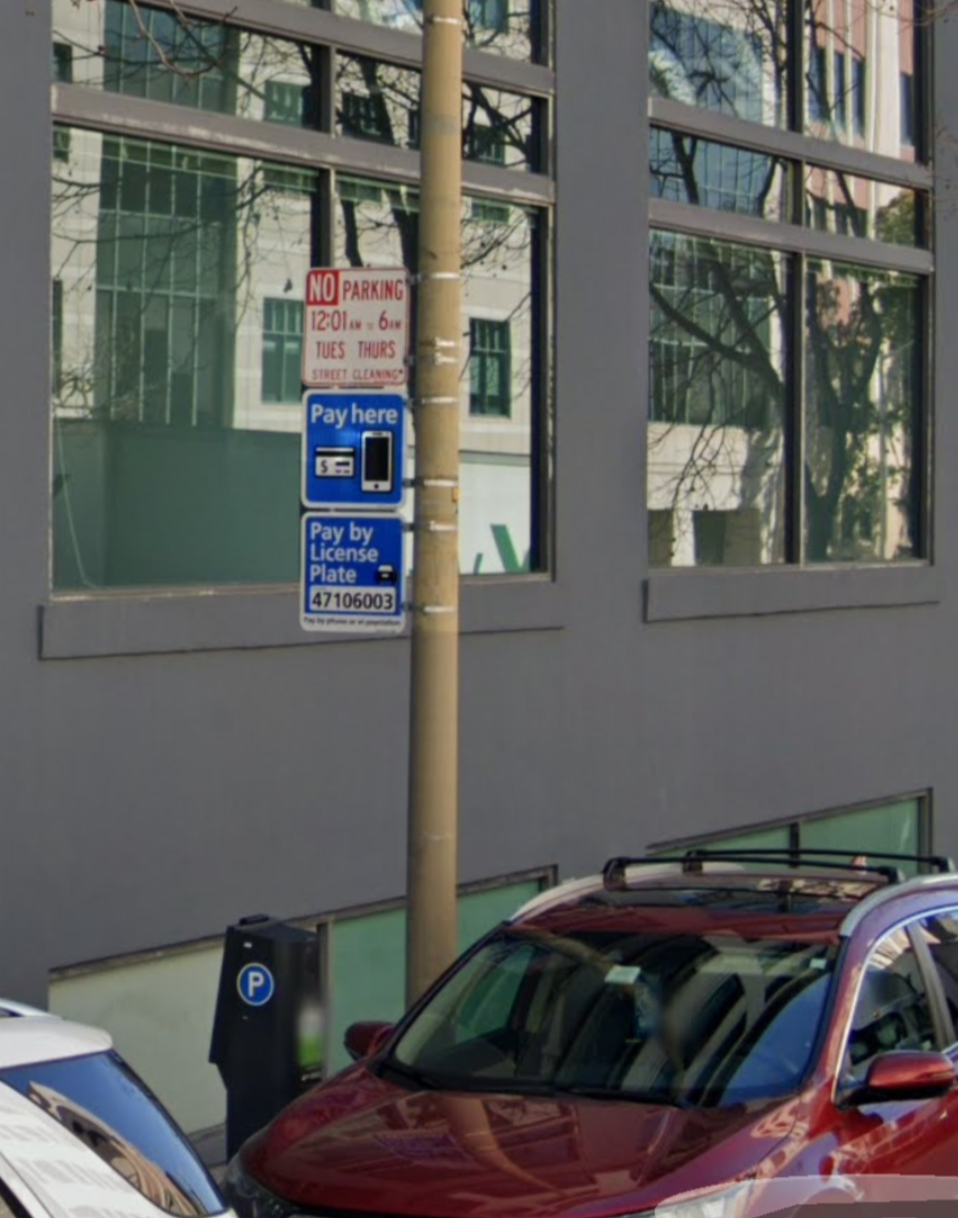
Google’s Street View vehicles capture images of all of these obstacles.
If I park my car and go to my hotel room in a hurry, I use Street View to check parking rules. The parking restrictions are legible.
The dashboard can also warn about traps: In San Francisco, the only holidays for meters are New Year’s Day, Thanksgiving and Christmas Day. Even on Independence Day, you’re not free from parking tickets.
You can go even deeper: many cities have switched to parking apps to allow people to pay for meters. The status of the spot or zone could be added to the map. (This is not definitive because a car may have left the space or someone might have paid in another way.) See my related post on adding real-time information to maps.
Google and Apple can’t create parking spaces, but they can make it much easier for you to find them. In the process, they can help improve the air in cities. That’s a big win that could also be helpful from a public policy point-of-view.
Keeping location data accurate is a Herculean (almost Sisyphean) task. Stores go out of business and new ones take their place. Snowstorms and pandemics temporarily shutter a business. Bars stay open later on a Sunday for the Super Bowl.
It used to be that business information was updated once a year. Data companies would ship Yellow Pages overseas and people would type in the information and send it back to the companies to sell them. Consumers could buy them as CDs or DVDs to generate mailing lists.
That bar has gone up dramatically. With everything else being on their phones being real-time, consumers expect location data to be as well. Plenty of friends (including tech savvy friends) assume that what Google, Apple, OpenTable, etc. tell them is gospel.
It’s not so. I tell them to call to verify. I’ve been to plenty of “fully booked” restaurants that are actually quite empty. OpenTable charges restaurants for each reservation. That gives restaurants a disincentive to make those times available when they would otherwise be full. Bowling alleys might be full of people, but that’s because it’s league night. The typical customer can’t walk in and bowl.
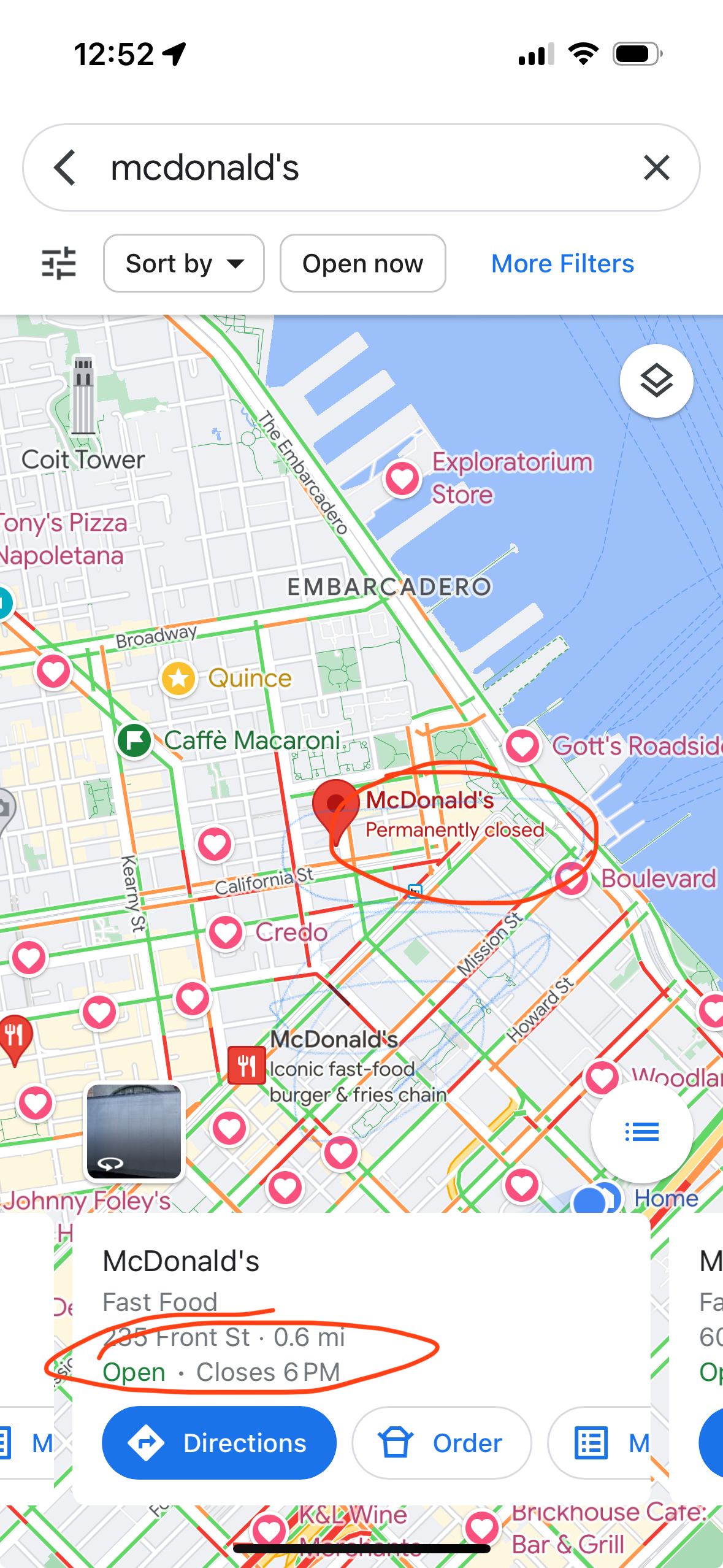
I’ve been to plenty of places where Google’s “live now” data is inaccurate. (In both directions.) Here is a recent example:
The location on the map (POI for mapping nerds) shows that the McDonald’s is “Permanently closed,” but the “live” information says it is “Open”. Both things can’t be true. If you walk by (what local nerds call “ground truth”), you will find that it is permanently closed.
There are a number of ways to improve timeliness and data quality:
Have the facilities update their information individually. Google has an extensive set of tools at Google My Business for companies to manage their profiles. Small business owners and government agencies are usually heavily pressed for time or don’t know about these tools.
Have users submit corrections. There are a lot more users than there are business owners. I submitted the McDonald’s correction to Apple and it was updated within a few days. The challenge with this approach is that there is fraud. Competing businesses might report a business closed. People create fake emergency rooms (yes, this a real example). Yelp has been frequently bombed with reviews when a business is in the political spotlight
Get information feeds from businesses and government. Chains could submit corrections through feeds. But even this information isn’t timely. The McDonald’s app still listed the above McDonald’s as open for at least a week after it closed. Ironically, this is one of many ways Mapquest blew it. Their initial business was store locators; they would charge businesses to put a store search on the store’s Web site. This presented a channel conflict: they didn’t want to feed it in to the consumer site because it could potentially cannibalize the store locator business. (There is precedent for doing this right: Transit agencies provide real-time data through GTFS.)
Use anonymized cell-phone location data to predict the number of people are at a business. A key problem is that in many urban areas there is so much density that even the most advanced GPS isn’t good enough. Indoor spaces are another problem.
The best way to keep data “live” is to use real-time transaction data. In the developed world, most businesses take credit cards. A lot of cash businesses use point-of-sale systems like Square. Restaurants are using online ordering. (Disclosure: I was an early board advisor to Olo until its IPO, which powers the ordering for Google Food, as well as restaurants like P.F. Chang’s, Five Guys, Qdoba.)
In the McDonald’s example above, the store locator was inaccurate, but if you tried to order something, you were told it was closed.
There are many advantages to transaction data:
If people are transacting, there is a very strong likelihood that a business open. If you don’t see any transactions, you can make a strong inference that the business is closed.
You can approximate cost based on transaction value. For restaurants, you could make reasonable estimates for groups of 2, 4, etc.
If the data source has SKU information (like from Olo or Square), you can get the full menu and the actual most popular items.
Depending on the level of anonymity, you can determine how frequently people visit a place. Frequent visits is a good indicator of NPS.
The rapid uptake of Apple Pay gives Apple an advantage here.
Transaction data won’t tell you if the trail you wanted to hike is closed due to snow, but business search will be a lot better than it is today.







 redesign | mobile