Maximizing the value of deals on Facebook and foursquare

Facebook Places punch card

I was walking down the street the other day and did a search on Facebook Places. Up popped up a deal for Boyd’s Coffee: get 10 punches and get a free drink. As a potentially new customer, this was not the least bit attractive. I had no idea what their coffee tasted like. In order to get a deal, I’d have to visit at least 10 times. It may work as a retention tool, but not as an acquisition tool. A better offer for new customers would be 50 cents or a dollar off a drink.

Likewise, many of the mayor offers on foursquare aren’t appealing to the casual user. As foursquare has gotten more popular, it may take visiting nearly every day to win a mayorship at popular venues.

Most traditional marketing tools have focused on either acquisition or retention. Coupons (including Valpak and Groupons) get people in the door. Loyalty programs (like punch cards) entice existing customers to come back.

Facebook, Foursquare and the like offer the promise of doing both — if offers can be adapted for the user. As long as I haven’t checked into the venue before, I get a $1 off coffee coupon. Once I’ve redeemed that, it becomes the punch card.

Because Facebook and foursquare use persistent identity, they are less susceptible to abuse than paper coupons. This allows merchants to make richer introductory offers if they choose: the merchant could offer a free coffee the first time.

The platforms could also be adapted to support refer-a-friend promotions. For example, Tristan Walker recently tweeted about an incredible banana beignet dessert at Tamarine. I added that to my to-do list. Businesses could use these data to recognize and reward key influencers.

While the existing platforms are somewhat limited, they could quickly evolve into tools that give small businesses CRM tools that the big guys have.

A Facebook deals sticker at Boyd's Coffee

Picturing a new vision for local search

I frequently tout Yelp as the company that has the best local database in the United States focused on restaurants and entertainment. With thousands of Yelpers around the country who aggressively review businesses in their cities, Yelp manages to stay well ahead of their competitors. Where a new restaurant can take months to make it into Google Maps, it’s often listed on Yelp before it opens thanks to devoted Yelpers who keep an eye on what’s going on in their neighborhoods.

Yelp also has another key asset, which has long been hidden: a large volume of pictures uploaded by Yelpers. While these have been available on the Web site, they haven’t been the focus. Yelp’s iPad app puts them front and center.

Local search has long been optimized around the data sources that are available and the way computers best process information, not the way consumers look for information. Looking for the address of Lovejoy Bakers? Piece of cake. Local search will find it for you. Looking for a romantic restaurant that’s not too crowded but has a modern feel? Good luck with that.

Here’s where pictures can play a big part. Solving such queries is incredibly hard because they require value judgments and computers aren’t good at making such judgments. Even among different people, those judgments vary. Romantic, crowded and modern mean different things to different people. If you read dozens of reviews, perhaps you could get a good sense for whether a business meets your definition of these words. But that’s work that very few people are willing to do.

It’s much easier (and more fun) to flip through dozens of pictures.

Pictures provide easier and faster answers to:

  • Is this place a dive?
  • Does this place cater to people like me?
  • It this place kid friendly? I never would’ve guessed that a brewpub near me was kid-friendly until I flipped past a picture of a play area with kids in it.
  • What does this place feel like?
  • Is the food pretentious?

Pictures also help with another problem that many user reviews have: too much time spent talking about the reviewer rather than the place being reviewed.

Popular venues in major cities such as flour+water and 21st Amendment in San Francisco can have more than 100 pictures. In smaller cities, it might be just one or two.

We’re just at the beginnings of truly using images in local search. I imagine that we’ll soon see image recognition algorithms that will sort the uploaded pictures into categories such as food, interior, exterior, etc.

Cell phones are increasingly becoming data collection devices and Yelp users are at the vanguard. Yelp claims 3.5 million monthly unique users on mobile devices. If only a small fraction of them are contributing content, that’s still thousands of people providing ground truth. Yelp reports that a photo is uploaded every 30 seconds via mobile devices. With check ins, photos and real-time data corrections, local search is becoming a much richer experience.

This slideshow requires JavaScript.

AT&T’s 180,000% markup

One of the challenges of international travel is getting access to communications. I’ve gotten used to being able to check email, look up restaurants, find maps and communicate with friends from anywhere in the U.S.

Take your iPhone overseas and all of this can get really expensive, really fast.

At AT&T’s pay-per-use rates, you’re charged $19.97 per MB. It’s cheaper to buy and send a physical post card to friends than it is to send a digital picture.

The only way around that is to buy a local SIM and use it on an unlocked iPhone. This process varies from country to country and can be quite a challenge if you don’t speak the local language. It also means that you don’t have coverage the moment you step off the plane.

I got lucky on my recent trip to Italy. The first store I walked into had a clerk who spoke English and understood what I needed. For 2 Euros ($2.76) a week*, I got up to 250 MB of data usage. At AT&T’s a la carte rates, that same usage would run $4,992. If you plan ahead, you can get 200MB for the low, low price of $199.

Even ripoff hotel minibars only charge 3x-4x street costs for convenience.

AT&T’s data markups are even way out of line with its international voice roaming rates. With voice,  AT&T actually provides some value in that phone calls to your number get routed by AT&T to your phone overseas. With data, the only convenience over a local SIM is that you don’t have to seek out a local provider.

The pricing is so absurd that the only people who would do this are business travelers who must be connected at all times, the fabulously wealthy or everyday customers who don’t understand the charges and will further resent AT&T when they get the bill.

AT&T’s the company that pioneered Digital OneRate, which eliminated nationwide roaming charges. I’d like to see them do something rational for international roaming.

* For comparison, this is also much less than AT&T charges for domestic data usage. With a contract, AT&T charges $15 for 200 MB of data. This works out to about $11 for 5 times as much data.

How to pay at Starbucks using your Android phone

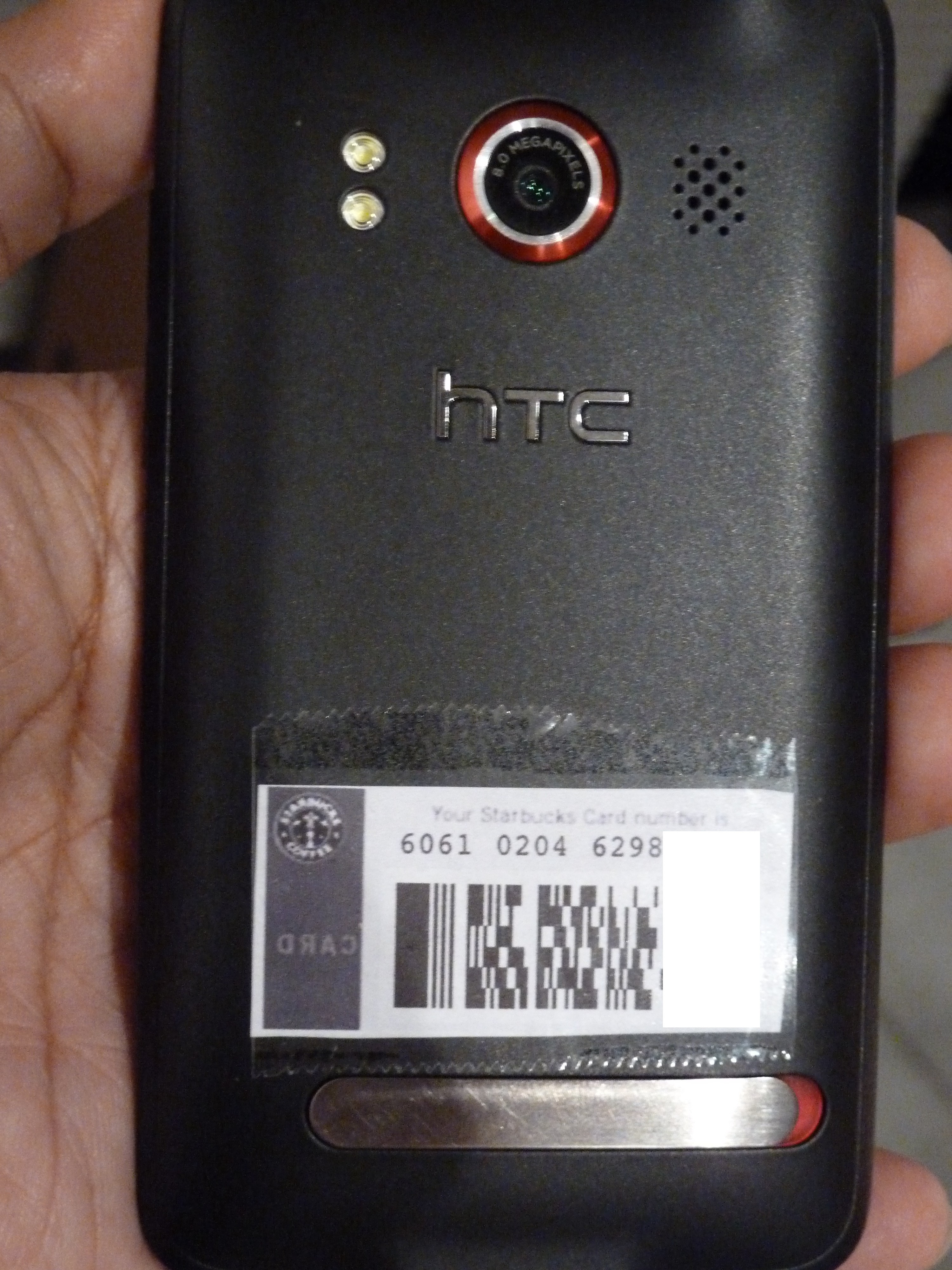
Android-enabled Starbucks mobile payment device.

Starbucks made a lot of noise recently with the launch of mobile payments in the United States for iPhone and Blackberry users. As an Android user, I felt left out (as is often the case.) But there’s a way to use your Android phone to pay for your coffee. Here are the steps:

  1. Borrow a friend’s iPhone or iPod Touch.
  2. Set up your account and enter your Starbucks card information.
  3. Go to the “Cards” screen and click “Touch to Pay”.
  4. Take a screenshot of the bar code that appears. (Hold the power and home buttons.)
  5. Email the screenshot to yourself.
  6. Print the screenshot. (I printed it at 35% zoom to get the right size.)
  7. Cut-and-paste (physically) the bar code to the back of your Android phone.

Viola! Mobile payment device.

It’s even better than the iPhone app: it’s quicker (no need to find and launch the app and click a button) and it works even when the battery is dead.

It lacks a lot of features. You can’t find the nearest Starbucks, reload your card or see your transaction history. But for the most common task of paying for coffee, it is the optimal experience. It would be nice if Starbucks stored your preference on whether to print receipts, but that’s an issue with either method.

This illustrates one of the key challenges facing mobile payment systems that are emerging: in their desire to get our money, banks and retailers have already made paying for things incredibly simple. Swiping a credit card is just.not.that.hard.

Any digital wallet will have to be just as simple. Launching various applications, digging through menus and entering security codes are all steps that add friction to the purchase process.

Apple, Google and others entering the NFC/mobile payments game would do well to have standardized interfaces to flip among payment, library, transit and access cards versus having every app developer design interfaces as he sees fit. These could be tied to location — if you’re at Starbucks, the Starbucks card automatically shows up first.

LivingSocial brings yield management to small businesses

LivingSocial is testing a new product that allows businesses to offer real-time discounts to local consumers, according to AllThingsD.

LivingSocial’s existing product works much like Groupon. You sign up for a deal and typically purchase goods or services for half off the retail value. These deals can be redeemed over a 3- to 12-month period, depending on the deal.

While some have called these deals yield management tools, they’ve actually just been customer acquisition tools. In fact, some businesses have been so overwhelmed by these offers that they’ve had to hire extra staff to handle the influx of new customers. Some undoubtedly have had to turn away full-price customers to service the discounted customers. One of the challenges businesses have faced is that although they’re seeing new customers, those customers are getting a bad impression because the business is overwhelmed.

The key to effective yield management is to shift demand to when you have excess capacity and to charge a premium for the times that are at highest capacity.

Many small businesses already do this. Happy hours at bars are a simple example of yield management. Come in from 3 to 6 and drink for half price. There’s a high fixed cost (staff is already there, rent, electricity). As long as you cover the marginal costs of food and drink, you can generate extra profit during that otherwise dead time.

This could prove to be a boon to businesses who need to generate extra business quickly. For example, a spa that finds itself with massage therapists with a slack appointment book could send out a 1-day only deal.

While the details of Living Social’s implementation aren’t out yet, here are some things I’d like to see:

  • Ability for the business to control the amount of offers that are available. You don’t want to go from a situation where you’ve got a lot of spare capacity to one where you’re overwhelmed by demand. A limit would also create incentives for users to claim an offer quickly.
  • Ability to more narrowly target customers. The current regions are too large to ensure that the customers reached are likely to be repeat customers.
  • Ability to target specific products. Chicken moving slower than beef tonight? Half off chicken dinners!
  • Ability to exclude customers who are too close. You don’t want to offer discounts to people who are already at your business.

How Google could dramatically improve local search

A lot of companies have been spending a lot of time and effort in location-based services over the last couple of years. Whether it’s local search or check ins, the race to get people connecting with local businesses is on.

One ongoing challenge has been identifying where consumers are.  GPS has issues with power consumption, time to first fix and doesn’t work indoors. Cellsite-based location is not precise enough. Even WiFi triangulation, which is the most effective way currently, isn’t precise enough given current deployments. In densely packed urban areas, you can still come up with a hundred or more businesses that you would have to pick through.

One way that Google (or Facebook or anyone with a strong brand) could solve this problem is to send WiFi beacons to local businesses. This is roughly how it would work:

  • Routers are sent to businesses. The MAC address of the router is recorded and correlated with the address that it’s shipped to.
  • The business receives it and plugs it into a wall outlet.
  • The router then transmits its information to nearby phones.
  • Those phones can narrow the list of potential businesses based on that information.

This doesn’t even require the business to have an Internet connection. The only requirement is that the device be powered. At scale, the device could be custom designed to eliminate the Ethernet jacks on routers. This reduces costs and makes the device look less intimidating to folks who aren’t tech savvy. If you wanted to get fancy, you could shape the device so it didn’t look like a router at all — maybe something like the Open sign that Google is giving away. This would have the added benefit of branding to the business’s customers.

With a per device cost of approximately $15 and a service life of about 3 years, we’re looking at a cost of $5/year. If you sent them to 500,000 businesses (the focus should be bars/restaurants in high density urban areas), it’s still a modest cost of $7.5 million to tap into the local market.

The pitch to local businesses would be something along the lines of “make it easier for Google users to find you.” It could be presented as part of a small business starter kit, complete  with Google Places window decals, a guide to online advertising, personalized information on how the business is currently rated on Google and online advertising credit for use on Google. It could also serve as the validation mechanism for businesses to claim their Places page. In my experience, packages are more likely to be opened than typical direct mail pieces.

While there has been a lot of talk about NFC for searching or tagging, it would require a change in user behavior and is likely to take 2-3 years before a sufficient number of NFC-enabled phones are in use in the United States.

Not only would this sort of network enable easier local search and check ins, it could be used to generate real time maps of where the most popular places in a city are. People could also use it to generate automatic check ins when they reach selected favorite places.

If this sounds crazy, consider that Google is already testing giveaways for businesses in the Portland area as it tests its Hotpot product. Businesses can order free sugar packets, mints, magnets, billfolds and more.

The biggest challenge with this approach is the risk of bad press given the kerfuffle regarding StreetView vehicles capturing WiFi data by mistake. Although this is in no way equivalent, the media have a hard time understanding that. (Not to mention that the original issue was really blown out of proportion.) This could be offset if Google made the database open to the public. Not only would this improve results for Google applications, but could be used by a wide range of devices to improve position accuracy. It would be the equivalent of Google launching satellites for the public’s benefit.

Target-ing iPad savvy shoppers with a fresh take on paper

Target continues its mobile innovation with the launch of its iPad app. The app makes it easy to find the nearest store and look up this week’s specials.

Target has had a long history of innovation. I’ve written before about a combination MP3 player/gift card and Target’s Android and iPhone apps.

While browsing through the circular, you can build a list of items that you want to buy. You can also get additional information on items for sale.

It would be nice if it also told you what aisle the item was stocked in, availability at your nearby store and synchronized the list you build with the iPhone or Android apps. In-store availability and aisle location is provided for a limited number of items. (Target’s database, which is available on iPhone/Android, seems to be more robust, but the linkages haven’t been made.)

Target has offered its circular online for years. But the flash-laden app seemed overdone, sluggish and just didn’t have the same feel as flipping through the paper circular. The iPad app pretty much replicates the experience of paper minus the environmental guilt. (And fussing with pages that stick together.)

Newspapers should be very worried. Free standing inserts that provide half the bulk of many Sunday papers are an important revenue source. They are also an important circulation source: while many editors may recoil in horror, yes, some people do do buy the Sunday paper just for the ads.

Newspapers can also learn from the Target app. I’ve been using the iPad apps for the WSJ, New York Times, Washington Post and USA Today. In translating a primarily paper experience online, Target has done a better job than all of them.

Mobile and the improving user interface

The zero-click experience in the Happy Hours app.

Some of the best user interfaces being created today are on mobile devices. I often find myself reaching for my cell phone instead of my laptop when I need a hit of information. Common tasks such as looking up a business, buying movie tickets or checking email are often faster on mobile devices.

The best example of this is the Happy Hours app. Launch the app and after a few seconds it will show you the nearest happy hour specials sorted by distance that are going on right now. No input required.

Why are mobile interfaces better?

  • Access to sensors such as GPS. The Happy Hours app on my phone knows where I’m at. On the Web, at best it can guess what city I’m in.
  • Limited screen real estate. People often feel the need to fill whitespace. Nothing else to put there? How about some more remnant ads? With mobile, there is less whitespace to fill.
  • No SEO. The app itself doesn’t have to be filled with links for search engine crawlers. At least half of the GoTime.com home page (the company behind the Happy Hours app) is links for crawlers.

Target’s mobile apps hit the bullseye with store integration

As smartphones proliferate, integration with mobile devices will be a key part of the offline retail experience. While many businesses offer a simple store locator, Target’s iPhone and Android apps and mobile Web site tie much deeper into their stores.

Among the key features:

  • Weekly deals. Browse through the current week’s specials by category.
  • Product availability. Scan a bar code or enter a product and it will tell you whether the item is available online or in stores. If it’s in store, availability is displayed along with the aisle that it’s located in. No more wandering through the store trying to find something. (In all of the times I’ve tried it, it hasn’t been wrong.)
  • Payment.* If you have Target gift cards, you can enter the information and store it on your phone. When you’re ready to pay, pull up the bar code on the screen and show it to the cashier.
  • Gift registry.* Look up a gift registry and find item locations.
  • Store locator.

*Not available on the Android app.

Target has long been among the most innovative retailers. Four years ago, it offered an MP3 player gift card at Christmas. It has also offered a standalone gift find finder app that suggested Christmas gifts.

In the future, I’d expect to see integration with previous in-store purchases and tighter integration between the mobile apps and the Target Web site.

This slideshow requires JavaScript.

Mobile ordering puts the cash register in your pocket

All the ballpark food you can want, delivered right to your seat.

Next time you’re at the ballgame, your phone might get you some peanuts and Cracker Jack. I was at a Mariners game at Safeco Field earlier this week when an announcement encouraged the crowd to order concessions using their Android phones.

The app, from iConcessionStand.com, allows you to select food, drinks and team merchandise and have it delivered to your seat. When you launch the app, it asks for your seat location. It uses GPS to verify that you’re at the ballpark; you can’t order if you’re not there.

Pricing for the service is relatively modest. There’s a 99-cent service charge and a required tip. That’s well worth it to avoid long concession lines. (Pricing for food and drink, however, is the standard astronomical ballpark rate.) A $10 minimum purchase is required, but one beer gets you most of the way there. Delivery is quoted at 30 minutes. Selection was more limited than what was available on the concourse, but wide enough.

The big sticking point is payment information. After loading up my cart, I was prompted to enter my billing information, including credit card number and full billing address. For a one-off event, this was too much work. (Using a PayPal login is also an option.)

The ballpark isn’t the only place your phone can feed you. Chipotle offers ordering through an iPhone app. Build your order, pick a store for pickup, and enter payment information. When I arrived at the store, they’d received the order but it inexplicably had a delayed pickup time.  Pizza Hut has its own iPhone ordering app and Snapfinger offers ordering from a range of chains, including Outback, Baja Fresh, California Pizza Kitchen and Subway.

This integration from the virtual to the physical world will become increasingly common over the next couple of years as point-of-sale systems become better integrated with the Internet.