United's mobile check in not ready for takeoff

On my last trip, I had the opportunity to try United’s mobile check-in and mobile boarding passes. The promise is paper-free check in. It sounds really great, but it’s not quite there. Partly it’s due to United’s horrible user interface, partly the newness that gate agents aren’t accustomed to it.

The user interface rarely misses an opportunity to add extra steps.

  • When online check-in opens up, United sends you an email reminding you to check in. But clicking on the link in the email takes you to the full browser version. (It should automatically redirect you to the corresponding page on the mobile site if you’re on a mobile browser.)
  • When you go to http://mobile.united.com, you have to enter your confirmation number (who remembers these?), e-ticket number (ditto), Mileage Plus number (I don’t remember it despite being a top tier flier for years) or email address (long to type). There’s no way to just cookie your email address or MP number for all future check ins.
  • You’re presented with upsells, including the ridiculously overpriced Award Accelerator. (No way to say “I never ever want this.”)
  • After you finally check in, you’d think you get a boarding pass. But now you have to enter an email address to send the boarding pass to. (Never mind that you just logged into your account with an email address; it’s not prepopulated.)
  • You’d think, “OK, now, I’ll get an email with the boarding pass.” Nope. You get an email for each segment. Neither of which contains a boarding pass, but a link to a boarding pass.
  • Instead of using one link tied to your record, there is a link for each flight. If you click on the email for the wrong flight, you can’t just flip to the other flight. You have to go back and open a different email.
  • When you finally get to the boarding pass, you see a 2D bar code read by the scanner, along with your flight and seat information in text.

After doing all of this, I went to the airport without any paper. First step: security. The TSA agent looks at my ID and phone to compare names. He then has me hold my phone over a reader. It beeps and lights up in green. Good to go. At the gate, I hold my phone over the reader. Beep. Green. Board.

At the gate for my connection in Denver, I get paged because the agent wanted me to swap seats with someone else. She asks for my boarding pass. When I say I’ve got a mobile one, she prints out a boarding pass with a new seat assignment. Being a geek, I refresh the screen and see that it shows the new seat and ditch the paper. Unfortunately it doesn’t scan and she has to board me manually.

Leaving SFO, I had to standby for an earlier flight because of weather. Although the boarding pass initially showed my standby status, somewhere along the way that disappeared. (Causing me to panic and race to the big screens in the gate area to verify that I was still on the list.) When I cleared standby, the agent called me up and issued a paper boarding pass. The link I had showed no boarding pass.

In a future ideal world, my phone would beep when I cleared the standby list, I’d click to accept and the screen would show the updated boarding pass. It would free up the mob around the gate, let me get a drink or food and get the plane out faster.

In Denver, my original mobile boarding pass was still valid. It took some fiddling to get it to scan. I thought 2-D bar codes could be held in any direction, but that didn’t seem to be the case.

Note that although the boarding pass is generated dynamically, the information is static. If your flight is delayed, you won’t see that reflected. You’ll have to go back to http://mobile.united.com and enter your flight information. It also self destructs after a flight, so if you need documentation for business purposes or making sure you get your frequent flier miles, you might want to stick with paper. (In theory, it shouldn’t be needed for miles purposes, but I don’t like to rely on theory when it comes to airlines.)

More on: airlines

Checking in with foursquare at SFO

SFO is a hotbed of foursquare activity
SFO is a hotbed of foursquare activity. Creative Commons image by Håkan Dahlström.

With the increasing use of mobile applications such as Yelp and foursquare, it’s becoming possible to pull ideas from thin air. Users of these apps can leave tips for others to find that are linked to a specific location.

In most places there aren’t enough tips yet to make filtering an issue. San Francisco International Airport, with more than 57,000 checkins on foursquare, is an exception. It offers a glimpse of what we can expect as these services become more popular. The airport is the perfect petri dish for tips: it serves a technically savvy audience and people often find themselves there with plenty of time on their hands.

The SFO tips page contains dozens of notes including places to eat, complaints, ground transportation, wifi and power availability. Mixed in to all of this are ads, other spam and random observations. Some examples:

have a corned beef sandwich at max’s if you’re flying southwest. the best! well, really good

When you enter short term parking do it as far to the right as you can (lvl 2) & then immediately head to lvl 1. There is always parking next to gate and that is the lvl that connects to the terminal

Free wifi at the Continental lounge in Terminal 1- be warned, it’s located outside Security

Smoking hot brunette woman at gate 20. Stop by and smile at her. She is so lovely!

Bart to Millbrae gets you within 1 block of an in n out burger. Great for 3+ hour layover!

Heading to wine country? Take a moment to stop by St. Supery in the heart of Napa on Hwy 29. Mention this to get a 2 for 1 tasting.

Sorting through the volume of tips can be overwhelming. As the volume increases, we’ll need ways to filter them. Among the ways to filter:

  • Timeliness. Some of the tips, such as wifi at the Continental lounge, are evergreen. Others, like the smoking hot brunette are very timely. Tipsters should be able to flag their tips to self destruct. As I wrote earlier, being able to identify tips by timeliness would allow for new applications, such as sharing rides. (“Anyone want to split a cab to Moscone?”)
  • Social network. Among the tips were tips from people I follow on Twitter, including Danny Sullivan and Adam Lasnik. Being able to surface these would increase relevance.
  • Ads vs. not ads. Sometimes people want ads, especially if it can save them money.
  • Keyword search.

Places like airports are especially complex because they’re really collections of places, sometimes with other groupings and physical restrictions. Being able to filter tips by terminal would also be useful. But then maybe that’s best left to GateGuru.

Now we're going Places

I’ve been writing about Twitter and location since my first post about Twitter in 2007. This week, Twitter launched Places, which allows users to add their location to a tweet.

Here’s a screenshot from 2007:

Twitter location 2007
Embedding location in a tweet the hard way in 2007

and today:

Embedding location in a tweet in 2010

In 2007, I used a third-party application from Where to include my location. Clicking on that link would take you to a map on Where’s site showing the address. (The link in the original post no longer works.)

With the launch of Twitter Places, the search is done within the Web browser (and soon in Twitter’s mobile applications). You can select where you are from a list of nearby places. Clicking on the place name brings up the map above and the option to view tweets about that place.

Although the difference between the two may seem subtle, they are significant:

  • Because the place is metadata, it doesn’t count toward the 140 character limit.
  • Place names are human readable, unlike addresses and latitude/longitude. Knowing the name of a place makes it much easier to find than just a street address, especially in dense metropolitan areas.
  • Places are unique to a specific venue. Doing a pure location-based search would return tweets from surrounding businesses or businesses that have since disappeared.
  • Integration in to the main Twitter experience means broad exposure and eventual standardization of place identifiers. That has been a longstanding challenge in the local space.

Twitter’s geo APIs have been available for several months and third parties like bing have created interesting applications like Twitter Maps. With the availability of places across the Twitter platform, we can expect to see more interesting applications including both real-time applications (ride sharing and ticket exchanges) and historical (restaurant reviews, past events).

Once Twitter allows owners to claim their Place and associate it with a Twitter account, we could see official tweets of announcements and offers incorporated into a Place’s search results.

When pictures are tagged to a Place (instead of a lat/long), we’ll have the ability to visually browse a venue in Twitter.

EVO vs. iPhone

I’ve been using an HTC EVO since last Friday. As an iPhone user for the last two years, this is the first Android phone that has appealed to me.  CrunchGear has a good comparison of the technical specs of the iPhone and the EVO.

The two biggest complaints others have voiced about the EVO are bulk and poor battery life. Yes, it is bulky. It’s the heaviest phone I’ve had in at least 5 years — at 6 ounces, it’s 25% heavier than the iPhone 4G. It’s width makes it more awkward to hold than an iPhone, but not uncomfortably so. But it also has a big, beautiful screen. Life is a tradeoff.

I haven’t had issues with battery life, but then I don’t talk a lot on my phone. Unlike with the iPhone, you can carry around a spare battery.

The other issue that has been mentioned regularly is the on-screen keyboard. The iPhone’s keyboard is less complicated, but the EVO let’s you accomplish more tasks (like entering numbers) without leaving the main keyboard. The one issue I’ve definitely noticed is that some keys on the left side haven’t been registering consistently. (e.g. “A” and “S”)

While others have railed against one or the other, the phones are different enough that they’re likely to appeal to different people. I’ve tried to identify those below.

For typical consumers, my recommendation would be the iPhone, provided that you’re in an area where AT&T’s network isn’t saturated. For me? I’ve got three more weeks to decide.

If you…

… have a lot of music or photos and like iTunes.

Go with the iPhone. I haven’t been able to find a decent media synchronization experience for EVO. I used my iPhone frequently for podcasts and those are easy to set up and synch with iTunes. I also synch photos from my computer to my iPhone. Again, not something I can do with the stock EVO.

… want to customize your phone experience.

Go with EVO. You can customize a lot of elements of how the phone operates. You can create themes for different uses, e.g. a work theme, play theme and travel theme. Each theme can have different applications, shortcuts and widgets. It’d be even nicer if you could change themes automatically based on time of day or location. (e.g. work theme while at the office)

… don’t want to know what a task manager is.

Go with iPhone. Ordinary users should never have to see things like com.google.android.apps.googlevoice. It’s difficult to figure out what apps are running on the EVO. That’s problematic because you could easily have an unknown app running down your battery.

… want something that looks pretty.

Go with iPhone. It’s hard to top Apple design. The EVO is bulkier and certainly looks more utilitarian than iPhone. The EVO screen also shows fingerprints a lot more than my iPhone 3G.

… give out your Google Voice number to friends, family and colleagues.

Go with EVO. The Google Voice integration is incredible. Calls you make can be routed through GV automatically. Calls are logged correctly in the phone and on the GV site. Voicemail is also seamlessly integrated. Text messages aren’t integrated into the phone’s messages app.

… want a broad selection of apps.

Go with iPhone. Yes, it’s not open and yes, Apple can arbitrarily reject apps. But iOS has many more apps written for it. While many of the major apps are on both platforms, I couldn’t find equivalents for flickr or Zipcar on Android. Google Voice is the key exception of an app that’s on Android but not iPhone.

For gamers, the iPhone advantage is even stronger. With the gyroscope on iPhone 4, gaming will only get better.

…  like flickr, Facebook and Twitter.

Go with iPhone. The Facebook and Twitter apps for iPhone are much more polished than their Android counterparts. For example, on the Facebook app, clicking on a link someone has shared sends you on an infinite loop between the shared item and the person’s wall.  (Google VP Vic Gotundra recently gave a Facebook intern an HTC Evo in hopes of getting a better experience on Android.) I couldn’t find an official flickr app for Android.

HTC includes some tools for all three networks that integrate them into the phone’s UI. For example, contact lists from all three can be integrated with the phone’s main contact list. This sounds great — and is the right direction for phones — but the software isn’t ready for prime time. I often see the same people listed 3 or 4 times. (You can manually consolidate these for each person, but that’s a lot of work.) If you set up favorite people, you’ll see when they’ve updated their social networks. Background downloading of status updates also takes a toll on battery life.

… have terrible AT&T coverage.

Go with EVO. AT&T’s networks in SF and NY are overloaded and getting data connections or making a call can be a real challenge.

I’ve had few issues with Sprint’s network. Sprint also includes roaming on Verizon’s network.

… want something that “just works” out of the box.

Go with iPhone. The stock EVO is much more customizable than a stock iPhone. With customization always comes complexity. When iPod came out, a lot of techies criticized it for being a dumbed down MP3 player. Other MP3 players of the time had FM radios! They didn’t tie you into one company! But by stripping away all those extra features, Apple created something that just worked for the most common tasks for most people.

Same is true with iPhone. Owning the entire stack gives Apple a huge advantage in creating a user experience that just works across its enormous userbase. Video calling will work the same across all iPhone 4s. Not true with Android.

With HTC’s Sense UI, Android, Sprint customizations and apps all playing a part, the EVO experience doesn’t hold together.

Although features like social networking integration will be important, what HTC has done with EVO is too confusing for most people.

… want to be able to connect your laptop, iPad or other devices.

Go with EVO. Although AT&T is now offering tethering, they’re charging an extra $20 a month and the usage still counts against your 2GB data limit. For$30 a month, Sprint offers unlimited data and a wireless hotspot that supports up to 8 devices simultaneously. If you don’t need that, you might be able to use an app like PDANet to tether your laptop without paying the $30 a month.

… talk a lot, text a lot, use a lot of data or use navigation and want to economize.

Go with EVO. Sprint’s pricing plans are generally cheaper than AT&T for heavy users. For $80, Sprint includes unlimited nights (beginning at 7pm vs. 9pm for AT&T) and weekends, unlimited calls to any mobile phone (vs. just AT&T customers), unlimited texting (an additional $20 on AT&T) and navigation (extra $10 on AT&T). Sprint also has generous corporate discounts that can knock up to 25% off the bill. Low volume users who can get by with less than 250MB of data a month are better off with AT&T.

… are a world traveler.

Go with the iPhone. With GSM, you’ll at least have the option of international coverage in most countries, even if you have to pay exorbitant roaming rates. Of course, it’s best to unlock your phone and use local carriers if you’re spending any amount of time outside the country.

… are uncertain.

Try EVO. Sprint offers the most generous return policy in the business. You have 30 days to decide whether you like it. If you don’t, you can take it back and you won’t pay anything. They won’t even charge you for the service you used. AT&T will charge you for the service, plus the activation fee, unless you return within 3 days. Sprint’s early termination fee is also lower, $200 vs. $325.

NOTE: Comparisons here are based on a stock iPhone vs. a stock EVO.

Geo-enabled Twitter comes alive on Twitter Maps

Bing's Twitter Maps show you what's going on

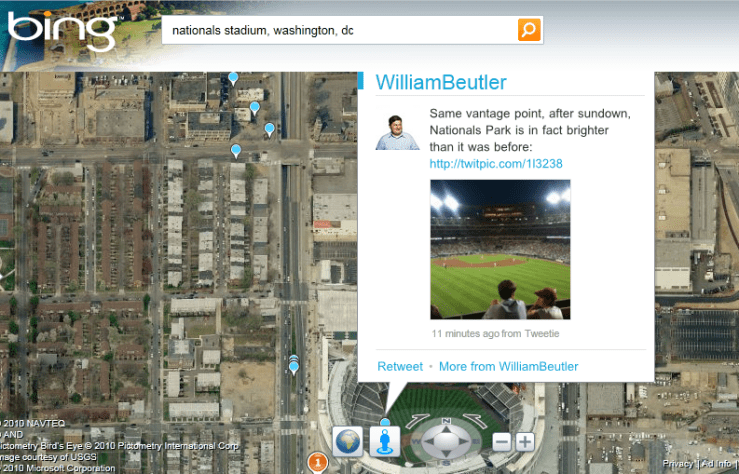
I’ve been playing with Bing’s Twitter Maps lately and it’s one of the better implementations of Twitter’s geo APIs that were introduced last fall. It shows tweets and foursquare checkins within the last 7 days plotted on the map. Google Maps recently introduced a similar feature, but it seems to only show items that are fed through Google Buzz (including tweets that people have configured to send to Buzz).

Some future applications of geo-enabled Tweets:

  • Events. For last-minute party goers, a real time view of what’s going on around town, complete with pictures and real-time reactions.
  • Ticket scalping. Rather than walk around for blocks talking to scalpers about what they have, glance at a list of tickets posted. The information transparency would result in a higher price to sellers and a lower price to buyers than what scalpers typically offer. (In my experience at baseball games, scalpers usually ask at least 3x what they paid.)
  • Finding a place to go. When in new cities, it’s often hard to figure out where to go — what are the lively neighborhoods at night. By looking at a map of recent tweets, you could quickly discover where people are still awake.
  • Read reviews from friends. Geo-enabled tweets filtered by those you follow would provide socially relevant recommendations.
  • Offers from local businesses. These could be persistent or distressed inventory. Slow night? Tweet an offer to draw in customers.
  • News. Twitter has long been used for user-generated breaking news. With geo-enabled tweets, breaking news could be aggregated by location in addition to hashtags. The biggest stories could be identified by an increase of tweets from a location (versus normal) and retweet frequency. News from media outlets could also be plotted.
  • Construction and accident information. Avoid bottlenecks by seeing tweets from fellow drivers, DOTs and news sites.
  • Trip sharing. Find others at the airport headed your way, cutting costs and reducing pollution.

And, of course, there’s friend finding, which is the most talked about use of geo-enabled tweets.

So far, the percentage of tweets I see with geo information is tiny (>1% of those I follow). But as more and more geotagged data is put into Twitter, the key will be applications providing the right tools to filter all of that data. At a minimum, we’ll need the ability to filter by time of tweet, people we’re following, hashtag and application (e.g. foursquare).

Unfortunately, bing’s Twitter Maps doesn’t seem to be available where real-time information would be most useful — on mobile devices.

More on: geotagging, social networkingTwitter

Twitter and foursquare: the tipping point to getting local business online

Crepe cart in Seattle

Getting small local businesses to go online has been the holy grail of the Internet. I’ve written before about some of the reasons local business don’t go online and suggested several ways that they could use emerging technologies to get online with minimal effort.

That finally seems to be happening. Whether it’s a crepe cart in Seattle, ice cream store in San Francisco or a restaurant in Sedona, businesses are using the simplicity of Twitter for their virtual presence.

Most local businesses are too busy running their business to exert a lot of effort maintaining an online presence. If it’s not easy, it won’t get done. My favorite example of a small business reusing their existing work is the Webcam pointed at the wall of Beachwood BBQ where they list the pints on tap.

The challenge is that these businesses are only announcing their presence to existing customers or passersby. While this can help drive repeat visits through specials, notices of new arrivals, etc. it does little to bring in new customers.

That’s where foursquare comes in. This location-based social game allows users to “check in” to places they visit. Check in often enough and you become the “mayor” of that place. Savvy businesses have latched on to this and begun offering discounts to their mayors.

It has also been incorporated into the foursquare check in process. When I checked in at a restaurant in Seattle, I was presented with an offer at a nearby bar: happy hour all day for the mayor or $1 off well drinks for anyone else who checked in. (Checking in updates your social network status, providing further exposure for the business.) It’s one of the first examples of location-based mobile advertising that works. The process is a bit cumbersome now, but it provides a glimpse into where the technology is headed.

In addition to providing exposure to businesses, it solves a user problem that local search has long failed at: discovery. People often don’t know what they’re looking for when they’re out. Suggestions, even if they’re sponsored, help fill the discovery gap.

Foursquare offer
foursquare mayor offer

Flickr launches browser-based geolocation

flickr nearbyOne of the most exciting features of OS 3.0 on the iPhone is Safari’s implementation of the HTML 5 spec for browser-based geolocation. This allows Web sites to ask the browser for the user’s location, a capability that  has largely been limited to device-specific applications.

This new capability allows for easier-to-use location-based services. Flickr has jumped on this with a “photos taken nearby” application that will show you pictures centered around your location. Click on the “Photos taken nearby” link at m.flickr.com and you’ll instantly see a map of your location with nearby pictures.

The initial implementation is basic; you have no control of the pictures shown. It would be nice to see to search the nearby pictures for specific terms or to see pictures taken by someone. But as a proof-of-concept, it works great.

This is undoubtedly the first of many browser-based location services we’ve seen. Google has already announced that it will launch its Latitude service in a similar fashion. You can imagine other services such as local business search, movie showtime lookups, weather and local news provided automatically in the browser.

It’s a sign of how far we’ve come in mobile since the launch of iPhone 3G. It wasn’t long ago that I wrote asking carriers to set my location free. In principles of mobile design, I wrote “Don’t create an app if you don’t have to.” Now you don’t have to for location-based services.

My one complaint is that the browser sends back a very precise latitude/longitude. This is necessary for cerain applications, like mapping. But most applications don’t need that level of precision. Weather, for example, only needs a city level of precision. I’d like to be able to control what gets sent.

More on: geotagging

Fixing public transit with mobile technology

As gas prices have fallen from last year’s record levels, use of public transit is falling. It makes perfect sense: the cost of driving has decreased, so more people drive.

One way to get more cars off the road is to raise the cost of driving. Paul Kedrosky, Greg Mankiw and others have talked about raising the gas tax to make driving more expensive. It sounds great in theory, but it’s political suicide for any candidate who would seriously push it. It’s also a highly regressive tax.

Another alternative is to reduce the cost of public transit. There are four cost components to public transit: cash, information, time and transaction. We could build better transit systems with greater frequency like in Europe, but that’s expensive. Mobile technology provides a cheaper route.

Cash fare — Typically the cash fare will win over the cash cost of driving or alternatives such as cabs, especially when you factor in the cost of parking in the dense urban areas best served by public transit.

A San Francisco bus stop
This bus stop sign provides very little information. Technology could be used to provide detailed information on demand.

Information cost — Public transit systems are a usability nightmare. Maps don’t have enough detail to figure out where you’re going. You have to decipher dozens of multicolored lines with tiny numbers and then hope that the line runs when you want it to. DC’s Metro system just released a study of the usability of its bus stop signs with one of the findings that information was printed in 4-point type at some stations. And you might not even have a map; some bus stops just show a line number.

Google Maps on iPhone has made this easy. I stepped off a plane in San Diego and put in the hotel address. Google Maps told me which route to take, the fare and how far I’d have to walk. There’s still the matter of finding the bus stop, but that can be solved over time using crowdsourced geotagged photos like the one at right. Google recently announced transit information availability on Android.

There are also dozens of transit-related iPhone applications that focus on specific transit systems.

Time cost — Public transit is often slower than driving. A big part of that slowness is not knowing when the bus or train is going to arrive — the waiting is the hardest part. Real-time transit tracking on mobile devices can help. When I lived near DC, I could see on my phone when the next train was leaving. If it was 20 minutes, I could have another drink in the bar. (Paid for by my savings from not taking a cab.) If I’d been waiting in the Metro, that 20 minutes would have felt like 60, adding to the perceived cost of transit.

Nextbus offers mobile transit predictions using GPS devices installed on transit vehicles. Unfortunately, it’s not location enabled and it doesn’t provide the level of detail (including maps with the location of vehicles) that Nextbus offers on its Web site.

Real-time data can be crowdsourced on heavily trafficked routes. Every Caltrain during rush hour seems to have at least 40 iPhone users on it. A simple app could transmit current position, which could be shared with other riders. (There’s already a Caltrain Twitter account that uses crowdsourced data for service interruptions.)

The Kennedy is packed -- take the L instead!

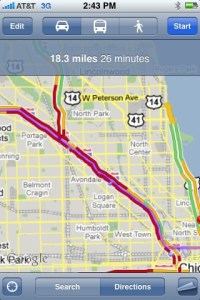
Real-time traffic information can also help increase the appeal of public transit. Subways and regional rail are often faster in rush hour. When I last flew to Chicago I was about to step into the taxi line when I decided to check the traffic conditions. The Kennedy showed all red on Google Maps. I flew by all that traffic on the Blue Line for $1.50, instead of paying $40 or more in a cab.

Transaction cost — Transit systems use many different payment methods. On San Francisco’s Muni there’s cash, multi-ride coupon books, transfers, multi-day passes, monthly passes. Want to ride the bus and all you have is a $10 bill? That will be an expensive ride. Want to ride the Muni and then transfer to Caltrain? You’ll have to decipher a new system. See my recent experience trying to pay for a Muni ride.

This is the area that has seen the least progress. Some regional systems have been implemented or are in development. Being able to pay by credit card or cell phone at the turnstile would make this a lot easier. A “buy” button after I select a route on my cell phone with Google Maps would be ideal.

Combining easy routing with real-time arrival information and easy payment will help increase the appeal of transit to people who don’t have to use transit. That would help address an ongoing problem with transit in America: we view public transit as for poor people and fund it like we fund welfare. Get more people choosing to ride transit and we might have more widespread support for it.

Heck, if Apple ran ads showing people using iPhones to find public transit, it might even become hip.

Dash acquisition and the standalone navigation market

This week it was announced that RIM bought Dash Navigation. I’ve written before about Dash. I’ve long been excited about the service, but Dash suffered from three big problems:

  • Bulky and expensive hardware — The device was nearly three times as big as most of its rivals. It’s weight necessitated an industrial-strength mount. The combination wasn’t something you could easily throw in your bag when traveling. At $399, the price was at the high end of the market.
  • High monthly service cost — Dash had a built in cellular modem, which added a steep monthly subscription fee. Many of the features that you might expect to see in such a beautifully engineered service — weather maps, videos, pictures of businesses — couldn’t be provided because of the high rates charged by wireless carriers.
  • Lack of distribution — Dash Express was available direct form the company and through Amazon, but never made it into the big box retailers where a lot of GPS units are purchased.

The RIM acquisition solves the first two problems. If RIM adapts Dash for use on Blackberrys, you won’t have to have a separate device and the service can ride on top of your existing data plan. Dash will be in a position to offer a better product for a lower price.

Distribution may still be a challenge; it’ll be interesting to see if carriers will allow RIM to ship a navigation offering that competes with their own. Two years ago I would’ve said there’s no chance; now I’m more hopeful.

Dash/RIM will face stiff competition. I expect that in the next two months we’ll see TeleNav, TomTom and others come out with turn-by-turn navigation applications for iPhone. (See my earlier post on what an iPhone-based navigation service could do.)

Between iPhone and Blackberry, this could spell the end of the standalone PND. The 2-way connectivity offers the ability to deliver a wide range of services that unconnected PNDs can’t offer: up-to-date business search, integration with Web apps like Zillow home prices and radio station finders, buddy finders, realtime traffic, gas prices, pictures of businesses, etc. Integration with the phone’s address book provides additional opportunities.

TomTom and Mitac have been struggling with rapidly eroding margins. Navigon has left the U.S. market entirely. If iPhone and Blackberry-based navigation take off, the standalone PND market may just be price sensitive consumers buying low end devices at Wal-Mart for $60.

Success of cell phones in the PND market will depend, in part, on the accessory market. We need to see car mounts that will let you charge your phone, serve as a speakerphone and let you transmit music from your phone to your car.

Disclosure: I worked on the distribution agreement between Tellme and Dash Navigation.

Principles of mobile design

Mobile is an exciting new space with the opportunity to create highly personalized, immersive experiences. Here are some of the principles I follow when designing products for mobile devices:

  • No shovelware — Mobile has very different constraints and user environments than the Web and your design should reflect that. Just as attempts to paste newspapers on to the Web failed, so will attempts to paste Web sites on to mobile. If a vendor pitches you a zero-effort solution that will automatically transcode your Web site, just say no. (The exception to this is mobile-specific templates for articles, blog posts, etc. stored in a content management system.)
  • Focus on the here and now — Mobile users are looking for quick hits and aren’t likely to engage in elaborate planning tasks. Focus on the key tasks a user is likely to be doing while mobile. When possible, show what’s going on when and where the user is. Make the server do the work instead of the user. For example, if your site has a conference schedule and it’s the middle of the show, you should have a page that lists the tracks that are happening RIGHT NOW instead of forcing the user to look through days of listings.
  • Don’t create an app if you don’t have to — Apps are great, but they also cause a lot of user friction. If you can accomplish the user’s goals with a mobile Web site, do that first.
  • Every click matters — The difficulty of input on mobile devices makes it all the more important to ensure that every click counts. Mobile sites should use personalization and location information to get the user to her goal as fast as possible. Provide quick links on your home page to tasks that the user has recently done.
  • Make every byte count — Wireless networks aren’t anywhere near the speed or reliability of home or work networks, making it even more critical to have tight pages without gratuitous graphics, headers, toolbars, etc. Many Web designers have gotten sloppy over the years as increasing broadband speeds have masked the slowness of their pages. You can’t do that on mobile.
  • Be forgiving — Phones sometimes do things like automatically capitalize usernames. Accept the capitalized username. (Assuming, of course, that your namespace is case insensitive.) Recover gracefully from dropped connectivity.
  • Auto detect mobile clients — If your mobile site is at “m.foo.com” and the user goes to “foo.com”, show the mobile version anyway. Deep links for stories, photos and other objects should also be rendered in the mobile version; if the user goes to “foo.com/articleid=32”, show “m.foo.com/articleid=32”. flickr does this correctly. The New York Times does not. But be sure to offer a link to the full version just in case your server guessed wrong. And cookie that state.
  • Be cross platform — Carry over user data between the Web and mobile. If the user searched for something on the Web, that search should be included in the history and typedown on mobile. Let users easily create reminders on their mobile device for things they need to do when they go to your Web site. (e.g. write a review, read a long article)
  • Think different — In the post iPhone era, handset manufacturers and carriers are providing more access to phone features than ever before. Designers have access to cameras, GPS, accelerometers, microphones and more. The best applications will take advantage of these capabilities to deliver experiences that can’t be created on PCs. For example, wouldn’t it be great if when you added a contact to your address book, it would automatically log where that happened?