AT&T’s 180,000% markup

One of the challenges of international travel is getting access to communications. I’ve gotten used to being able to check email, look up restaurants, find maps and communicate with friends from anywhere in the U.S.

Take your iPhone overseas and all of this can get really expensive, really fast.

At AT&T’s pay-per-use rates, you’re charged $19.97 per MB. It’s cheaper to buy and send a physical post card to friends than it is to send a digital picture.

The only way around that is to buy a local SIM and use it on an unlocked iPhone. This process varies from country to country and can be quite a challenge if you don’t speak the local language. It also means that you don’t have coverage the moment you step off the plane.

I got lucky on my recent trip to Italy. The first store I walked into had a clerk who spoke English and understood what I needed. For 2 Euros ($2.76) a week*, I got up to 250 MB of data usage. At AT&T’s a la carte rates, that same usage would run $4,992. If you plan ahead, you can get 200MB for the low, low price of $199.

Even ripoff hotel minibars only charge 3x-4x street costs for convenience.

AT&T’s data markups are even way out of line with its international voice roaming rates. With voice,  AT&T actually provides some value in that phone calls to your number get routed by AT&T to your phone overseas. With data, the only convenience over a local SIM is that you don’t have to seek out a local provider.

The pricing is so absurd that the only people who would do this are business travelers who must be connected at all times, the fabulously wealthy or everyday customers who don’t understand the charges and will further resent AT&T when they get the bill.

AT&T’s the company that pioneered Digital OneRate, which eliminated nationwide roaming charges. I’d like to see them do something rational for international roaming.

* For comparison, this is also much less than AT&T charges for domestic data usage. With a contract, AT&T charges $15 for 200 MB of data. This works out to about $11 for 5 times as much data.

How to pay at Starbucks using your Android phone

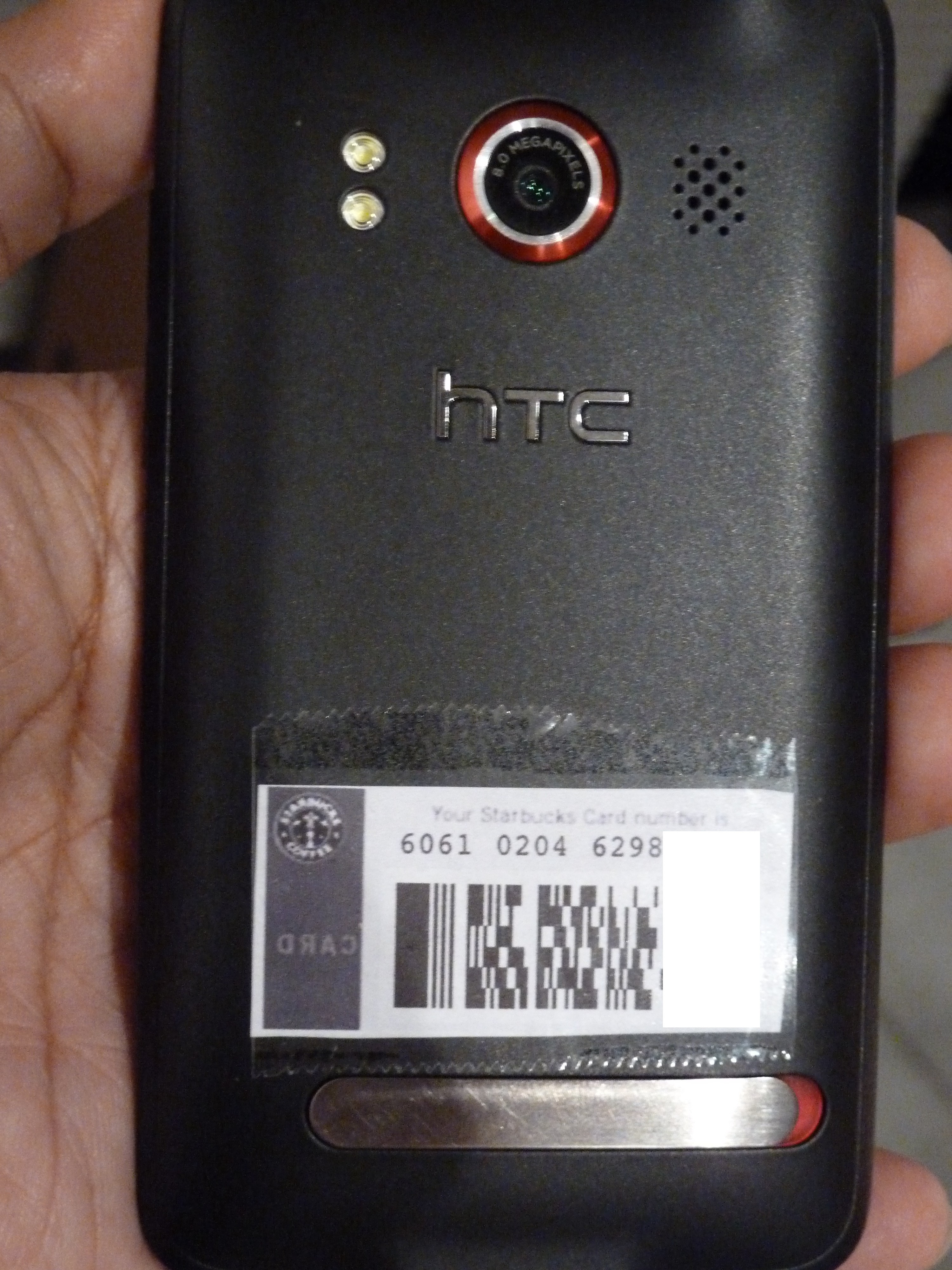
Android-enabled Starbucks mobile payment device.

Starbucks made a lot of noise recently with the launch of mobile payments in the United States for iPhone and Blackberry users. As an Android user, I felt left out (as is often the case.) But there’s a way to use your Android phone to pay for your coffee. Here are the steps:

  1. Borrow a friend’s iPhone or iPod Touch.
  2. Set up your account and enter your Starbucks card information.
  3. Go to the “Cards” screen and click “Touch to Pay”.
  4. Take a screenshot of the bar code that appears. (Hold the power and home buttons.)
  5. Email the screenshot to yourself.
  6. Print the screenshot. (I printed it at 35% zoom to get the right size.)
  7. Cut-and-paste (physically) the bar code to the back of your Android phone.

Viola! Mobile payment device.

It’s even better than the iPhone app: it’s quicker (no need to find and launch the app and click a button) and it works even when the battery is dead.

It lacks a lot of features. You can’t find the nearest Starbucks, reload your card or see your transaction history. But for the most common task of paying for coffee, it is the optimal experience. It would be nice if Starbucks stored your preference on whether to print receipts, but that’s an issue with either method.

This illustrates one of the key challenges facing mobile payment systems that are emerging: in their desire to get our money, banks and retailers have already made paying for things incredibly simple. Swiping a credit card is just.not.that.hard.

Any digital wallet will have to be just as simple. Launching various applications, digging through menus and entering security codes are all steps that add friction to the purchase process.

Apple, Google and others entering the NFC/mobile payments game would do well to have standardized interfaces to flip among payment, library, transit and access cards versus having every app developer design interfaces as he sees fit. These could be tied to location — if you’re at Starbucks, the Starbucks card automatically shows up first.

LivingSocial brings yield management to small businesses

LivingSocial is testing a new product that allows businesses to offer real-time discounts to local consumers, according to AllThingsD.

LivingSocial’s existing product works much like Groupon. You sign up for a deal and typically purchase goods or services for half off the retail value. These deals can be redeemed over a 3- to 12-month period, depending on the deal.

While some have called these deals yield management tools, they’ve actually just been customer acquisition tools. In fact, some businesses have been so overwhelmed by these offers that they’ve had to hire extra staff to handle the influx of new customers. Some undoubtedly have had to turn away full-price customers to service the discounted customers. One of the challenges businesses have faced is that although they’re seeing new customers, those customers are getting a bad impression because the business is overwhelmed.

The key to effective yield management is to shift demand to when you have excess capacity and to charge a premium for the times that are at highest capacity.

Many small businesses already do this. Happy hours at bars are a simple example of yield management. Come in from 3 to 6 and drink for half price. There’s a high fixed cost (staff is already there, rent, electricity). As long as you cover the marginal costs of food and drink, you can generate extra profit during that otherwise dead time.

This could prove to be a boon to businesses who need to generate extra business quickly. For example, a spa that finds itself with massage therapists with a slack appointment book could send out a 1-day only deal.

While the details of Living Social’s implementation aren’t out yet, here are some things I’d like to see:

  • Ability for the business to control the amount of offers that are available. You don’t want to go from a situation where you’ve got a lot of spare capacity to one where you’re overwhelmed by demand. A limit would also create incentives for users to claim an offer quickly.
  • Ability to more narrowly target customers. The current regions are too large to ensure that the customers reached are likely to be repeat customers.
  • Ability to target specific products. Chicken moving slower than beef tonight? Half off chicken dinners!
  • Ability to exclude customers who are too close. You don’t want to offer discounts to people who are already at your business.

How Google could dramatically improve local search

A lot of companies have been spending a lot of time and effort in location-based services over the last couple of years. Whether it’s local search or check ins, the race to get people connecting with local businesses is on.

One ongoing challenge has been identifying where consumers are.  GPS has issues with power consumption, time to first fix and doesn’t work indoors. Cellsite-based location is not precise enough. Even WiFi triangulation, which is the most effective way currently, isn’t precise enough given current deployments. In densely packed urban areas, you can still come up with a hundred or more businesses that you would have to pick through.

One way that Google (or Facebook or anyone with a strong brand) could solve this problem is to send WiFi beacons to local businesses. This is roughly how it would work:

  • Routers are sent to businesses. The MAC address of the router is recorded and correlated with the address that it’s shipped to.
  • The business receives it and plugs it into a wall outlet.
  • The router then transmits its information to nearby phones.
  • Those phones can narrow the list of potential businesses based on that information.

This doesn’t even require the business to have an Internet connection. The only requirement is that the device be powered. At scale, the device could be custom designed to eliminate the Ethernet jacks on routers. This reduces costs and makes the device look less intimidating to folks who aren’t tech savvy. If you wanted to get fancy, you could shape the device so it didn’t look like a router at all — maybe something like the Open sign that Google is giving away. This would have the added benefit of branding to the business’s customers.

With a per device cost of approximately $15 and a service life of about 3 years, we’re looking at a cost of $5/year. If you sent them to 500,000 businesses (the focus should be bars/restaurants in high density urban areas), it’s still a modest cost of $7.5 million to tap into the local market.

The pitch to local businesses would be something along the lines of “make it easier for Google users to find you.” It could be presented as part of a small business starter kit, complete  with Google Places window decals, a guide to online advertising, personalized information on how the business is currently rated on Google and online advertising credit for use on Google. It could also serve as the validation mechanism for businesses to claim their Places page. In my experience, packages are more likely to be opened than typical direct mail pieces.

While there has been a lot of talk about NFC for searching or tagging, it would require a change in user behavior and is likely to take 2-3 years before a sufficient number of NFC-enabled phones are in use in the United States.

Not only would this sort of network enable easier local search and check ins, it could be used to generate real time maps of where the most popular places in a city are. People could also use it to generate automatic check ins when they reach selected favorite places.

If this sounds crazy, consider that Google is already testing giveaways for businesses in the Portland area as it tests its Hotpot product. Businesses can order free sugar packets, mints, magnets, billfolds and more.

The biggest challenge with this approach is the risk of bad press given the kerfuffle regarding StreetView vehicles capturing WiFi data by mistake. Although this is in no way equivalent, the media have a hard time understanding that. (Not to mention that the original issue was really blown out of proportion.) This could be offset if Google made the database open to the public. Not only would this improve results for Google applications, but could be used by a wide range of devices to improve position accuracy. It would be the equivalent of Google launching satellites for the public’s benefit.

Target-ing iPad savvy shoppers with a fresh take on paper

Target continues its mobile innovation with the launch of its iPad app. The app makes it easy to find the nearest store and look up this week’s specials.

Target has had a long history of innovation. I’ve written before about a combination MP3 player/gift card and Target’s Android and iPhone apps.

While browsing through the circular, you can build a list of items that you want to buy. You can also get additional information on items for sale.

It would be nice if it also told you what aisle the item was stocked in, availability at your nearby store and synchronized the list you build with the iPhone or Android apps. In-store availability and aisle location is provided for a limited number of items. (Target’s database, which is available on iPhone/Android, seems to be more robust, but the linkages haven’t been made.)

Target has offered its circular online for years. But the flash-laden app seemed overdone, sluggish and just didn’t have the same feel as flipping through the paper circular. The iPad app pretty much replicates the experience of paper minus the environmental guilt. (And fussing with pages that stick together.)

Newspapers should be very worried. Free standing inserts that provide half the bulk of many Sunday papers are an important revenue source. They are also an important circulation source: while many editors may recoil in horror, yes, some people do do buy the Sunday paper just for the ads.

Newspapers can also learn from the Target app. I’ve been using the iPad apps for the WSJ, New York Times, Washington Post and USA Today. In translating a primarily paper experience online, Target has done a better job than all of them.

Mobile and the improving user interface

The zero-click experience in the Happy Hours app.

Some of the best user interfaces being created today are on mobile devices. I often find myself reaching for my cell phone instead of my laptop when I need a hit of information. Common tasks such as looking up a business, buying movie tickets or checking email are often faster on mobile devices.

The best example of this is the Happy Hours app. Launch the app and after a few seconds it will show you the nearest happy hour specials sorted by distance that are going on right now. No input required.

Why are mobile interfaces better?

  • Access to sensors such as GPS. The Happy Hours app on my phone knows where I’m at. On the Web, at best it can guess what city I’m in.
  • Limited screen real estate. People often feel the need to fill whitespace. Nothing else to put there? How about some more remnant ads? With mobile, there is less whitespace to fill.
  • No SEO. The app itself doesn’t have to be filled with links for search engine crawlers. At least half of the GoTime.com home page (the company behind the Happy Hours app) is links for crawlers.

Target’s mobile apps hit the bullseye with store integration

As smartphones proliferate, integration with mobile devices will be a key part of the offline retail experience. While many businesses offer a simple store locator, Target’s iPhone and Android apps and mobile Web site tie much deeper into their stores.

Among the key features:

  • Weekly deals. Browse through the current week’s specials by category.
  • Product availability. Scan a bar code or enter a product and it will tell you whether the item is available online or in stores. If it’s in store, availability is displayed along with the aisle that it’s located in. No more wandering through the store trying to find something. (In all of the times I’ve tried it, it hasn’t been wrong.)
  • Payment.* If you have Target gift cards, you can enter the information and store it on your phone. When you’re ready to pay, pull up the bar code on the screen and show it to the cashier.
  • Gift registry.* Look up a gift registry and find item locations.
  • Store locator.

*Not available on the Android app.

Target has long been among the most innovative retailers. Four years ago, it offered an MP3 player gift card at Christmas. It has also offered a standalone gift find finder app that suggested Christmas gifts.

In the future, I’d expect to see integration with previous in-store purchases and tighter integration between the mobile apps and the Target Web site.

This slideshow requires JavaScript.

Mobile ordering puts the cash register in your pocket

All the ballpark food you can want, delivered right to your seat.

Next time you’re at the ballgame, your phone might get you some peanuts and Cracker Jack. I was at a Mariners game at Safeco Field earlier this week when an announcement encouraged the crowd to order concessions using their Android phones.

The app, from iConcessionStand.com, allows you to select food, drinks and team merchandise and have it delivered to your seat. When you launch the app, it asks for your seat location. It uses GPS to verify that you’re at the ballpark; you can’t order if you’re not there.

Pricing for the service is relatively modest. There’s a 99-cent service charge and a required tip. That’s well worth it to avoid long concession lines. (Pricing for food and drink, however, is the standard astronomical ballpark rate.) A $10 minimum purchase is required, but one beer gets you most of the way there. Delivery is quoted at 30 minutes. Selection was more limited than what was available on the concourse, but wide enough.

The big sticking point is payment information. After loading up my cart, I was prompted to enter my billing information, including credit card number and full billing address. For a one-off event, this was too much work. (Using a PayPal login is also an option.)

The ballpark isn’t the only place your phone can feed you. Chipotle offers ordering through an iPhone app. Build your order, pick a store for pickup, and enter payment information. When I arrived at the store, they’d received the order but it inexplicably had a delayed pickup time.  Pizza Hut has its own iPhone ordering app and Snapfinger offers ordering from a range of chains, including Outback, Baja Fresh, California Pizza Kitchen and Subway.

This integration from the virtual to the physical world will become increasingly common over the next couple of years as point-of-sale systems become better integrated with the Internet.

Facebook Places is at the beginning of a long road

Facebook Places on the iPhone

Facebook’s much awaited Places product finally launched this week. It’s the first step toward bringing friend finding to the masses.

People have been using Facebook to do this for years; posting their location in freeform status updates that their friends can read and comment on. (e.g. “heading to Cambridge for dinner.”) By turning that freeform text into structured location data, Facebook can make that data more useful.

From an iPhone or HTML5-capable mobile device, you can check in to a place, such as a restaurant, bar, movie theater, airport. You can also leave a message with the check in. The check in is posted to your wall and may appears in friends’ news feeds. On the mobile side, you can see a list of your friends and where they’ve checked in. Clicking on a place will show you details of the place, including a map and who has checked in.

The initial release is fairly simple. In fact, it’s not that much more useful than the freeform status updates.

Facebook is entering a very crowded space with competitors such as foursquare, Gowalla, Loopt, Google Latitude, Whrrl and Twitter. Many of those products are much more robust. Facebook’s key advantage is the size of its social graph: within the past 24 hours, 18 of my friends have checked in.

There are many opportunities for improvement to Facebook Places:

  • Basic UI. Check ins are sorted by time, not distance. A friend checking in 2,000 miles away 2 minutes ago is less relevant than someone checking in 2 miles away 5 minutes ago. This problem is exacerbated by the fact that the city isn’t shown. Considering that many people use Facebook to keep track of friends all around the world, this is a significant issue. Foursquare has a separate bucket of “Friends in other cities.” Update: Facebook now has a separate grouping of nearby friends.
  • Map view. Often, visualizing your friends on a map is much easier than scanning a list. Foursquare already offers this.
  • Visiting friends. Out of town friends who are in town aren’t indicated. One of the big potential values of social friend finding is discovering when friends are in town. If a friend from far away is visiting, I’m more inclined to want to get together than someone who lives in town.
  • Pictures. There is no way to associate a picture with a check in. Given the difficulty in typing on mobile devices, often a picture gives a lot more information. These pictures could also be used to build a much more robust Place page.
  • Pushing location. Sending people your location via SMS is tedious. You have to address the message, type out where you are. If they don’t know where it is, they have to pull up a map or text you back for directions. With Places, it would be easy to push a notification to friends with where you are, complete with map. This could be sent as a push notification on iPhones or as an SMS with a URL for other phones.

As with most Facebook product launches, questions of privacy come up. In general, I think Facebook has done a good job with the default privacy settings on Places. You must explicitly check in; there is no background tracking.

Only your friends can see where you’ve checked in. Unfortunately, my social graph on Facebook wasn’t designed with location in mind. When I decided whether or not to accept friend requests on foursquare, I used a tighter filter than on Facebook. Now, I’ll have to go back through Facebook friends and create a list of who should have access to location. (See Post technology columnist Rob Pegoraro’s piece on how he classifies his friends.) Yes, old high school friends have been known to burgle homes based on Facebook updates. If that worries you, watch Rob’s video on how to adjust your privacy settings for Places.

The one big complaint I have with the privacy defaults is that your friends can check you into a location without your permission.

See also:

Heading toward the Facebook recommendation engine

Image representing Facebook as depicted in Cru...
Image via CrunchBase

There’s an interesting thread over at Mike Blumenthal’s blog on the effect of Facebook Places on the local reviews space.

My view is that reviews and updates will coexist, much as blogs and Twitter coexist. People who were less committed to reviews will migrate their activity to Facebook Places updates. But Places could lead toward the ultimate recommendation engine.

In the local space, there’s really only one review site that matters: Yelp. They’ve got a strong set of tools and an active and engaged community. New restaurants and bars, which are often of the most interest, will have a dozen reviews on Yelp a year before they even show up on many Yellow Pages sites.

There are three big challenges with Yelp:

  • It’s been too successful. Many restaurants have hundreds of reviews. Although Yelp provides great tools for analyzing the data, it can still feel overwhelming. It also discourages participation from more casual users. In the early days of Yelp, I was an active reviewer. That’s tapered off substantially — what’s the marginal benefit of me writing the 426th review of a place?
  • These aren’t my real friends. I don’t know how compatible their tastes are with mine. It also affects the propensity to write reviews. People are more likely to do something that helps their friends than something that helps a generic audience.
  • Skewed demographics. Yelp primarily caters to a young, urban demographic. If you’re a mom in the suburbs, its value is more limited.

Facebook Places lowers the bar to participation and ties it into real-life social networks. Instead of writing out a long review, a few clicks is all it takes. Combine that with Facebook’s large user base on mobile devices — its monthly uniques on mobile devices is 4x Yelp’s monthly uniques on the Web — and we’ll see a tsunami of local data. (For more on importance of massive amounts of data, watch Google’s Peter Norvig’s talk.)

While each blip may not be as rich as the data in Yelp, you could build a recommendation engine to infer a lot from that data.

If I see that a place I am considering visiting is regularly frequented by my friends with families, I can infer that it is good for kids. Positive reviews can be inferred by friends going back to a place regularly. There are some friends who I have negative taste relationships with. If I know that they’re regulars somewhere, I know not to go there. Facebook can also make recommendations based on places I’ve visited and the overlaps with places my friends have visited. Facebook also has real demographic information which could be used to tailor recommendations.

Status updates in the social network also prompt discussions. Even if the original poster doesn’t write a review, it may be followed up by “hey, I was thinking of going there. what did you think of it?” Facebook could also close the loop by prompting people to add star ratings, Like or add comments a few days after a check in.

When it comes to restaurant reviews and recommendations, most people are looking for “good enough”. While you could spend hours reading every Yelp review of several restaurants and possibly get a better answer, a recommendation based on your friends’ activity is probably nearly as good. Facebook has done really well with good enough; Facebook Photos dominates online photo sharing, despite many functional weaknesses when compared with flickr.

I built a prototype of this when I was at AOL Search and even with a few users in the system, it worked really well.

More on: Facebook, local search, Yelp

See also: