
You’ve done your research, you found the place you want to go, you get there. It’s closed!

What went wrong? It turns out the map is out of date. We didn’t have this expectation when we had paper maps. But online is different! It should be in real-time! (In a future post, I’ll talk about how to make it near real-time.)
I was reminded of this the other day when I tried to go to a McDonald’s. The sign had been dismantled and there was a letter on the door that they had closed. (I only go to McDonald’s for their cheap Diet Coke!)
Even though data sources exist, they didn’t make them to the maps.

Even when the map platforms know that the business is closed, they don’t render it optimally.
Broadly, there are two types of searches in local: category and business name. If the user is searching for a category, such as “restaurants 10018”, closed businesses should be left out. Why show something that you know the user can’t use?
On the other hand, if a user has searched for a specific business name, it’s helpful for the user to know that the business has closed. One thing to keep in mind is that people don’t often know the exact name of the business.
I did a search for “Alexanders books.” The top search results on Apple Maps don’t reflect my search. I get a list of bookstores; only after scrolling through dozens of bookstores do I see Alexander listed and that it is permanently closed.
Google does a better job. (Note that Google pulled up the correct business, even though I didn’t ask for it exactly.) This is the result I got:
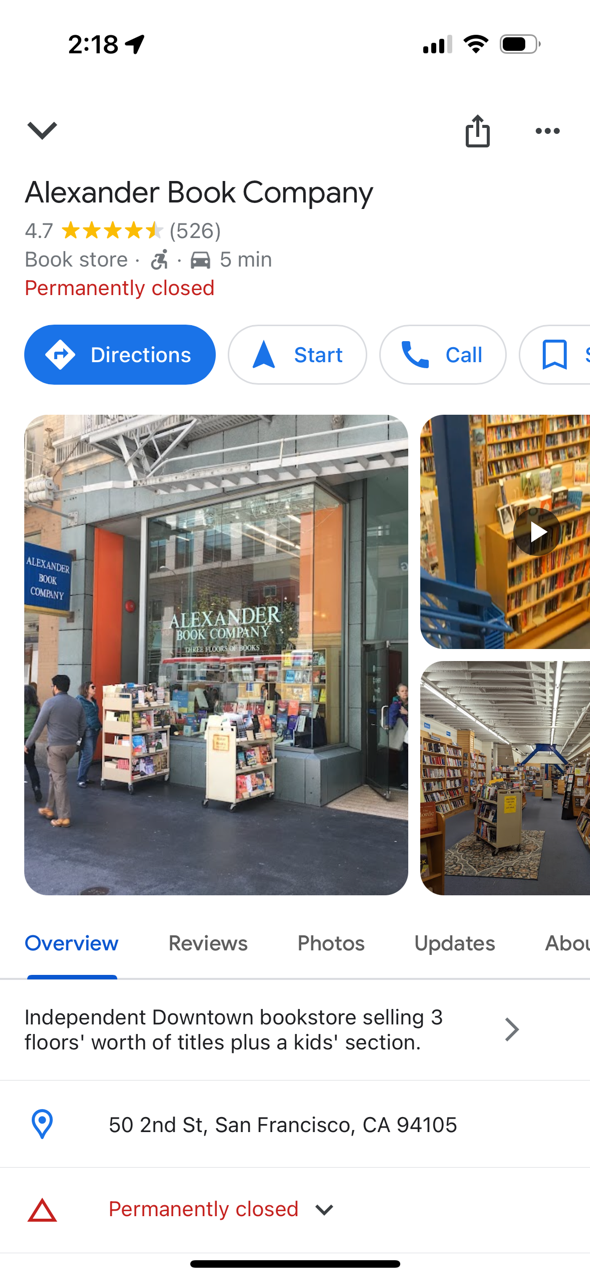
But even that isn’t a great experience. Does the user really want to get directions, navigate to or call a business that is permanently closed? Probably not. After learning that their preferred store is closed, the most likely thing the user wants to do is find another bookstore.

 redesign | mobile